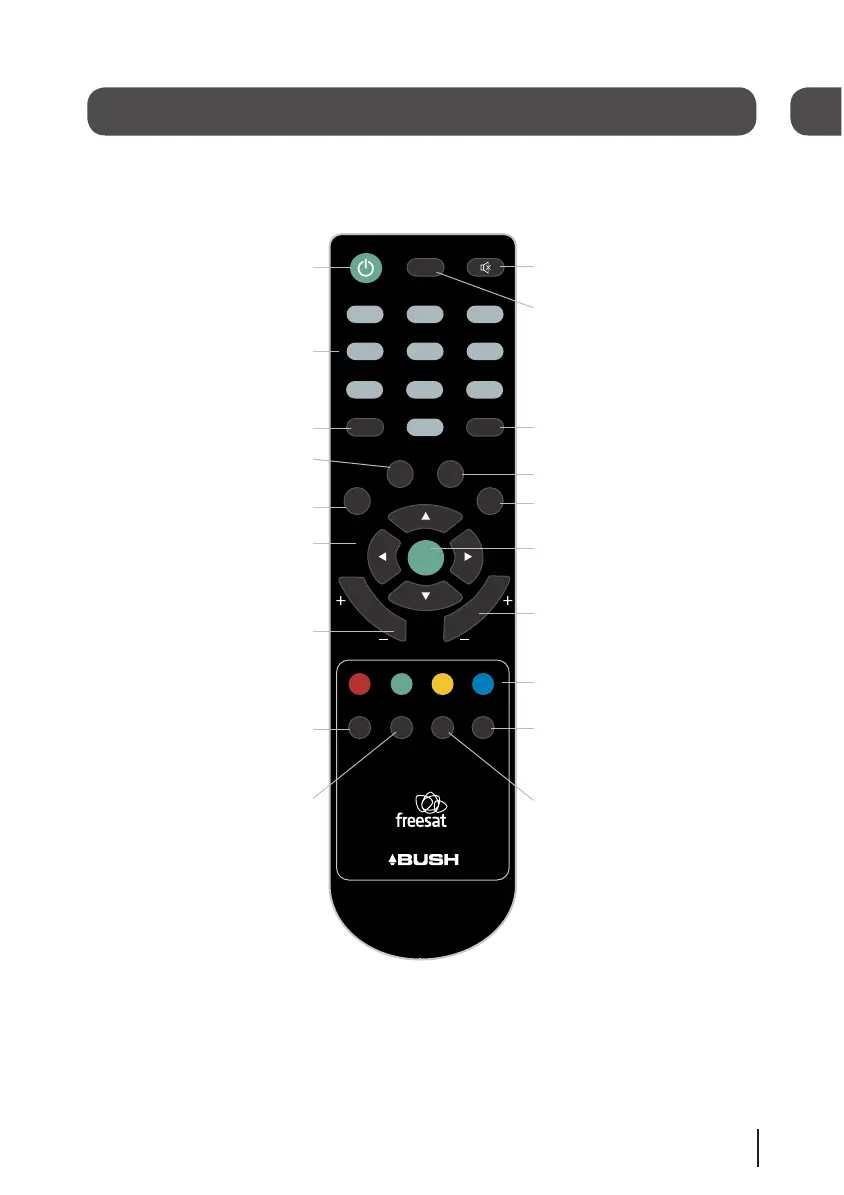
STANDBY Power On/Standby.
MUTE Turns the volume On
and Off.
NUMBER PAD Enter values and
select the channel number
directly by entering it’s number.
AUDIO Opens the audio selection
menu.
INFO Display the Info bar.
NAVIGATION Navigate up/down/
left/right in menus/on screen
displays.
OK Confirm selection in menu/on
screen displays.
EXIT Closes menu.
BACK Takes you back to the
previous menu.
CH +/- Channel up and down.
COLOUR BUTTONS For interactive
use and navigating menus.
CH LIST Opens the channel list
menu.
SUB Turns the subtitles On and
Off.
AD Turns audio description on or
off. Also opens the audio menu
when the info banner is displayed.
GUIDE Opens the genre list and
the programme list.
TEXT Displays digital text when
available.
VOL +/- Volume up and down.
SWAP Return to the previous
selected channel.
MENU Opens the main menu.


 To Next Page