Page 3
Functions & controls
Please familiarize yourself with the parts and accessories listed below
Accessories included
• 1 x CBAR7W
• 1 x Sub woofer
• 1 x Remote control
• 1 x CR2025 battery
• 1 x Audio cable (Coaxial)
• 1 x Audio cable (Optical)
• 1 x Audio cable (RCA - 3.5mm)
• 1 x Audio cable (RCA - RCA)
• 1 x Instruction manual
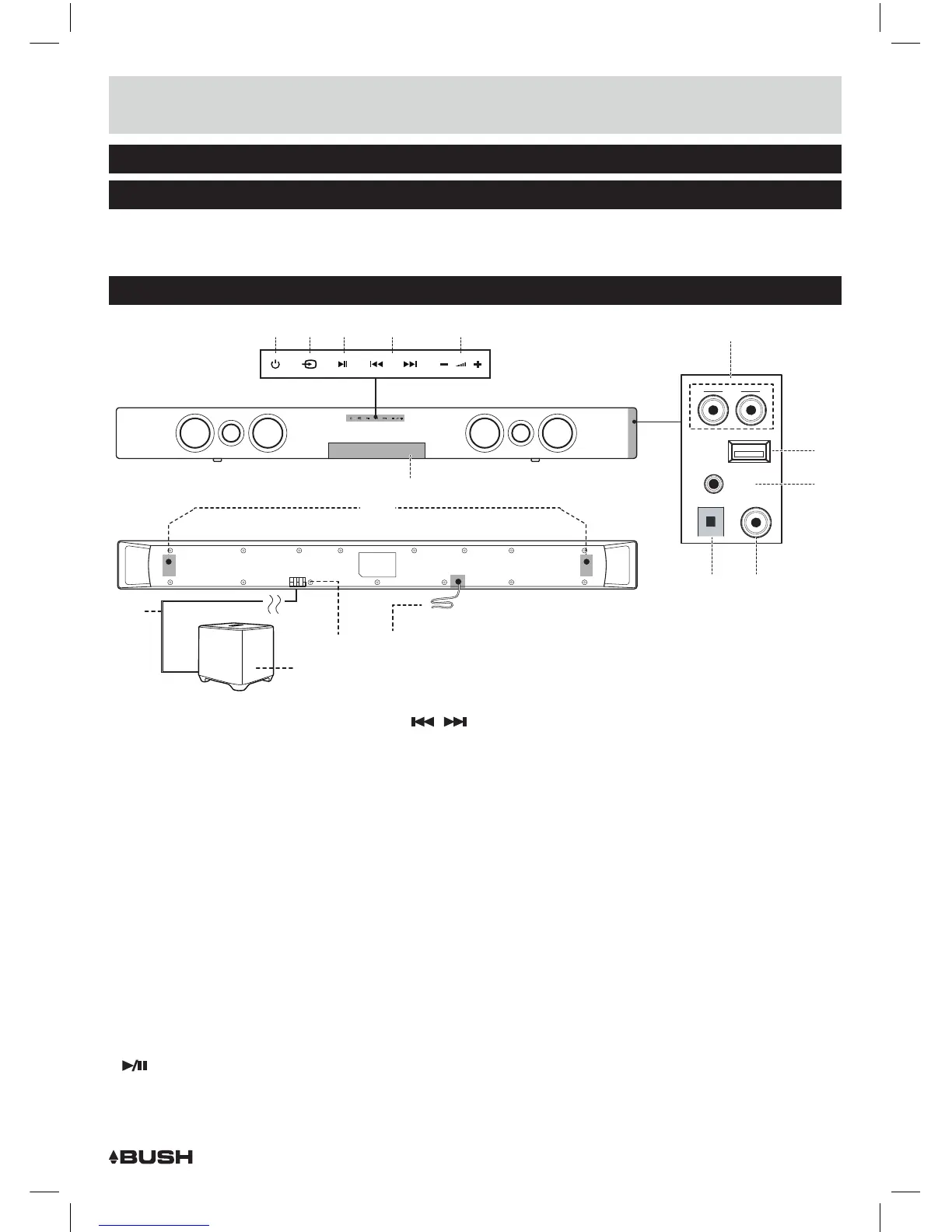
Overview of controls
1 WALL-MOUNT BRACKETS: Use
these brackets to fix the Sound
bar to a wall.
2 MAINS POWER CABLE: Connect
to a UK mains outlet.
3 DISPLAY: Indicates the current
status of the unit.
4 STANDBY touch button: Switch
on the Sound bar or switch to
STANDBY mode.
5 SOURCE touch button: Select an
audio source from TV, AUX, COAX,
BT or OPTICAL inputs.
6
PLAY/PAUSE touch button:
START or PAUSE Bluetooth
playback.
7 SKIP
/ touch button:
Skip previous & next buttons for
bluetooth playback.
8 VOLUME + / - touch buttons:
Increase or decrease the output
volume.
9 TV AUDIO INPUT (RCA): Connect
the analogue audio output from a
TV or other audio source.
10 SERVICE PORT: This USB port is
used ONLY for software updates.
11 AUX AUDIO INPUT (3.5mm):
Connect the analogue audio
output from an MP3 player or
similar using a 3.5mm audio
cable.
12 OPTICAL AUDIO INPUT: Connect
the digital audio output from a
TV, DVD or Blu-ray player.
13 COAXIAL AUDIO INPUT (RCA):
Connect the digital audio output
from a TV, DVD or Blu-ray player.
14 SUBWOOFER SPEAKER
TERMINALS : Connect to the
external subwoofer.
15 SPEAKER CABLE : Connect the
external subwoofer to the Sound
Bar.
16 SUBWOOFER
54 6 7 8
9
10
11
12 13
1
214
16
15
TV
R
L
TV
R
L
TV
R L
SERVICE
PORT
AUX
OPTC COAX
3



 To Next Page