Page 3
Functions & controls
Please familiarize yourself with the parts and accessories listed below
Accessories included
• 1 x CCRXL181
• 1 x Instruction manual
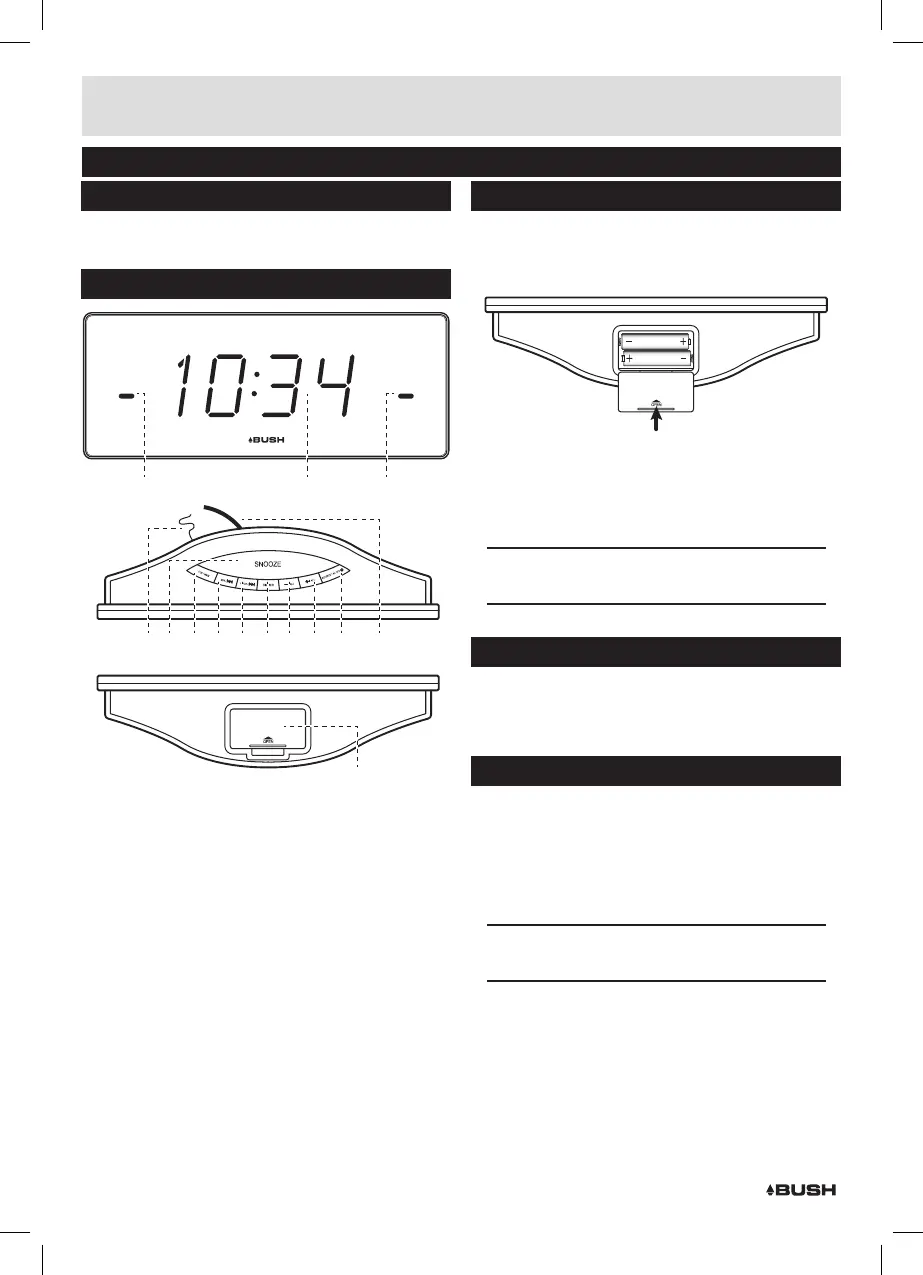
Overview of controls
Buzzer
Radio
Buzzer
Radio
Alarm 2Alarm 1
SLEEP
1
6
54 7 8 9 10 11 12 13
14
2 3
1: ALARM1 STATUS indicators
2: DISPLAY
3: ALARM2 STATUS indicators
4: ANTENNA
5: SNOOZE/SLEEP button
6: CLOCK/MEM button
7: TUNE-/MIN button
8: TUNE+/HR button
9: DIMMER button
10: VOL- / AL2 button
11: VOL+ / AL1 button
12: SOURCE/ALARM OFF/STANDBY button
13: MAINS cable
14: BACKUP BATTERY compartment
Battery installation (backup only)
1: Remove the battery compartment cover (14) from the
bottom of the unit. By pressing the tab inwards (in the
direction of the engraved arrow) and lifting.
2: Insert 2 x AAA batteries into the compartment,taking
care to match the battery orientations marked on the
inside of the compartment.
3: Replace the battery compartment cover.
NOTE: Battery backup retains clock, presets &
alarm settings.
Mains power connection
1: Connect the mains plug (13) to a UK wall socket.
2: Switch the wall socket ON.
3: The unit will enter STANDBY mode after powering on.
Standby mode
Entering standby mode when the unit is not being
used will save energy.
1: To enter STANDBY mode press and hold the SOURCE/
ALARM OFF/STANDBY button (12). Press again to
wake.
NOTE: Programmed alarms will still sound when
in STANDBY mode.


 To Next Page