Getting to know your Turntable
You’ll be up and running in no time
Getting to know your Turntable
14
If you require any technical guidance or find that your product is not operating as intended, a simple solution can often be found in the Troubleshooting
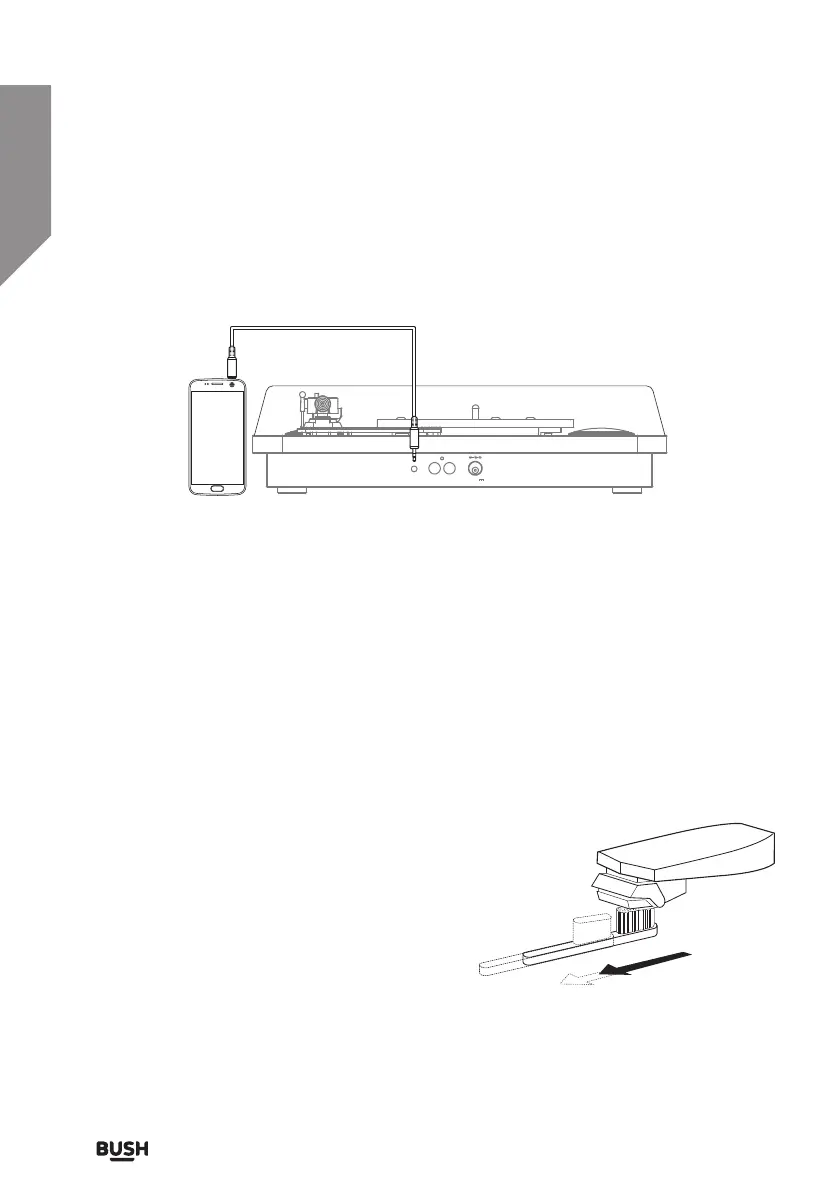
Listening to an external source
Connect other audio sources such as a smartphone to the turntable to allow playback
through the built-in speakers. Follow the below steps to get connected.
1. Connect a 3.5mm audio cable (not supplied) to the AUX IN socket on the rear of the
turntable. The platter will stop spinning if playing a record.
2. Connect the other end to the earphone/Line out socket on the smartphone.
3. Begin playback on the smartphone.
4. Adjust the volume.
5. When connecting via the headphone output the volume of the built-in speakers
is affected by the volume control on the smartphone. Ensure that the smartphone
volume is set to about 70-80% to avoid distortion.
Handling vinyl
Vinyl records can get dusty. This will cause a build-
up of dust on the stylus during playback.
Keeping your vinyl collection clean and cleaning
before use will reduce noisy crackles during
playback and increase your listening experience.
Should you get a dust build-up on the stylus,
gently dust off with a soft brush from back to front
as shown.
AUX IN R L DC 5V 1A


 To Next Page