Using your Turntable
Let’s get started
Using your Turntable18
If you require any technical guidance or find that your product is not operating as intended, a simple solution can often be found in the Troubleshooting
Getting started
1. Remove all packaging from the turntable including the security wire around the tone-
arm rest/lock (2) and the white plastic cartridge protector.
2. Place the turntable on a stable surface.
Connecting the power
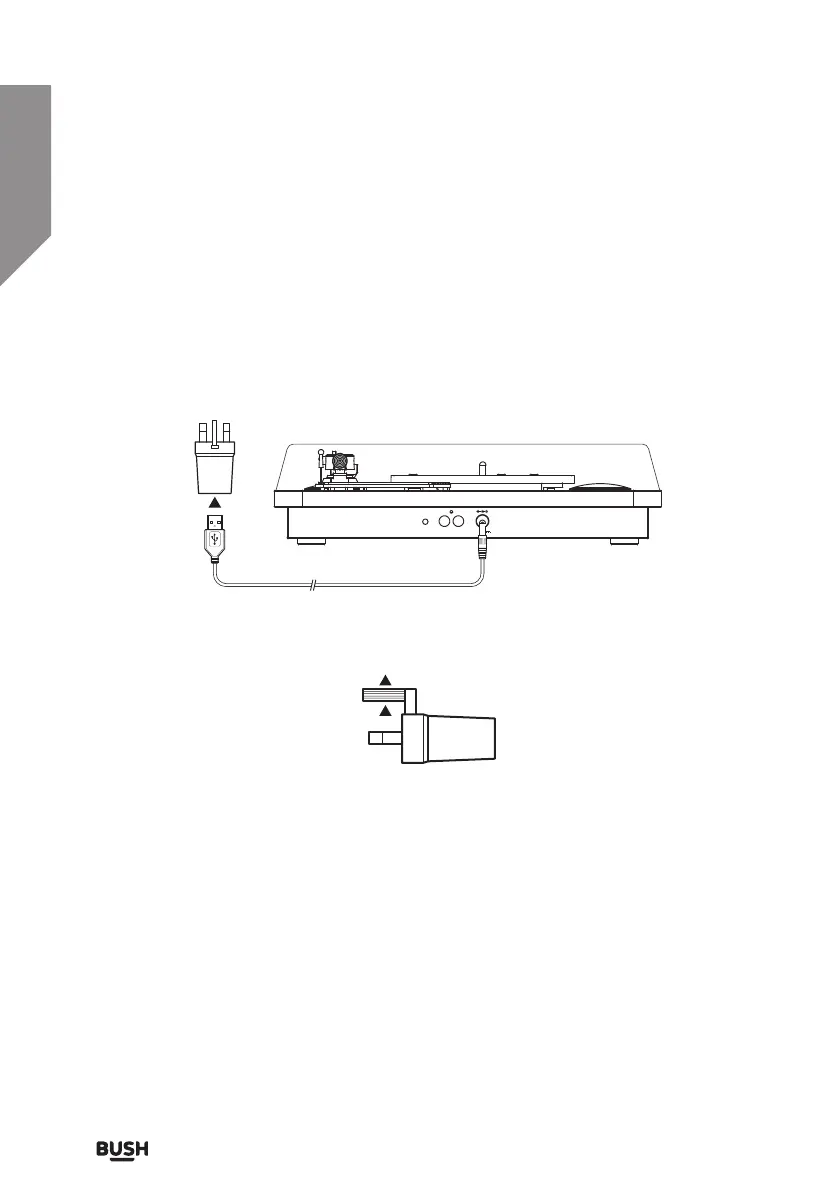
1. Insert the USB plug end of the supplied cable into mains adapter socket. Then insert
the other end into the DC mains input socket (9) on the rear of the turntable. (Fig 1)
2. Extend the central earth pin upwards on the adapter, then connect to a wall socket
and switch on. (Fig 2)
Turn the power On/O
1. Rotate the ON/OFF/Volume control knob (12) clockwise until you hear a click and the
POWER LED (13) illuminates.
2. To power off the turntable rotate the ON/OFF/Volume control knob (12) anti-
clockwise until you hear a click and the POWER LED goes off.
AUX IN R L DC 5V 1A
Fig 1.
Fig 2.


 To Next Page