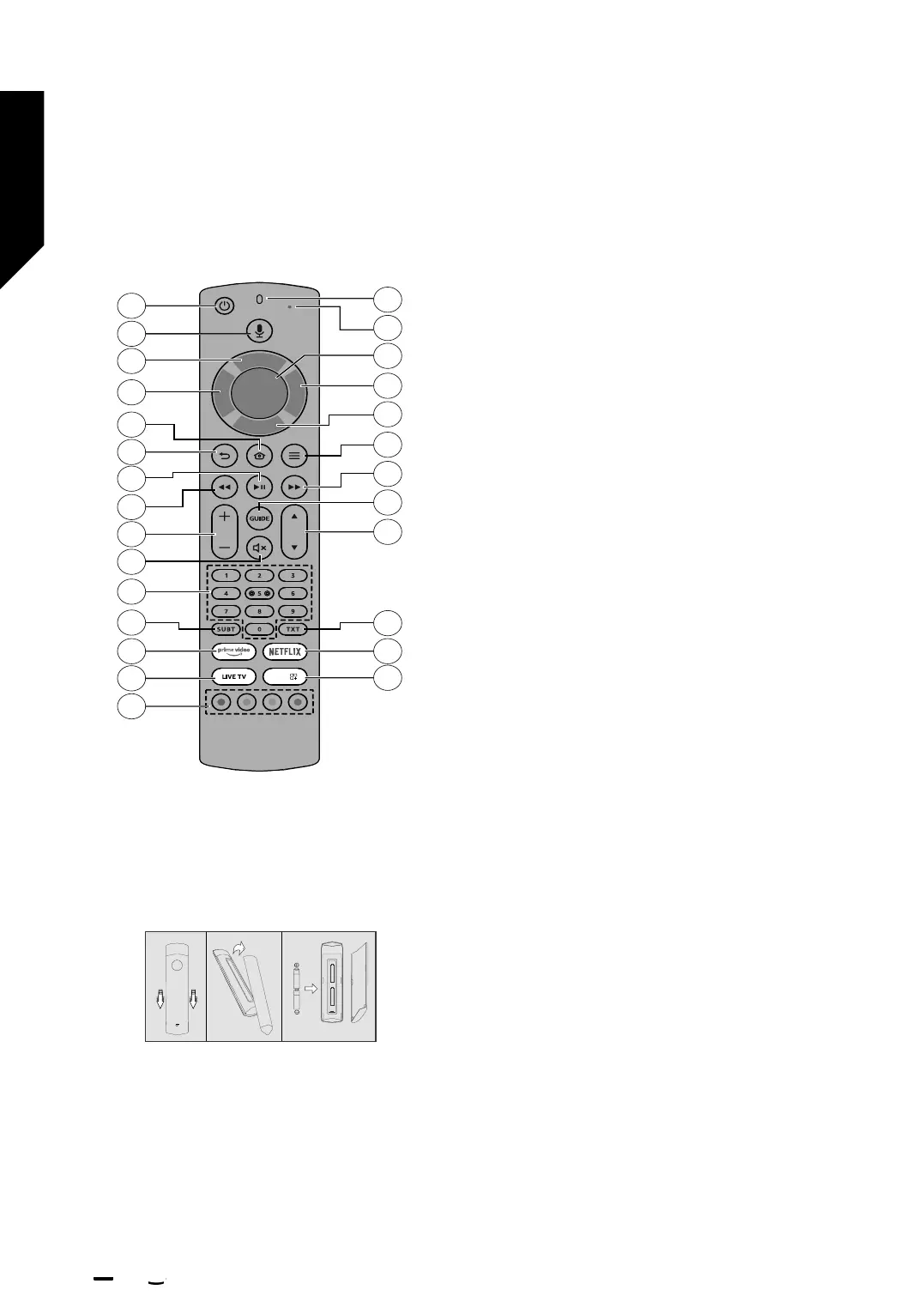
Remote Control
1
2
6
5
9
11
15
12
10
18
19
8
7
20
21
22
3
4
23
24
25
26
27
13
17
16
14
APPS
Inserting the Batteries into the Remote
Remove the back cover to reveal the battery compartment
on the back side of the remote control first. Insert two
1.5V - size AAA batteries. Make sure the (+) and (-) signs
match (observe correct polarity). Do not mix old and new
batteries. Replace only with same or equivalent type.
Place the cover back on.
To pair remote with the TV
When TV is turned on for the first time, a pairing process
for your remote will be performed during the initial setup.
Your remote control should automatically pair with
your TV at this point, but if it didn’t, follow the on screen
instructions to pair it. If you experience diculties pairing
your remote with your TV you can turn o other wireless
devices and try again.
1. Standby: Standby / On
2. Alexa Voice Button: Activates the microphone on the remote
3. Up Directional button (*)
4. Left Directional button (*)
5. Home: Opens the Home screen. Press and hold or press twice
to display quick settings menu
6. Back/Return: Returns to previous menu screen, goes one step
back, closes open windows, closes teletext (in Live TV-Teletext
mode), returns to main screen or Home tab
7. Play/Pause
Pause: Pauses the media being played
Play: Starts to play selected media
8. Rewind: Moves frames backwards in media such as movies,
scrolls back a day in the channel guide
9. Volume +/-: Increases/decreases the volume level
10. Mute: Completely turns o the volume of the TV
11. Numeric buttons: Switches the channel in Live TV mode, enters
a number or a letter in the text box on the screen
12. Subtitle: Displays audio and subtitle options, where you can
change the language, size and style preference (where available)
13. Prime Video: Opens Prime Video screen
14. Live TV: Switches to Live TV mode to watch TV channels
15. Coloured Buttons: Follow the on-screen instructions for
coloured button functions
16. Apps: Displays your apps & games
17. Netflix: Launches the Netflix application
18. Text: Opens and closes teletext or interactive services (where
available in Live TV mode)
19. Programme +/-: Increases/Decreases channel number in Live
TV mode
20. Guide: Displays the channel guide
21. Fast forward: Moves frames forward in media such as movies,
scrolls forward a day in the channel guide
22. Options: Displays setting options (where available)
23. Down Directional button (*)
24. Right Directional button (*)
25. Select: Confirms selections, enters sub-menus
26. Alexa LED: Illuminates when the Alexa Voice Button is pressed
and during pairing process
27. Microphone opening: Speak into the microphone when using
Alexa or voice search.
(*) Directional buttons: Navigates menus, setting options, moves
the focus or cursor, etc. Follow the on-screen instructions.
Getting to know your TV
You’ll be up and running in no time
Getting to know your TV
12
If you require any technical guidance or find that your TV is not operating as intended, a simple solution can often be found in the Help Menu,
or online at www.bush-support.co.uk. If you still require further assistance, call one of our experts on 0345 604 0105, a Bush enquiry line.
BUSH I firetv
'
�,













 To Next Page