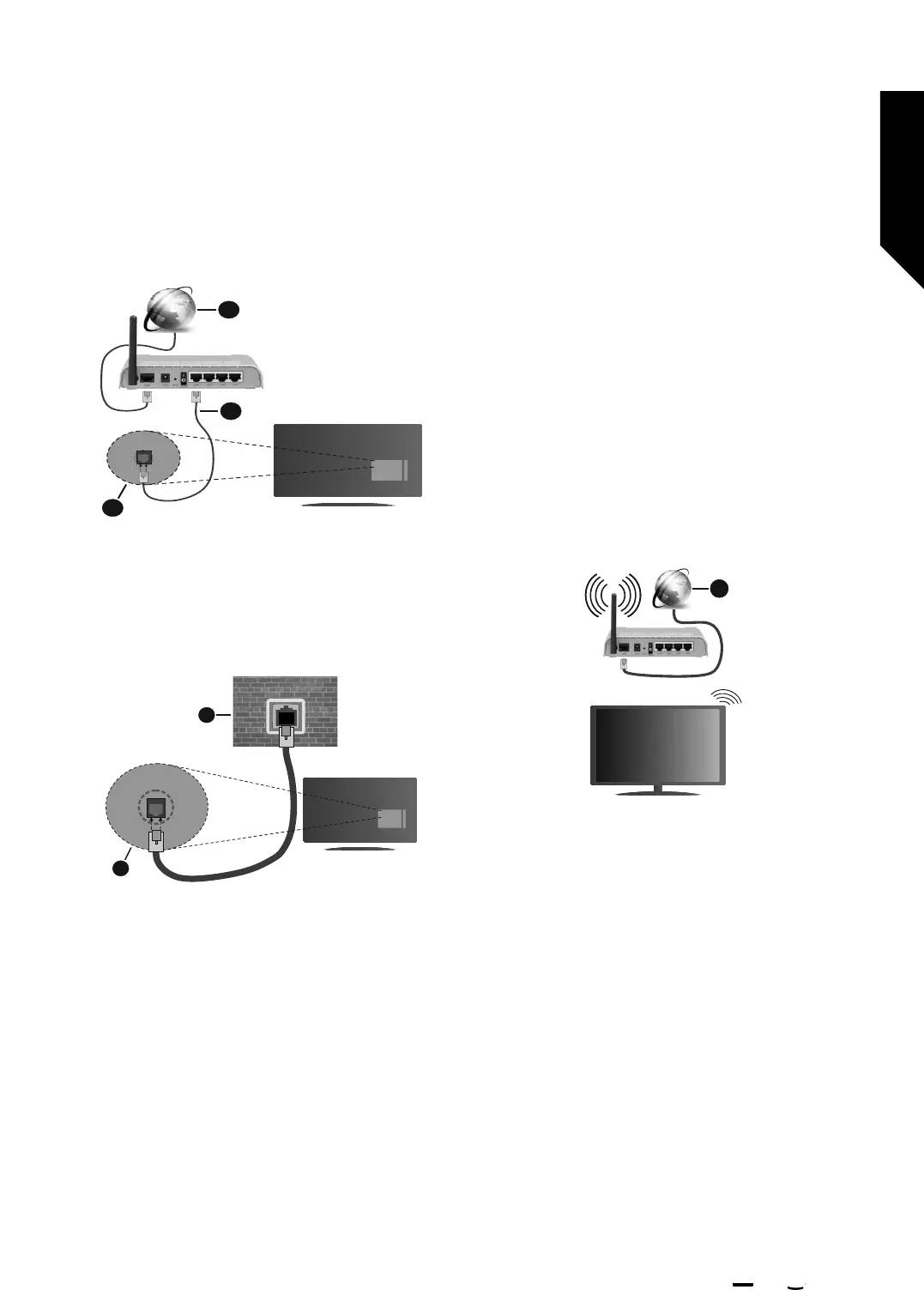
Connection or Configure Network option will be
available instead of Ethernet Configuration option.
1. Broadband ISP connection
2. LAN (Ethernet) cable
3. LAN input on the rear side of the TV
You might be able to connect your TV to a network wall
socket depending on your network’s configuration. In that
case, you can connect your TV directly to the network
using an Ethernet cable.
1. Network wall socket
2. LAN input on the rear side of the TV
Wireless Connection
A wireless LAN modem/router is required to connect the
TV to the Internet via wireless LAN.
Highlight Enable Wi-Fi/Network option in the Network
menu and press Select to enable wireless connection.
Then disconnect the Ethernet cable, if connected priorly.
Some of the available networks will be listed. Highlight
See All Networks and press Select to see the complete list.
If you prefer to connect your TV to your network via WLAN
you have 3 ways to do this.
•Highlight one of the listed available wireless networks
and press Select. Then enter the password if the network
is password protected.
•Use the WPS button on your router. Highlight Join
Network Using WPS (Button) option and press Select.
Press the WPS button on your router. Your TV will
connect to your router, without the use of a password.
Note: During the initial setup process Connect using
WPS Push Button option will be available instead of
Join Network Using WPS (Button) option.
•Enter WPS PIN on your router. Highlight Join Network
Using WPS (PIN) option and press Select. A code will be
created and displayed on the screen. Enter this code on
your router. Your TV will connect to your router, without
the use of a password.
Note: During the initial setup process Connect using
WPS PIN option will be available instead of Join
Network Using WPS (PIN) option.
1
1. Broadband ISP connection
A network with hidden SSID can not be detected by other
devices. If you want to connect to a network with hidden
SSID, highlight the Join Other Network option under the
Network menu and press Select. Add the network by
entering its name, security type and password manually.
If you want to configure additional settings of the network
manually, highlight Advanced when prompted and press
Select. Follow the on-screen instructions to proceed and
enter the required values respectively.
If you want to save the wireless network passwords
to Amazon you can use the Save Wi-Fi Passwords to
Amazon option. To delete saved passwords turn this
option o.
A Wireless-N router (IEEE 802.11a/b/g/n/ac) with 2.4 and 5
GHz bands is designed to increase bandwidth. These are
optimised for smoother and faster HD video streaming,
file transfers and wireless gaming.
Use a LAN connection for quicker data transfer between
other devices like computers.
Advanced features
Getting the most from your TV
Advanced features
35
If you require any technical guidance or find that your TV is not operating as intended, a simple solution can often be found in the Help Menu,
or online at www.bush-support.co.uk. If you still require further assistance, call one of our experts on 0345 604 0105, a Bush enquiry line.
BUSH I firetv
'
�,













 To Next Page