For any help concerning set up and use of your TV please call the Customer Helpline: 0845 604 0105
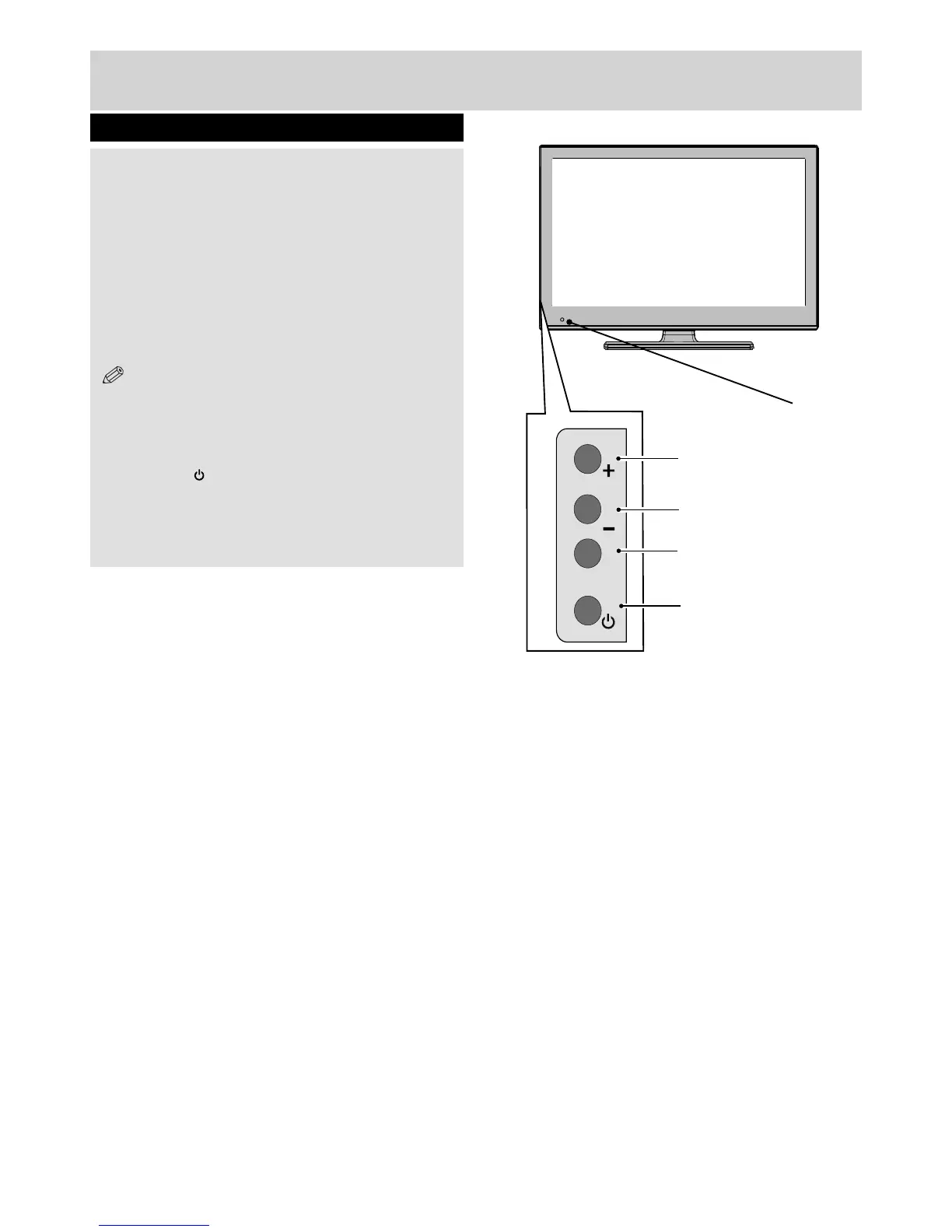
Standby-LED
P\V-AV
1
2
3
4
10
Getting Started
TV - Control buttons (left side)
1. Up (+) button
Increases the volume and moves up a channel.
2. Down (-) button
Decreases the volume and moves down a
channel.
3. Programme / Volume / AV selection
(P/V/AV) button
Changes the operation of “Up” and “Down”
buttons.
NOTE: You can use +/- buttons to change volume.
To change channels, press P/V/AV button once and
then use +/- buttons. If you hold the P/V/AV button for
a few seconds, the source OSD (On Screen Display)
will be displayed.
4. Standby ( ) button
Turns the TV on when in standby mode or turns
the TV off into standby mode.
01_MB60_[GB]_[ARGOS]_3902UK_24970LED_BRONZE17_10076435_50206729.indd Ksm2:10 04.11.2011 13:27:21


 To Next Page