2
Slope Mode (11):
- Indicates unit is calibrated and displaying slope
compensated distances.
- Indicates unit is not calibrated and is displaying
non slope compensated distances.
- To display the Straight-Line Distance in Slope Mode,
tap the Center Distance. Unit will display the Straight-
Line Distance for 3 seconds, then return to Slope
Compensated Distances.
*Blinking Slope Icon - Still receiving slope compensated
distances but need to update calibration for more
accurate distances.
*Calibrate unit by taking it to a Teebox or Green.
Screen Lock:
To lock the screen while playing a round, press and hold
the Power button until the Lock icon appears. Repeat the
process to Unlock.
Quick Start Operation Guide
1. Power On: Press and hold the Power button to turn on the device.
The Home Screen is displayed.
2. To start the game, tap Play Golf on the Home Screen. With its ecient GPS
connectivity, the device will select the course nearest to your location and
even the hole if you are on a teebox or green. To change courses, navigate to
Settings > Course Select. The device’s GPS connection will be even faster when
you are outside, with a clear view of the sky.
3. Navigate to functions from Front/Center/Back:
(Power button navigates back to Front/Center/Back Screen)
• Greenview - Swipe Left
• Hazards and Layup points - Swipe Right
• Shot Distance Calculator - Swipe Down
• Menu - Swipe Up (Round Summary, Clock, Settings, Exit Game)
4. Power O: Press and hold the Power button for 3 seconds.
*From Front/Center/Back Screen, disregard Lock Screen, keep holding button.
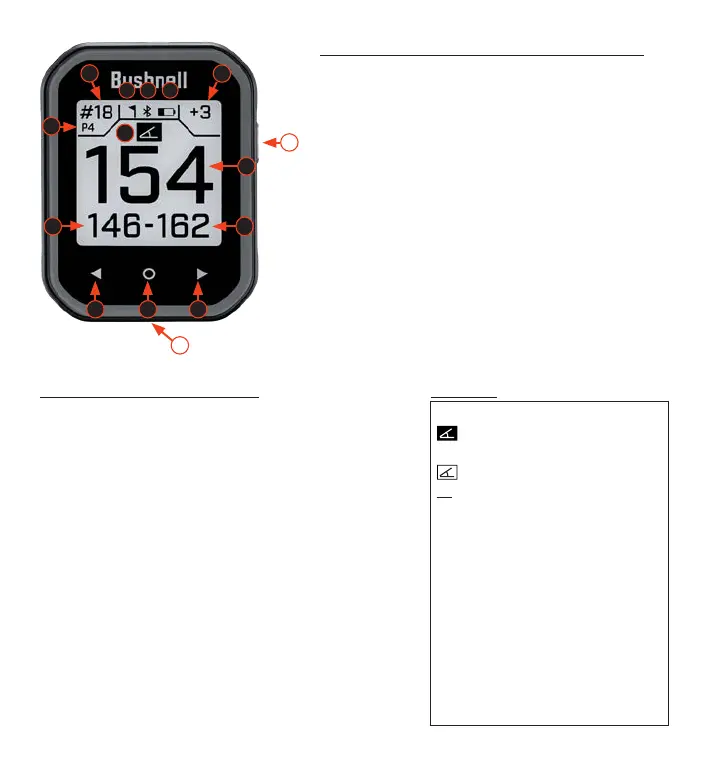
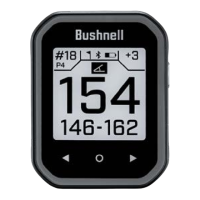
Controls/Parts and Play Golf Screen Guide
1. POWER/BACK/LOCK BUTTON: see below for further explanation
2. FLAG - Indicates pin has been moved in Greenview
3. BLUETOOTH - Indicates in the unit is connected via Bluetooth
4. BATTERY LIFE INDICATOR
5. CENTER DISTANCE - Distance to center of the green (or pin, if it has moved)
6. FRONT DISTANCE - Distance to front of the green.
7. BACK DISTANCE - Distance to back of the green
8. HOLE - Current hole number
9. PAR - Par for the current hole
10. SCORE - User’s current total score for the round
11. SLOPE INDICATOR - Illustrates the calibration status for slope feature
(see below for further explanation)
12. PREVIOUS HOLE
13. HOME BUTTON/FAVORITE: Default is no function
(To dene favorite: Settings > Golf Settings > Home Button)
14. NEXT HOLE
15. USB-C PORT - Connect to charge unit
1
8
10
5
9
2
15
11
3 4
6
7
12 13 14
Features



 To Next Page