
 Need help?
Do you have a question about the Bushnell GOLF Phantom and is the answer not in the manual?
Precautions against explosion, improper replacement, crushing, puncturing, or extreme temperatures.
Instructions on how to charge the rechargeable battery and information on battery life.
Detailed explanation of each button: UP, MENU, SELECT, DOWN, PWR, SHOT, and USB Port.
Steps for selecting courses, viewing distances to greens and hazards, and advancing through holes.
Options within the Golf Menu: Resume, Battery, Set Units, Change Course, Exit Round.
Options within Settings: Tee Times, Battery, Bluetooth, Set Units, Auto Off, Time/Date.
How to change language, contrast, and time/date format settings.
Instructions for updating golf course data via the Bushnell Golf website.
Information on using the BITE magnet for attaching the device to golf bags or belts.
Locating the serial number on the back of the unit for registration and updates.
Definitions for abbreviations used to designate golf course hazards.
Details on warranty coverage, claim process, and return instructions.
Information regarding FCC rules, interference, and device compliance.
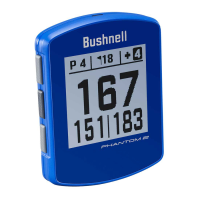
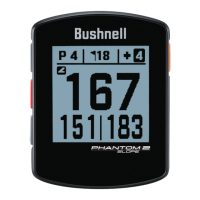
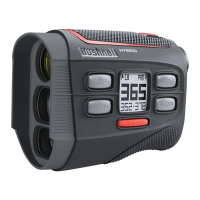
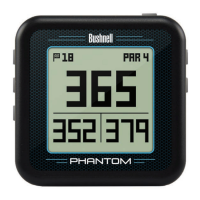
The Bushnell Phantom Golf GPS Rangefinder is a compact and user-friendly device designed to assist golfers by providing accurate GPS-based distances on the course. It features a clear digital display that shows essential information such as current hole number, par, and distances to the front, center, and back of the green. The device is pre-loaded with data for over 33,000 golf courses worldwide, making it ready for immediate use without the need for software downloads or membership fees.
The primary function of the Phantom is to provide precise yardage information to help golfers make informed shot decisions. When in "Play Golf" mode, the device automatically identifies the course and displays distances to key points on each hole. Users can easily cycle between the primary distance screen (Center/Front/Back) and up to two screens showing distances to various hazards, which are designated by abbreviations (e.g., BGB for Back Green Bunker, CRK for Creek Layup). The device also includes a "Shot" button, allowing golfers to measure the length of their shots from a starting point to their current location. This feature is particularly useful for tracking personal performance and club distances.
The Phantom offers a "Tee Times" feature, enabling users to set up a golf date in advance. When a tee time is set, the device automatically enters "Play Golf" mode and searches for local courses seven minutes prior to the scheduled time, streamlining the start of a round.
Connectivity is enhanced through Bluetooth technology, allowing the Phantom to connect with the Bushnell Golf smartphone app. This app, available on Apple and Android devices, can be used to configure the Phantom's settings and wirelessly update its internal golf course database. The app also facilitates setting tee times.
For power management, the device includes an "Auto Off" feature with adjustable time settings (1.5 hours, 9 hours, or disabled). This helps conserve battery life by automatically powering off the unit if no buttons are pressed or if it doesn't auto-advance to the next hole. However, users are cautioned that selecting a shorter auto-off time than the duration of a round could lead to loss of GPS satellite contact and data.
The Phantom also features a "Time/Date" setting, which can be configured automatically via GPS or manually. Other customizable settings include language (English, Spanish, German, French, Italian), display contrast, and units of measurement (yards or meters).
Operating the Phantom is intuitive, with a simple button layout. The "PWR" button turns the unit on and off, while the "MENU" button accesses various options and settings. "UP" and "DOWN" buttons navigate through menus and lists, and the "SELECT" button confirms choices. A brief press of the "PWR" button activates the backlight for 10 seconds, improving visibility in low-light conditions.
To begin a round, users select "Play Golf" from the main menu. The device then searches for GPS satellite signals and, once locked, displays a list of nearby courses. Golfers select their desired course, and the Phantom immediately shows the relevant distances for the current hole. Manual advancement to the next or previous hole is possible using the "UP" and "DOWN" buttons, which is useful for "shotgun" starts or correcting an accidental skip.
The "SHOT" button is a key feature for shot distance measurement. Pressing it at the tee (point A) starts the measurement, and as the golfer walks, the display updates to show the distance from point A to their current location (point B). Pressing "SHOT" again resets the starting point to zero.
The Phantom incorporates "BITE Technology," a powerful magnetic accessory located on the rear center of its housing. This allows the device to be securely attached to a golf cart bar or to the included bag/belt clip, providing convenient access during play. The bag/belt clip is designed to slide onto a golf bag or belt, with the convex BITE magnet on the back of the Phantom aligning with the concave area on the clip.
The Phantom is designed for durability and ease of maintenance. It is IPX4 rated, meaning it is resistant to water splashes from any direction, but it is not fully waterproof and should not be submerged. To ensure reliable operation, users should avoid exposing the unit to extreme environmental conditions or severe impacts.
Cleaning the device can be done occasionally with a soft, damp cloth. Strong chemicals such as gasoline and alcohol should be avoided, as they can damage the unit. When not in use, the Phantom should be stored in a dry place.
The device is powered by a long-lasting rechargeable battery, providing up to 10 hours of use (typically two rounds of golf) on a single charge. Battery life can be influenced by external factors like temperature. To recharge, the included USB cable connects the device to a computer or a smartphone USB charger. The display indicates "CHARGING" during the process and "CHARGING COMPLETED" when fully charged (approximately 4 hours from a fully discharged state). Users can check the battery condition (charge percentage) through both the "Play Golf" and "Settings" menus.
For software and course data updates, the Phantom can be connected to a PC or Mac via the provided USB cable. Bushnell Golf's website (www.bushnellgolf.com) serves as a resource for accessing updated course data from iGolf.com, submitting requests for new courses, or verifying existing course information. Registration of the Phantom via www.bushnell.igolf.com is recommended to ensure access to the latest GPS course data.
The device also includes a "Reset Device" option in the settings menu, allowing users to restore it to its original default settings. Other options under "Reset Device" (Check Update and Reformat) are intended for qualified service technicians only. The product ID/serial number, located on the back of the unit, is important for registration on the iGolf site for course updates.
A warning is provided regarding the Neodymium magnet in the mounting accessory, advising users with pacemakers or implanted heart defibrillators to maintain sufficient distance from the magnet. It also cautions against unsafe handling, exposure to high temperatures, and proximity to sensitive electronic devices or data storage media due to the magnet's strong magnetic field.
 General
| Connectivity | Bluetooth |
|---|---|
| Distance to Front/Center/Back | Yes |
| Distance to Hazards/Layups | Yes |
| Auto Course Recognition | Yes |
| Auto Hole Advance | Yes |
| Scorekeeping | No |
| Shot Distance Measurement | Yes |
| Odometer | No |
| Smartphone Notifications | No |
| Type | GPS |
| Display | LCD |
| Preloaded Courses | 36, 000+ |
| Water Resistance | Yes |
| Mounting | BITE magnetic mount |


 To Next Page