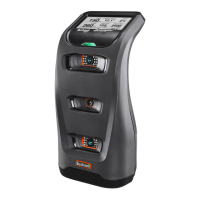
The Bushnell Launch Pro is a personal launch monitor designed to provide Tour-level accuracy and true-to-life simulation for golfers. It leverages advanced photometric technology to deliver precise data points for both ball and club, making it suitable for use on the range and in home simulators. The device integrates with the FSX performance and gaming suite, offering access to numerous world-class courses, skill-building games, and global leagues and competitions.
Function Description:
The Launch Pro measures and displays critical data points of a golf swing, including ball speed, launch angle, push/pull, spin, and carry. When equipped with club markers, it also tracks club speed, path in/path out, angle of attack, and efficiency (Smash Factor). The device features a touch display for easy navigation and interaction, an LED indicator light for status updates, and three high-speed cameras for data capture. It can connect to the internet via Wi-Fi, Ethernet, or USB-C, allowing for registration, subscription management, and data synchronization. The Launch Pro operates as a standalone device but offers enhanced functionality when connected to supporting apps and software.
Important Technical Specifications:
- Battery Life: 5-7 Hours
- Dimensions: 6"L x 6.2"W x 12"H
- Interfaces: USB-C / Ethernet / WiFi
- Ball Data Collected: Ball Speed, Launch Angle, Horizontal Launch Angle, Total Spin
- Club Data Collected: Club Speed, Smash Factor
- Weight: 5lbs (2.3kg)
Usage Features:
- Getting Started: The Launch Pro comes with a power cord, A/C power adapter, USB-C cable, 28 club marker pack, and an alignment stick. It is recommended to fully charge the battery before initial use. To power on/off, press and release the power button.
- Internet Connection: The device requires an internet connection for initial setup and at least once every 45 days to maintain full functionality. Connection can be established via Wi-Fi, Ethernet, or USB-C.
- Registration: Upon first power-up and internet connection, users are prompted to register the device by scanning a QR code. Registration renewal is required every 45 days to prevent data channel blockage.
- Subscriptions: The device supports subscriptions to enhance its value, which can be managed by scanning a QR code on the "ADD A SUBSCRIPTION" screen.
- Ball Placement & Hitting: For accurate readings, the Launch Pro should be placed upright approximately 2 feet from the hitting area, at the same level as the hitting surface if using a mat. The display indicates "MOVE BALL INTO HITTING ZONE" or "MULTIPLE BALLS DETECTED" if the ball is not correctly positioned. Once ready, the blue LED indicator light changes from blinking to solid.
- Quick Settings: Swiping down on the touch display accesses quick settings, including:
- Backlight: Turn on/off the display backlight.
- Settings: Access tracking mode, target alignment, firmware check, units of measurement, Wi-Fi settings, display options, diagnostics, and shot saver.
- Left/Right Handed: Toggle between left and right-handed modes.
- About: View account information, version, patents, system information, web dashboard, and counters.
- Battery: Check battery life.
- Club Tracking: To enable club tracking, apply a club marker to the clubface. The device then displays club speed, path in/path out, angle of attack, and efficiency. Club tracking mode can be activated via the SETTINGS menu.
- Target Alignment: The FSS Alignment Stick can be used to adjust target alignment up to 10 degrees. Place the stick in the hitting zone, align to the target, and step away for calibration. The new alignment angle is shown on the display, and the LED indicator light turns solid orange. Alignment can be viewed and reset in settings and is automatically reset when the unit is powered off.
Maintenance Features:
- Storage: Before storing, ensure the device is powered off. Store the Launch Pro in a cool, dry environment, preferably in its original foam-lined packaging or a specially designed carrying case to prevent damage.
- Cleaning: To remove dirt, wipe the device with a damp cloth.
Safety Tips:
- Use only the provided power adapter for charging to prevent damage, fire, or injury.
- Do not disassemble, change, or attempt to repair the Launch Pro, as this can result in electric shock and void the warranty.
- Avoid using the device in environments with high humidity, smoke, or dust.
- Do not look directly into the Launch Pro when it is turned on to prevent possible injury.
- If foreign objects or water enter the device, disconnect it from external power, turn it off, and discontinue use to prevent fire or electric shock.
- While designed to withstand ball impact, if the device enclosure or LCD display is damaged, turn off the power and discontinue use.
- The device uses precisely calibrated digital cameras; avoid dropping or subjecting it to impacts.
- Always store the Launch Pro in a safe, dry, and dust-free environment after use.

 Need help?
 General

 To Next Page