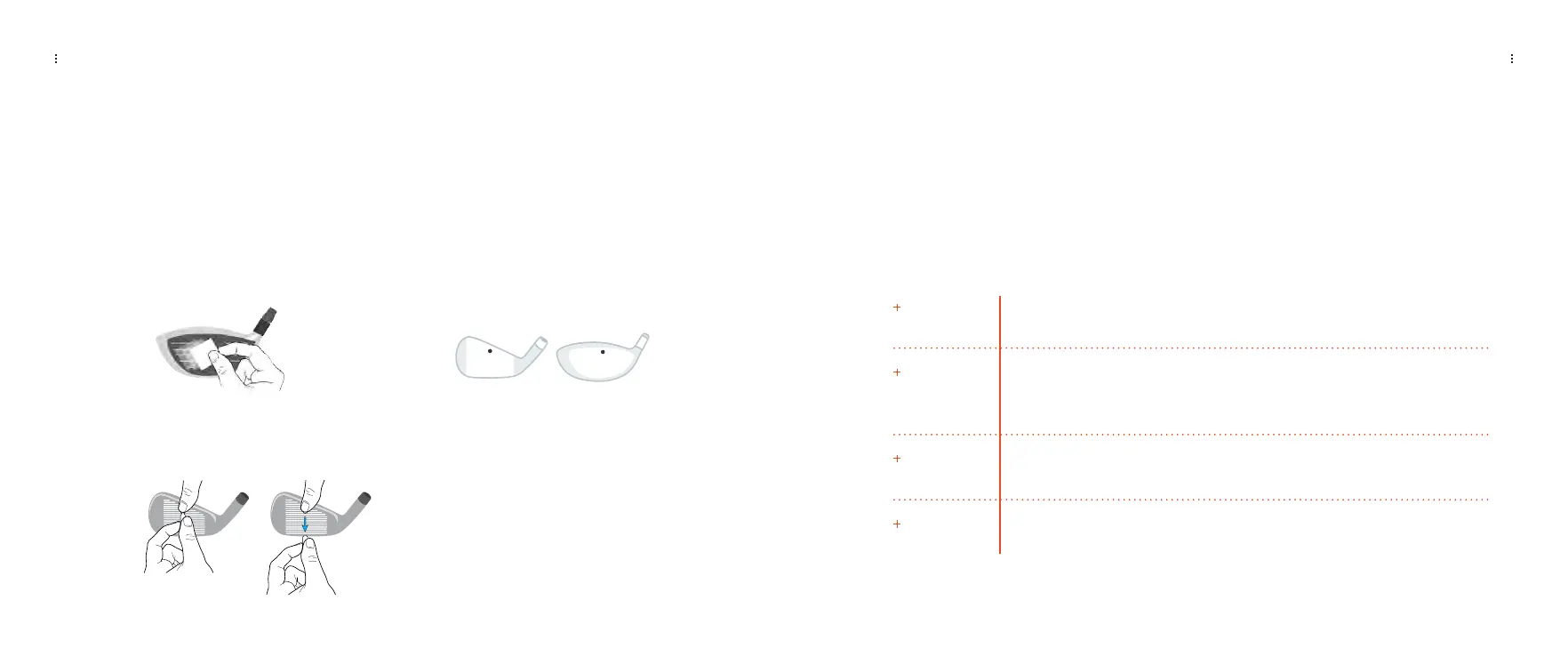
Applying a Club Marker
CLUB TRACKING
LEARN HOW TO APPLY A CLUB MARKER TO YOUR CLUB
Clean the clubface with an alcohol pad or water
1
Place club marker at the location (above) on the
clubface, adhesive side down
Your Launch Pro doesn’t only look at the ball, but the club too. To take advantage of this
feature, open the club marker packet (included) and follow the directions to apply the club
marker to your club.
Firmly apply pressure to the club marker with your finger
and gently pull the tab away, leaving only the club marker
on the clubface
After your next swing, your Launch Pro will now display club speed, path in and path out,
angle of attack, and efficiency.
Club Data Explained
Club Speed
The speed the club is traveling just prior to impact. A higher speed means
greater potential distance.
The direction the club head is moving at impact. A “0” path is a straight shot.
A negative path means the ball moves “out to in” and a positive path means
the ball moves “in to out”.
The vertical angle of the club head at impact. A positive number is hitting up
on the ball and a negative number is hitting down on the ball.
Efficiency, also known as Smash Factor, is the ratio between club head and
golf ball velocities.
Path in/
Path out
Angle of Attack
Efficiency
CLUB TRACKING
2
3
LAUNCH PRO USER MANUAL
25 26


 To Next Page