4.1.6 Setting Continuous Shooting Numbers
This parameter aects the number of pictures taken for each triggering
in the camera mode and is eective and can be adjusted only when the
device is set to the ON (Live) mode. It has three values: “1 Photo” (take
1 picture after triggered) and “2 Photo” (take 2 pictures with a certain
interval after each triggering) and “3 Photo” (take 3 pictures with a certain
interval after each triggering). Its default value is “1 Photo”. The following
shows you how to set shooting numbers as “3 Photo” provided that the
previous value is “1 Photo” in MENU state:
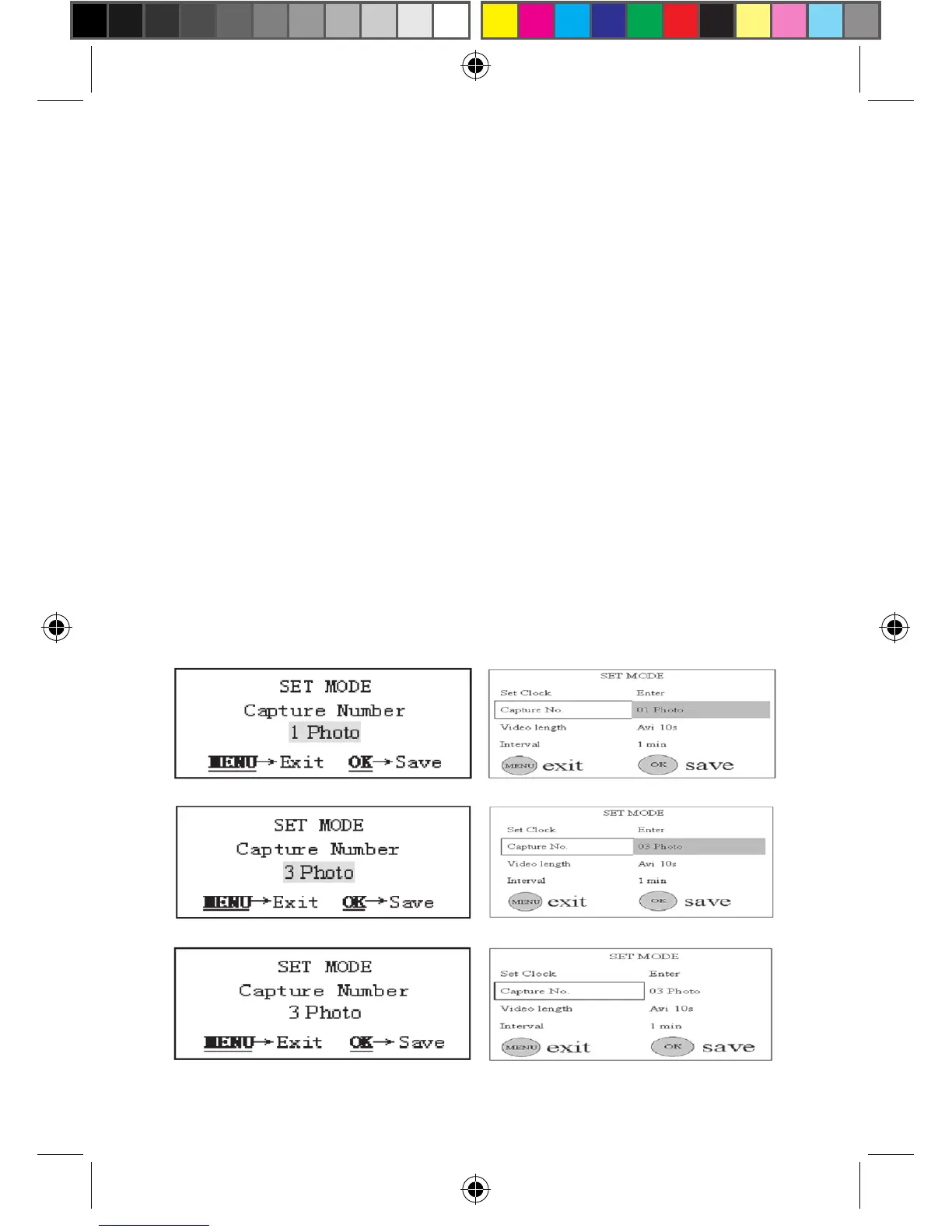
a) In MENU state push the UP or DOWN key until the parameter
“Capture Number” appears as shown in the Fig. 10(a) and 10(1).
b) Push the RIGHT key two times. The value of this parameter will
be changed to “3 Photo” and the value “3 Photo” is highlighted as
shown in the Fig. 10(b) and 10(2).
c) Press OK key for saving setting or MENU key for canceling
operation and exiting. After pressing the OK key the selected
value will no longer be highlighted, shown in the Fig. 10(c) and
10(3).
Figure 10: Setting Shooting Numbers
(a)
(1)
(b)
(2)
(c)
(3)



 To Next Page