
 Need help?
Do you have a question about the Bushnell CELLUCORE 20 and is the answer not in the manual?
Explains the meaning of camera status indicator lights for status, battery life, and cellular signal.
Configures image resolution, capture count, video resolution, and video length.
Allows users to assign a custom name for identification purposes.
Adjusts motion detection delay and sets operational times for image capture.
Sets flash output and shutter speed for short-range shooting conditions.
Configures flash for fast motion capture or long-range illumination.
Configures image timestamping and cellular data transmission frequency.
Addresses questions regarding data plans for multiple cameras and plan management.
Explains photo sharing and transmission to multiple recipients.
Details accessing video files and recommended SD card specifications.
Provides information on expected battery life and factors affecting it.
Details lens aperture, field of view, and available image resolutions.
Outlines video capabilities, motion detection, and capture timing parameters.
Covers power requirements, standby power consumption, and average battery longevity.
Outlines the steps and required items for returning the product for warranty service.
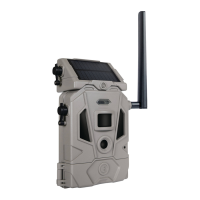
The Bushnell Cellucore 20 Trail Camera is a wireless scouting camera designed for hunters and outdoor enthusiasts to capture images and videos of wildlife. It features cellular connectivity, allowing users to review images, change camera settings, and monitor battery life remotely via a smartphone app or management website.
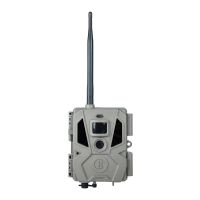
The Cellucore 20 operates by detecting motion using a Passive Infrared (PIR) sensor. Once motion is detected, the camera triggers to capture either still images or video clips, depending on the user's settings. These captured files are stored on an SD card and can be transmitted wirelessly to a user's account for remote viewing. The camera is equipped with LED IR flash for night vision, a lens, and a temperature sensor. An antenna facilitates cellular signal transmission. The device is powered by 12 AA batteries and also includes a DC In port for an optional solar panel accessory, which can extend battery life.
To begin using the camera, users first download the free Bushnell Trail Camera app on their smartphone (iPhone® or Android®) and create an account. A new camera is added by scanning a QR code or manually entering its serial number. Before activation, protective plastic covers must be removed from the camera lens and PIR sensor. The camera requires 12 AA batteries (lithium batteries are recommended for longer life) and a new SD card (up to 32GB, Class 6 or higher recommended for video).
Once batteries and an SD card are installed, the power switch is moved to the "On" position. The camera's default settings are optimized for typical scouting, including photo mode at 2MP resolution, a 10-second interval between photos, and "Medium" LED flash power. These settings are fully customizable via the app or management website, allowing users to adjust image resolution, capture videos, or modify trigger intervals to suit their specific needs.
Before closing the camera, it's crucial to ensure it has acquired a cellular signal, which can be checked using the camera status indicator lights. Lower signal strength can lead to service interruptions and reduced battery life.
The camera should be mounted on a sturdy tree or post, about 3.5-5 ft from the ground, with a diameter of approximately 6 inches. For optimal night results, the subject should be within 10-60 ft of the camera. To avoid false triggers, the camera should not be aimed at heat sources or nearby moving branches. The camera can be mounted using the provided adjustable belt, threaded through slots on the back and secured around a tree trunk. Alternatively, it can be mounted on a tripod or other accessories using its standard 1/4"-20 tripod socket.
The Bushnell Cellucore 20 Trail Camera is designed for ease of use and remote management. Users can monitor battery life and cellular signal strength through the mobile application or management website. This allows for proactive battery replacement and ensures continuous operation. The camera is compatible with an optional solar panel accessory (119986C), which can power the camera and recharge its internal lithium-ion battery, reducing the need for frequent AA battery changes. If the solar panel is connected and AA batteries are installed, the camera will prioritize power from the solar panel's rechargeable battery, switching to AA battery power if the solar panel's voltage is insufficient. The solar panel's battery also powers the camera at night.
For troubleshooting or support, Bushnell Customer Service is available. The camera is covered by a two-year limited warranty against defects in materials and workmanship, requiring the product to be returned postage prepaid for repair or replacement. It is important to note that the warranty does not cover damages from misuse or improper handling. When returning for repair, accessories like batteries, SD cards, and straps should not be included. The product should be securely packed to prevent transit damage.
 General
| Image Resolution | 20 MP |
|---|---|
| Detection Range | 80 feet |
| Power Source | 12 AA batteries |
| Connectivity | Cellular |
| Data Plan Required | Yes |
| Image Stamp | Date, Time, Temperature, Moon Phase |
| Flash Range | 80 feet |
| Recovery Rate | 1 second |
| Battery Life | Up to 6 months |
| Trigger Speed | 0.3 seconds |
| Memory Card Type | SD Card, up to 32GB |
| Video Resolution | 1080p |
| Flash Type | Low Glow |


 To Next Page