11
Installing the Software
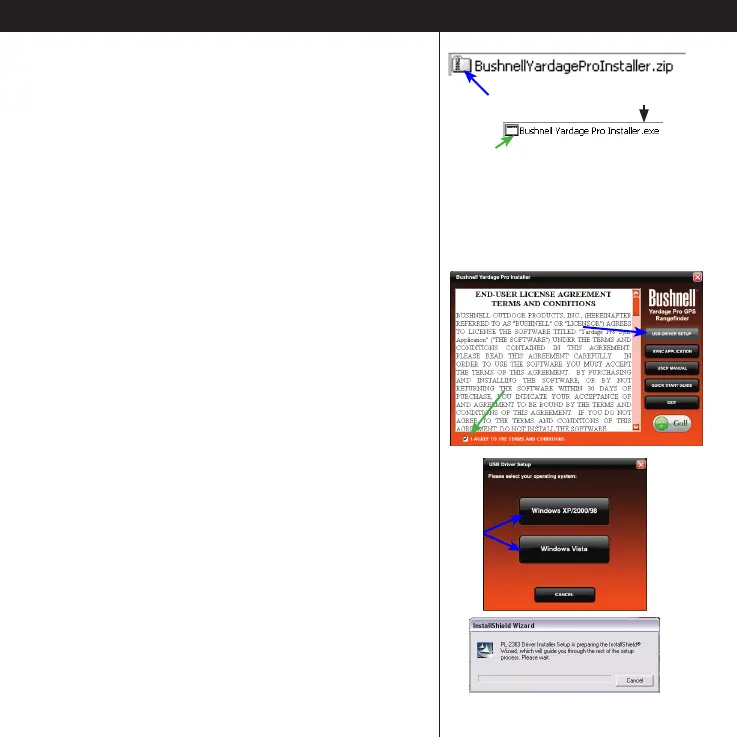
• Close your web browser and nd the
“BushnellYardageProInstaller.zip” folder on your
PC Desktop (or the location you chose for the
download in the previous step). Double click
the folder to open it and extract the les inside
1
. Then double click the le named “Bushnell
Yardage Pro Installer.exe” to start the software
installation
2
.
2. Install USB Driver and Sync
Application (Do Not Connect The YP GPS Unit Yet)
• Read the User License Agreement and
check (click) the box “I Agree to the Terms and
Conditions”.
• Click USB DRIVER SETUP.
• Select your computer’s operating system
(Windows XP/2000/98 or Vista), and follow
the onscreen directions to nish installing the
driver, which enables your computer to
1
WinZip® or similar le decompression utility is required
to open .zip les. Free downloads are available on the
internet if your PC was not provided with a utility for this.
2
If you get “Compressed (Zip) Folders” or “Unveried
publisher” warning pop-ups, click Run.
Note: the USB driver and Sync application do
not currently have Mac compatible versions.
Double click to open the zip folder
Double click to start the software installer





 To Next Page