29
The Score Card Page
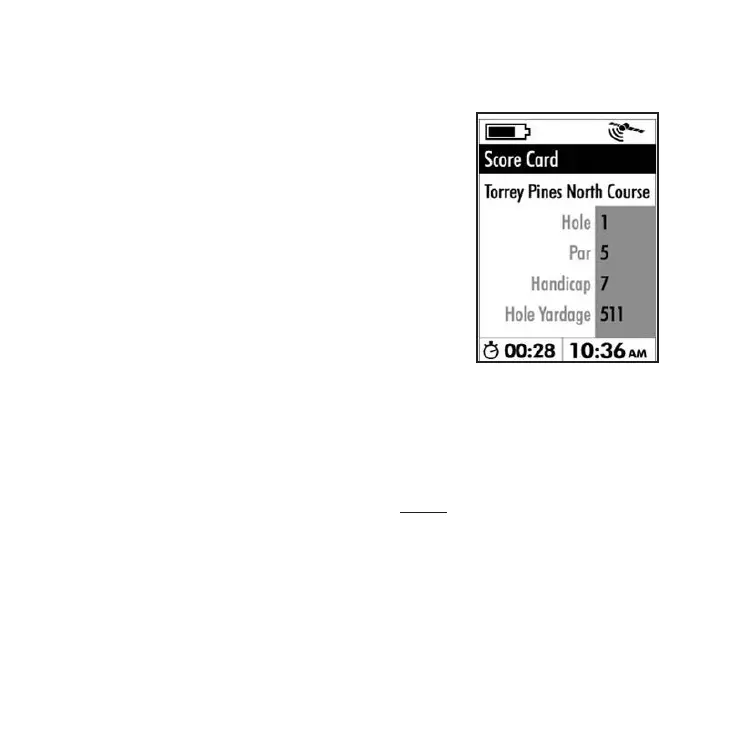
The Score Card page is simply a
page displaying relevant information
about the hole you are currently
playing-the data is included in the
downloaded data for each course,
and cannot be changed by the
user. To view the Score Card for the
hole you are currently playing (as
indicated by the “Hole #” display
next to the ag icon at the bottom of
the Play page), just press the PAGE
key while you are on the Play page.
The information shown on the Score
Card page includes:
•Course Name
•Hole Number-note that this does not change
automatically, but is based on the hole setting you
manually make on the Play page (you can preview
the Score Card info for the next hole by temporarily
changing the hole # on the Play page).
•Par for the hole
•Handicap (difculty rating of the hole)
•Hole Yardage-this is the distance from the tee
box position you chose using “Tee Box Set” on the
Settings page to the current hole-not the distance to
the hole based on your current actual GPS position.





 To Next Page