12
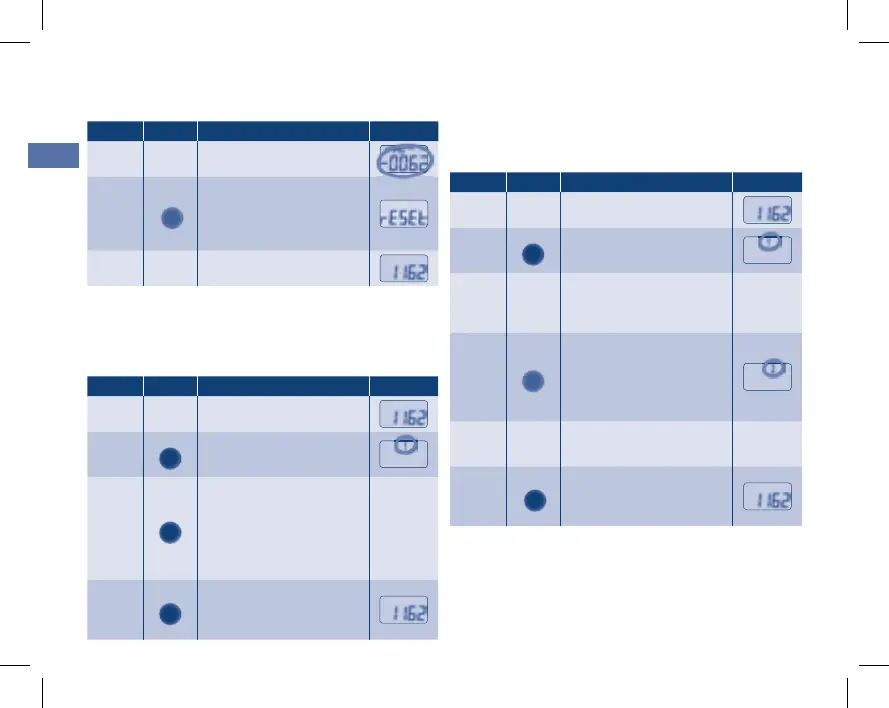
Special function:
The overall number of litres (from the beginning of the
water+more Aquameter installation) can also be read out.
Step Button Indicator
1
PROG.
Press and hold the “PROG”
button for approx. 5 sec.
f “1” flashes
2
PROG.
Once again press and hold
the “PROG” button for ap-
prox. 5 sec.
f The overall number of li-
tres from the start of opera-
tion of the Aquameter is in-
dicated
total
3
PROG.
Press the “PROG”
button once
f Indication of the current
filter capacity
Memory information:
It is possible to access the 5 most recent measure-
ments.
The capacity in litres [L] and the time period [t] are dis-
played for each case.
Step Button Indicator
1
PROG.
Press and hold the “PROG”
button for approx. 5 sec.
f “1” flashes
2
The display indicates the
quantity in litres and the
time period of the last
measurement
3
RESET
Press the “RESET”
button once
f The quantity in litres and
the time period of the next-
to-last measurement are in-
dicated
4
Repeat step 3 to access
the 5 most recent meas-
urements.
5
PROG.
Press the “PROG”
button once
f Indication of the current
filter capacity
Resetting the filter capacity:
(after water filter replacement)
Step Button Indicator
Filter capacity is depleted
f Indicator flashes
1
RESET
Press and hold the
“RESET” button for
approx. 3 sec.
f “RESET” appears in the
display
2
Filter capacity is reset
EBA Aquameter 5.indd 12 09.02.2011 13:36:13


 To Next Page