11
6. Programming
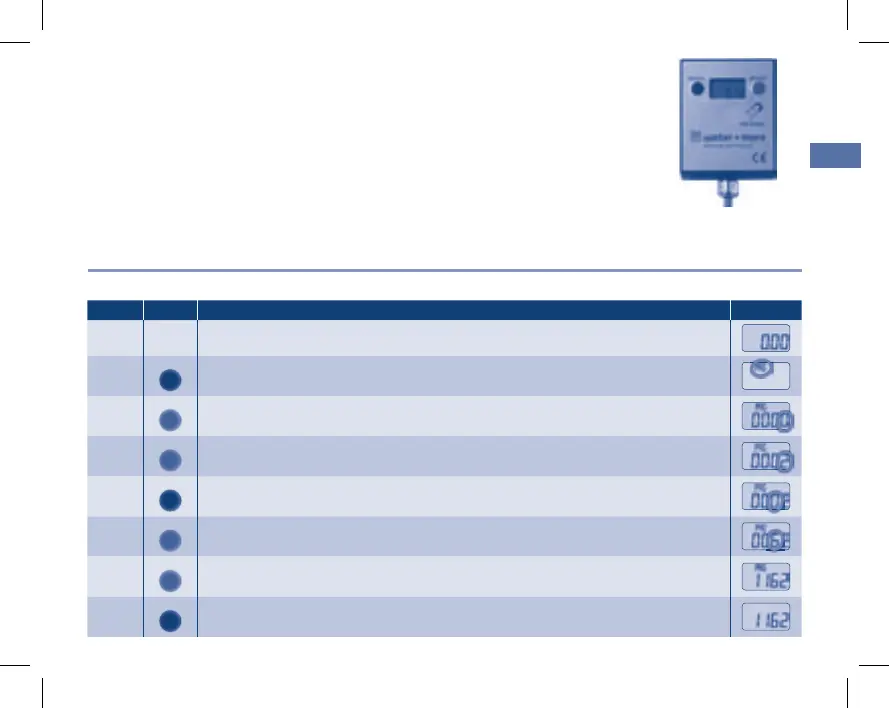
Filter capacity setting:
Step Button Indicator
1
PROG.
Press the “PROG” button once
f “PROG” flashes
2
RESET
Press the “RESET” button once
f first digit on the right, “0”, flashes
3
RESET
Set the desired value by pressing the “RESET” button.
f For the digit “2”, press two times
4
PROG.
Press the “PROG” button once to switch to the next digit
f first digit, “0”, flashes
5
RESET
Set the desired value by pressing the “RESET” button.
f For the digit “6”, press six times
6
RESET
Repeat steps 4 and 5 until all digits have been set.
7
PROG.
Press the “PROG” button once
f The filter capacity is set
Display:
Fastening options:
Double-sided adhesive tape: (not included in delivery)
Fasten a 50 x 40 mm piece of adhesive tape to the rear side of the display.
Fasten the display in the desired position.
Attention:
Fastening must take place on a surface that is free from grease, dust and dirt.
Screw: (not included in delivery) Recommendation
f Flat head screw, max. shaft diameter 4 mm
EBA Aquameter 5.indd 11 09.02.2011 13:36:12


 To Next Page