BYD Suri Owner‘s Manual
Keys and Doors 1-24
I. Appearance of Smart Key
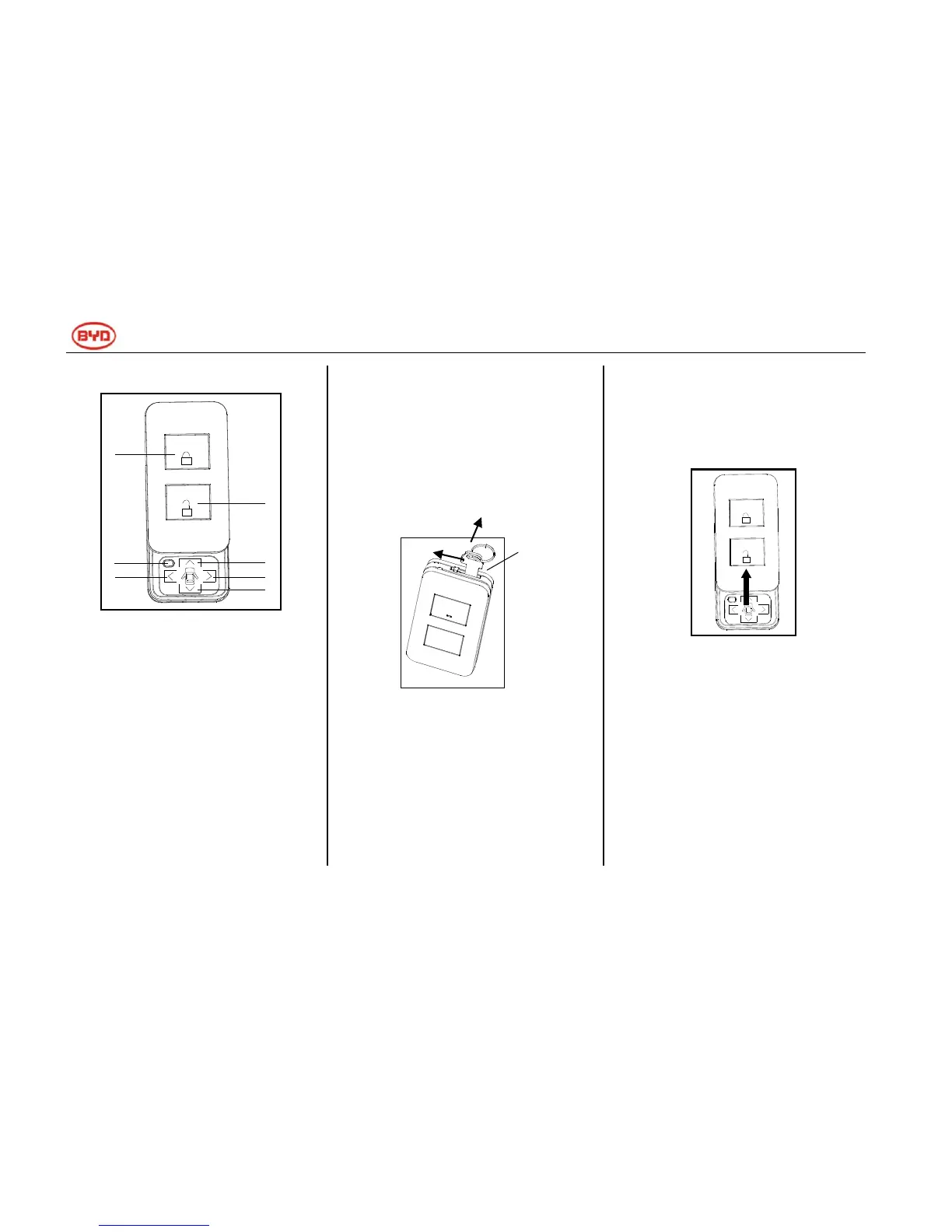
Figure 1 Slide Smart Key
1. The remote control buttons are
shown in Figure 1.
(1) ―Start‖ button;
(2) ―Forward‖ button;
(3) ―Reverse‖ button;
(4) ―Turn Left‖ button;
(5) ―Turn Right‖ button;
(6) ―Lock‖ button;
(7) ―Unlock‖ button.
2. The mechanical key is as shown
in Figure 2. If you want to pull out
the mechanical key, first release
the lock catch in the direction of
arrow①, and then pull out the key
in the direction of arrow ②, while
you can insert the key along the
opposite direction of arrow②.
Figure 2 Mechanical Key
II. Remote Start
1. The power mode is OFF, and the
transmission gear is in P position;
2. Push the sliding cover to the
direction of the arrow shown in
Figure 3, and then press and hold
the ―Start‖ button for a while to
start the car;
3. The turn signal will blink 3 times in
the case of successful start.
Figure 3 Open of Sliding cover
III. Remote Forward, Reverse and
Stop
1. In remote driving mode, press and
hold the ―Forward‖ button for a
while, the car will move forward,
and the turn signal will also blink
twice; release the ―Forward‖
button, the car will stop slowly, and
the turn signal will be turned off at
the same time.



 To Next Page