The ByronStatics Portable CD Player, model PCD-250, is a compact and versatile audio device designed for playing CDs and MP3 discs. It offers a range of features for an enjoyable listening experience, along with important safety and maintenance guidelines to ensure its longevity and user safety.
Function Description
The primary function of the ByronStatics Portable CD Player is to play audio from CD and MP3 discs. It is designed for portability, allowing users to enjoy their music on the go. The device supports various playback modes and sound adjustments, making it adaptable to different listening preferences.
Important Technical Specifications
- Power Source: The player can be powered by DC 5V, 1A via a USB cable or by two 1.5V LR6, AA batteries.
- Disc Type: It supports CD and MP3 discs.
- Disc Size: Compatible with 8cm and 12cm discs.
- Battery Operation Time: Approximately 4 hours at 50% volume when using batteries.
- Accessories: Includes 1 User Manual, 1 USB Power Cable, and 1 Earphone.
Usage Features
The portable CD player is equipped with several buttons and jacks for intuitive operation:
- DC IN Jack: For connecting the USB power cable.
- Earphone Jack: For connecting headphones to listen to audio privately.
- Speed Up/Down Button (SP+ / SP-): To adjust the playing speed.
- A-B/P/EP/Program Button: This multi-function button allows for A-B repeat, program playback, and setting EQ modes (CLAS, POP, JAZZ, ROCK, BASS).
- M/T (Model Timer) Button: Used to repeat one track, repeat all tracks, or browse the timer settings.
- +10/EQ Button: To skip forward by 10 tracks or adjust the EQ mode.
- Play/Pause Button (▶/II): To start or pause playback.
- Stop Button (■): To stop playback.
- Previous Button (⏮): To skip to the previous track.
- Next Button (⏭): To skip to the next track.
- Volume Up/Down Button (VOL+ / VOL-): To adjust the volume.
- Display: Shows playback information.
- Open Button: To open the CD compartment.
- Lock Switch: To prevent accidental button presses during playback.
- String Hole: For attaching a strap for easier carrying.
- Battery Compartment: For inserting AA batteries.
Basic Operations:
- Powering On: Insert two AA batteries or connect the USB power adapter.
- Unlocking: Slide the LOCK switch on the bottom of the unit to the right side to unlock button function.
- Opening Disc Cover: Press the "OPEN" button to release the disc cover.
- Inserting a CD: Put a CD disc in the compartment with the label side facing up and close the cover gently. The player will start playing the disc automatically, and the track number and playing time will appear on the display.
- Connecting Earphones: Connect the earphone plug to the earphone jack to listen privately.
- Playing: Press the ▶/II button to start, stop, or pause playback.
- Skipping Tracks: Press the ⏭ button to skip to the next track or the ⏮ button to skip to the previous track.
- Adjusting Volume: Press the VOL+ or VOL- button to adjust the volume.
- Speed Adjustment: Press the SP+ or SP- button repeatedly to set the playing speed.
- 10-Track Skip: Press and hold the +10/EQ button to skip to the next 10 tracks.
- EQ Mode: Press and hold the +10/EQ button until "OFF" appears on the display, then press +10/EQ repeatedly to browse the EQ mode (CLAS, POP, JAZZ, ROCK, BASS). Press the +10/EQ button to select and confirm the desired EQ mode.
- Repeat Playback: Press the M/T button to repeat one track, repeat all tracks, or browse timer settings.
- Program Playback: Press the A-B/P/EP/Program button to program specific tracks.
- A-B Repeat: During playing, press the A-B button to define the start point of repeat playing section, press the A-B button again to define the end point of the section. The player will start play the selected section repeatedly. Press the A-B button the third time to resume normal playing.
- Power Off: Press and hold the ■ button to turn off the player.
- Automatic Shut-off: When the player is paused for about 3 minutes, or when the disc cover is opened and there is no any operation, the player will turn off automatically.
Maintenance Features
Proper care and maintenance are crucial for the longevity and optimal performance of the portable CD player.
Caring for Discs:
- Handling: Treat discs carefully, handling them only by their edges. Avoid touching the shiny, unprinted side of the disc.
- Labels: Do not attach adhesive tape, stickers, etc., to the disc label.
- Cleaning: Clean the disc periodically with a soft, lint-free, dry cloth. Never use detergents or abrasive cleaners. If necessary, use a CD cleaning kit.
- Scratches/Damage: If a disc skips or gets stuck, it is likely dirty or damaged. When cleaning the disc, wipe in straight lines from the center of the disc to the outer edge. Never wipe in circular motions.
- Storage: Discs should be stored in their cases after each use to avoid damage.
- Exposure: Do not expose discs to direct sunlight, high temperatures or dust, etc. Prolonged exposure or extreme temperatures can warp the disc.
- Writing: Do not stick or write anything on either side of the disc. Sharp writing instruments, or the ink, may damage the surface.
Cleaning the Unit:
- Power Off: To prevent fire or shock hazard, disconnect the unit from the AC power source when cleaning.
- Exterior: The finish on your unit may be cleaned with a dust cloth and cared for as other furniture. Use caution when cleaning and wiping the plastic parts.
- Mild Soap: A mild soap and a damp cloth may be used on the front panel.
Important Safety Instructions:
- Ventilation: Ensure proper ventilation. Do not block openings or place the product on soft surfaces like a bed or rug.
- Heat Sources: Keep the product away from radiators, heat registers, stoves, or other heat-producing apparatus.
- Power Cord: Use a long AC cord or other long cord that can easily be tripped on or pulled on, causing injury. Make sure it is arranged so it will not drape over a tabletop, etc.
- Water/Moisture: Do not use this apparatus near water. Do not expose this product to rain or moisture.
- Cleaning: Always unplug the product from the wall outlet before cleaning.
- Block Openings: Do not block any ventilation openings. Install in accordance with the manufacturer's instructions.
- Battery Disposal: Dispose of used batteries according to local laws and regulations. Do not mix old and new batteries, different battery types, or expose batteries to excessive physical shock, vibration, or liquids. Do not disassemble, attempt to repair, or deform batteries. Do not dispose of batteries in fire. Do not peel or damage the battery label. Remove batteries from the unit if it is not intended to be used for an extended period of time.
- Laser Safety: This player employs a laser system. To ensure proper use of this product, read the instruction manual carefully. Do not open the enclosure. Invisible laser radiation may be present when the enclosure is opened. Do not stare into the beam.
- Moisture Condensation: Moisture condensation can occur in various situations, such as bringing the CD player from a cold to a warm place, using it in a humid place, or after moving it from an air-conditioned room. If moisture condensation occurs, the CD player may not function properly. To resolve this, remove the disc, disconnect the AC/DC adapter, and turn on the CD player and leave it ON for two or three hours to allow the moisture to evaporate.
- Hearing Damage: To prevent possible hearing damage, do not listen at high volume for long periods.
The ByronStatics Portable CD Player is designed to be a user-friendly and reliable device for personal audio enjoyment, emphasizing both performance and safety through its comprehensive features and guidelines.

 Need help?
 General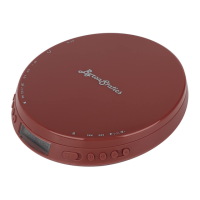

 To Next Page
