Page 1
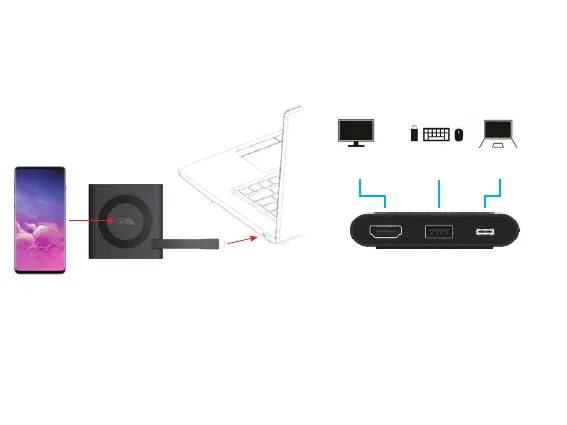
Step 1: Insert the end of the USB Type C Docking Station
Cable into the USB Type C port on your Laptop as show
below.
Using the CA Essential Micro Docking Station with Your Laptop
USB Type A
Gen 2 Port
USB Type C
Connection
HDMI Connection
to a TV or Monitor
Step 2: Connect your Peripherals to the
CA Essential Micro Docking Station.
Step 3: Place your device supporting Wireless
charging on the top of the CA Essential
Micro Docking Station.
Note: Power available for the attached peripherals and wirelessly charging are dependent on the power supplied
by your Laptop. For specic congurations supported and power delivered for the Qi Wirelessly Charger, USB
and HDMI ports see page 4.
Qi Wireless Charger


 To Next Page