Assemble and Extend the cart
+
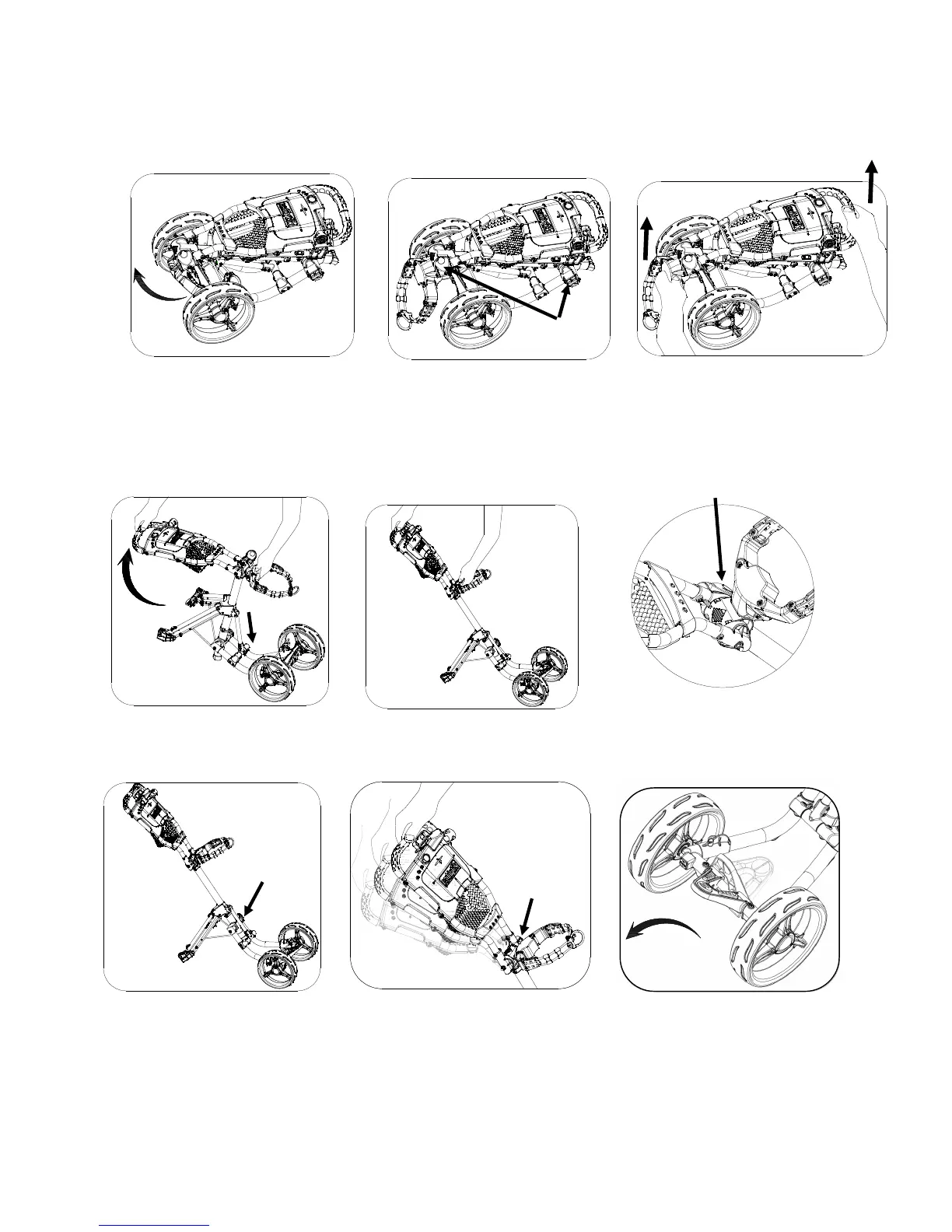
Extend the upper bag holder
bracket as shown in Fig. 1
Hold the upper bag holder and the
handle frame with hands as
shown in Fig. 3
Fig. 1
Fig. 2
Frame locking
buckles
Release handle and front wheel
frame locking buckles as shown
above Fig.2.
Pull the handle frame upward to fully extend the handle frame as in Fig. 4 and Fig. 5, and lock the locking
buckle as in Fig. 6.
Extend the lower bag holder
assembly as shown in Fig 9.
Fig. 5
Fig. 6
buckle
Fig. 3
Fig. 4
Fig. 7
buckle
Fig. 8
buckle
Fig. 9
Fully extend front wheel frame and lock the buckle as in Fig. 7.
Hold the
handle while releasing the locking buckle to adjust the handle height and
lock the buckle again as Fig. 8 shows.


 To Next Page