Folding the cart
+
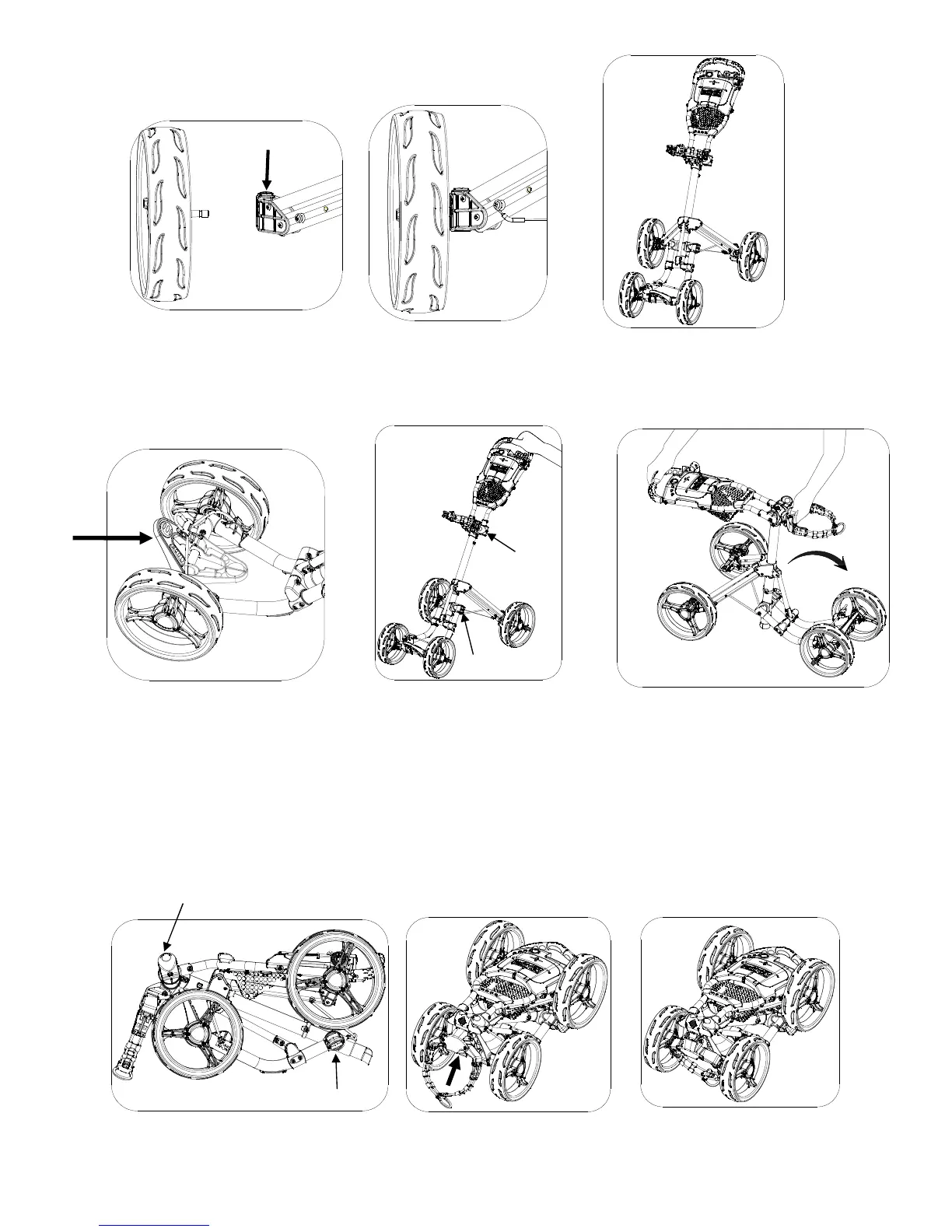
Press the button and insert the rear wheel into the wheel axel holder as shown in Fig. 10 and
Fig. 11. The cart now is ready for use as shown in Fig. 12.
Release the handle and front wheel
frame locking buckles as Fig.14.
CAUSION: Please hold on to
the handle when releasing
the handle frame locking
buckle to avoid the frame
dropping abruptly and
Fig. 17
Holding the handle frame and
the upper bag holder bracket,
move the handle downward to
fold the cart as shown in Fig. 15.
Fold the upper bag holder as
Fig.17 shown above.
The cart now is folded completely
as Fig.18.
Fig. 14
Fold the lower bag holder
as shown above
.
buckle
buckle
Handle frame locking buckle
Front wheel frame locking buckle
Button
Fig. 10
Fig. 18
Fig. 11
Fig. 12
Fig. 16
After the cart is fully folded, lock both
locking buckles as show in Fig. 16.
.


 To Next Page