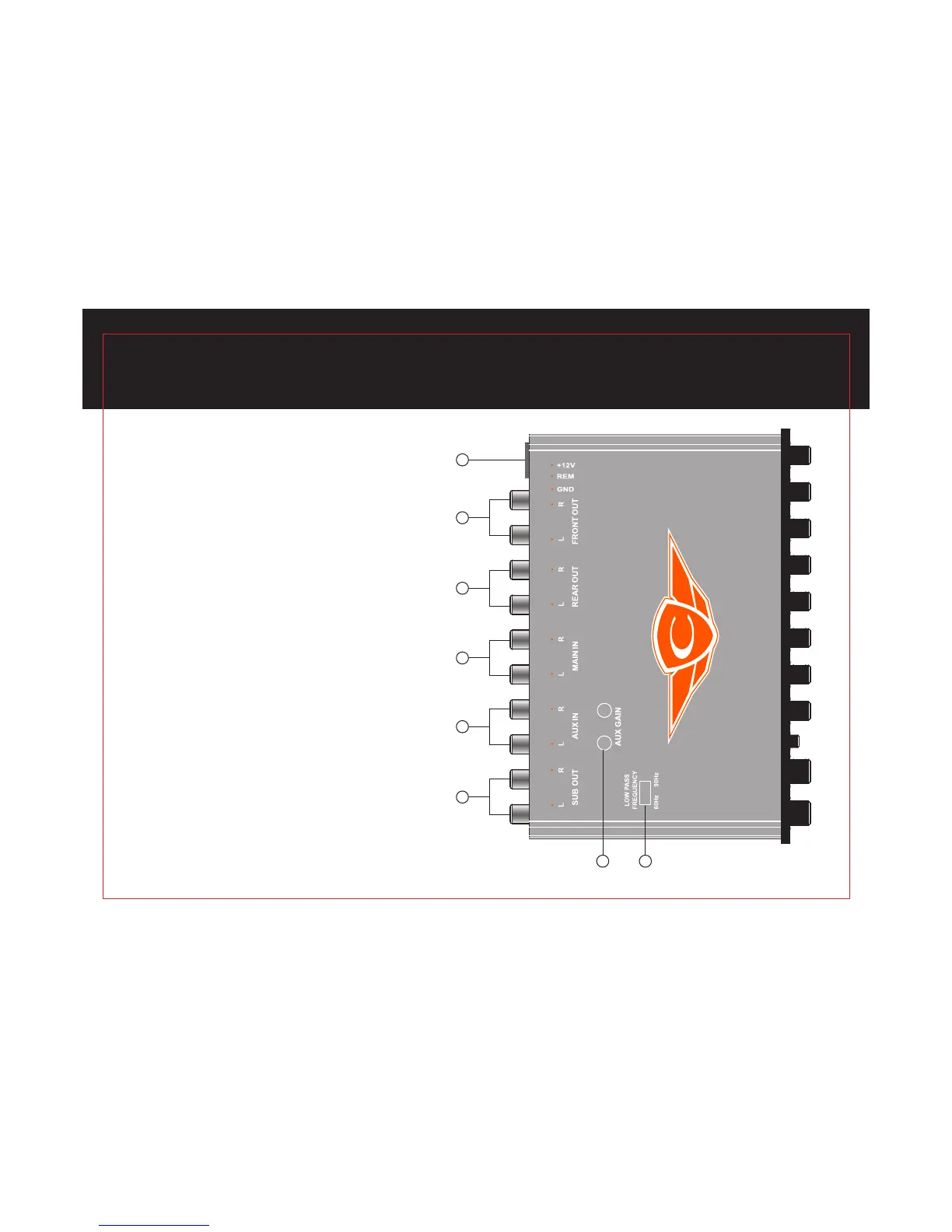
BACK PANEL CONNECTIONS
1. POWER: After connecting the Ground, Remote and
Power wires, plug in the Power Lock connector here.
2. FRONT OUTPUT: Plug in the RCA cables to your front
channel amplier here.
3. REAR OUTPUT: Plug in the RCA cables to your rear
channel amplier here.
4. MAIN INPUT: Plug in the RCA cables from the main
Source unit here.
5. AUX INPUT: Plug in the RCA cables from the AUX
Source unit here.
6. SUBWOOFER OUTPUT: Plug in the RCA cables to your
subwoofer amplier here.
7. AUX GAIN CONTROL: Gain adjustment for left and right
auxiliary input.
8. LOW PASS FREQUENCY: This switch select low pass
frequency 60Hz to 90Hz.
4
7 BAND GRAPHIC EQUALIZER
CEQ735
1 2 3 4 5 6
87


 To Next Page