8
CADILLAC USER EXPERIENCE FEATURES
Read your Owner's Manual for important information about using the infotainment system while driving.
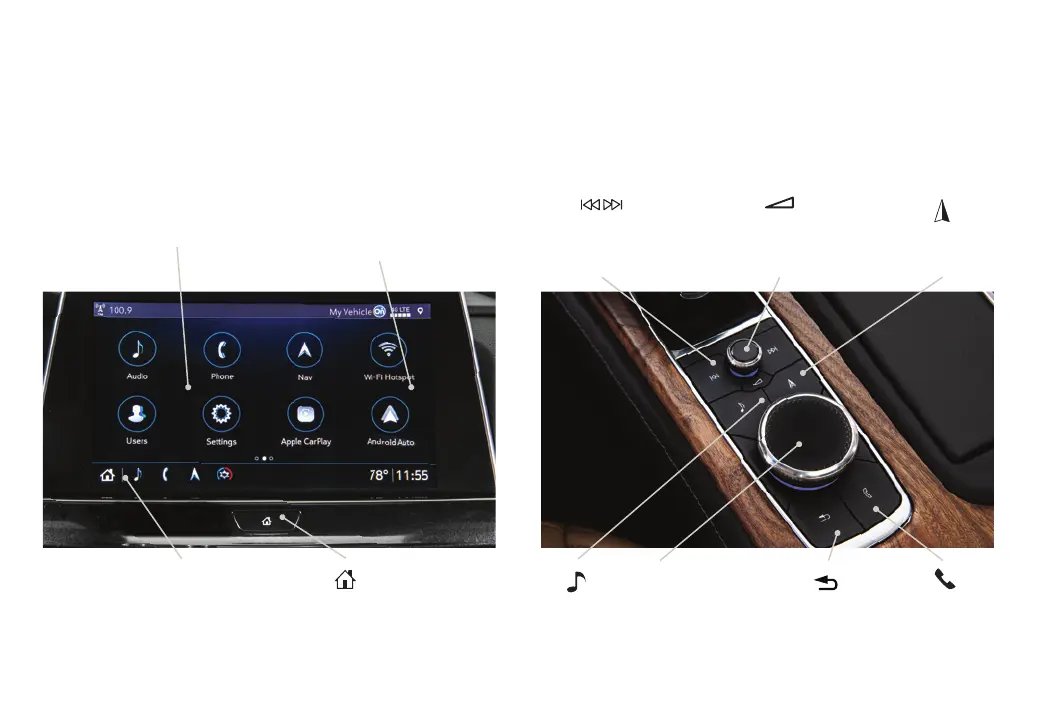
Your CT5 offers a variety of entertainment, communication and vehicle system options. Touch an application icon on the touchscreen
or use the rotary controller and buttons on the center console to access an item. You can use simple gestures on the touchscreen,
such as tap, drag, pinch and spread, to interact with the infotainment system. Link a compatible smartphone or portable audio
player/iPod® to the infotainment system using a Bluetooth or USB connection. For assistance, call 1-855-428-3669 or visit
cadillac.com/support.
Home
Page
Additional Pages:
Swipe to display the overview
page or additional pages
of apps (if available)
Applications Tray:
Shortcuts to commonly
used apps
Applications
♦
:
Touch a screen icon
to access an app
Power/Volume:
Rotate to adjust volume/Press
to mute audio/Press and hold to
turn system on-off
Press to seek the
previous or next
radio station or
track
Return to
previous
menu
Controller:
Rotate to move on the
screen/Press to select
an item
Phone
♦
menu or
Home page
♦
Navigation
menu
♦
or
Phone menu
♦
Audio
menu
Note: Infotainment buttons and configuration may vary depending on vehicle content.



 To Next Page
 Loading...