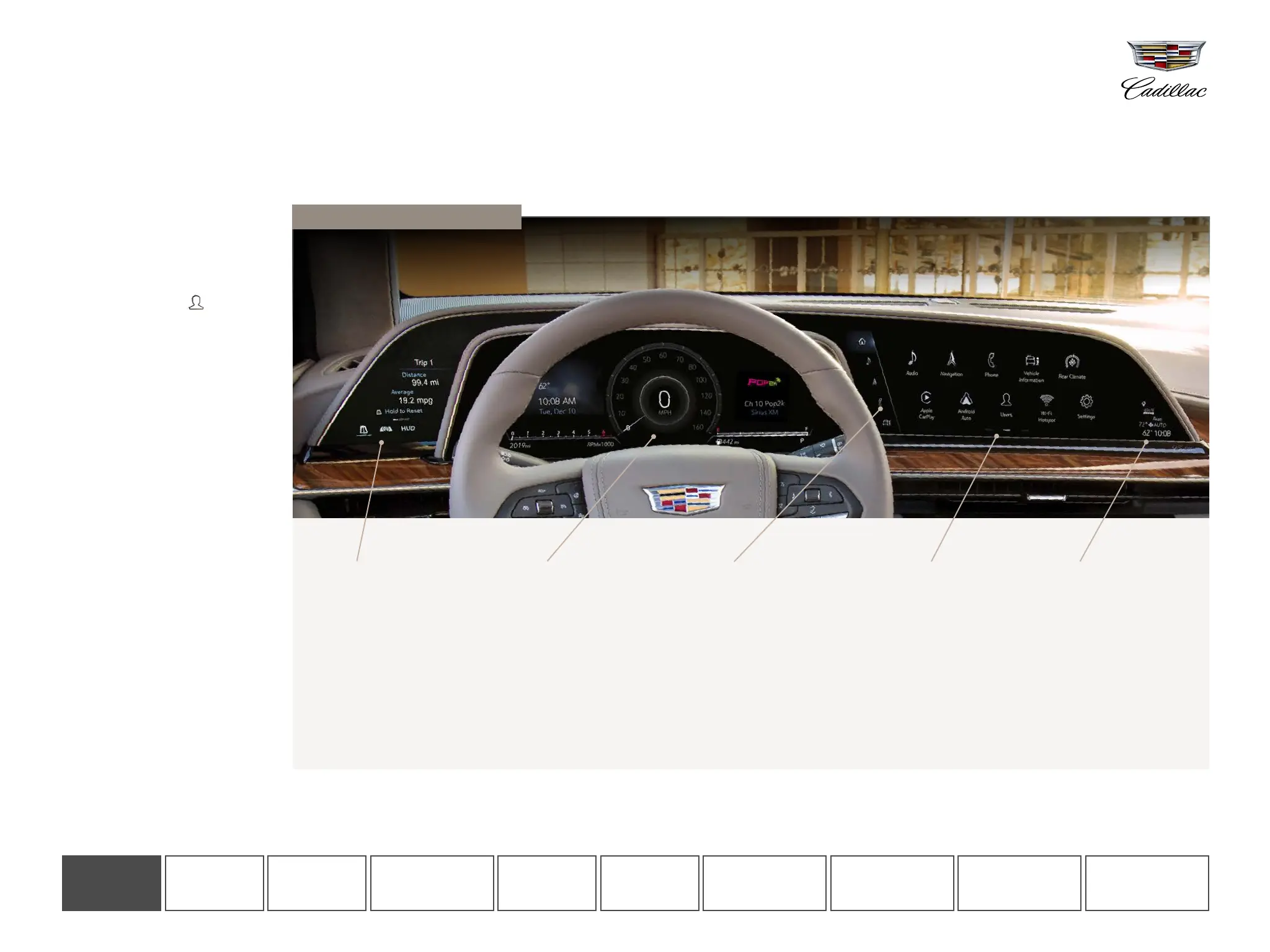
Leading-edge technology. The industry’s first curved OLED with 38 inches of total diagonal display. This system will completely revolutionize your driving experience—and this guide will help you
get acquainted with it.
GETTING STARTED
INTRODUCING THE ALL-NEW CADILLAC ESCALADE OLED INFOTAINMENT SYSTEM
1
CONTROL PANEL
This touch-screen displays
your trip information, lets
you select the Cluster
Display layout, and control
the available Head-Up
Display and available Night
Vision
2
system.
CLUSTER DISPLAY
This (non-touch) screen
shows your speed, fuel
level and other important
information. Choose from
four displays: Reconfigurable
Gauge View, Map
3
,
Augmented Reality and
available Night Vision.
APP TRAY
This area provides
shortcuts to commonly
used features.
INFOTAINMENT
SCREEN
This touch-screen
controls your navigation,
music and many other
vehicle functions.
Control the screen by
touch or with the Rotary
Controller. Swipe left and
right to see more pages.
STATUS PANE
This section of the
screen displays the time,
exterior temperature,
rear climate settings,
indicators and more.
Tap the time to set
the clock.
1 Functionality varies by model. Full functionality requires compatible Bluetooth and smartphone, and USB connectivity for some devices. 2 Read the vehicle Owner’s Manual for important feature limitations and
information. 3 Map coverage available in the U.S., Puerto Rico and Canada.
Take a moment to get acquainted with
the three screens integrated into your
dashboard.
USING THE OLED DISPLAYS
SET UP A PERSONAL PROFILE
To begin, set up a Personal Profile
and associate it with your key fob
so your preferences and settings
for the system are stored.
• Tap the USERS icon on
the Infotainment Screen and
accept the User Terms and
Privacy Statement
• Tap “Create a Profile”
• Associate your profile with your
key fob, if desired
• Enter the email address you use to
log into Owner Center
Note: If you skip profile setup, you will be
using the system as a Guest. Your settings
will be saved but not associated with your
key fob
Shown with optional content.
CONTROL
PANEL
CLUSTER
DISPLAY
INFOTAINMENT
SCREEN
PHONE AUDIO NAVIGATION
VEHICLE
INFORMATION
REAR SEAT
INFOTAINMENT
ADDITIONAL
FEATURES
GETTING
STARTED












 To Next Page