18
REAR CAMERA MIRROR
♦
– e rear camera mirror
provides a wider, less
obstructed eld of view to
assist when driving, chang-
ing lanes and checking
trac conditions.
A. On/O
Pull or push the lever
at the boom of the
mirror to turn the video display on or o.
B. Selection Control
Press and release the buon to select the brightness, zoom or
tilt seing.
C.
Adjustment
Press and release either buon to adjust the selected seing.
See Keys, Doors and Windows in your Owner's Manual.
DRIVER ASSISTANCE SYSTEMS
AUTOMATIC PARKING ASSIST WITH BRAKING
♦
– e
Automatic Parking Assist with Braking system steers the vehicle
and applies the brakes at idle speed to help you park the vehicle
while you follow commands and control the gear selection.
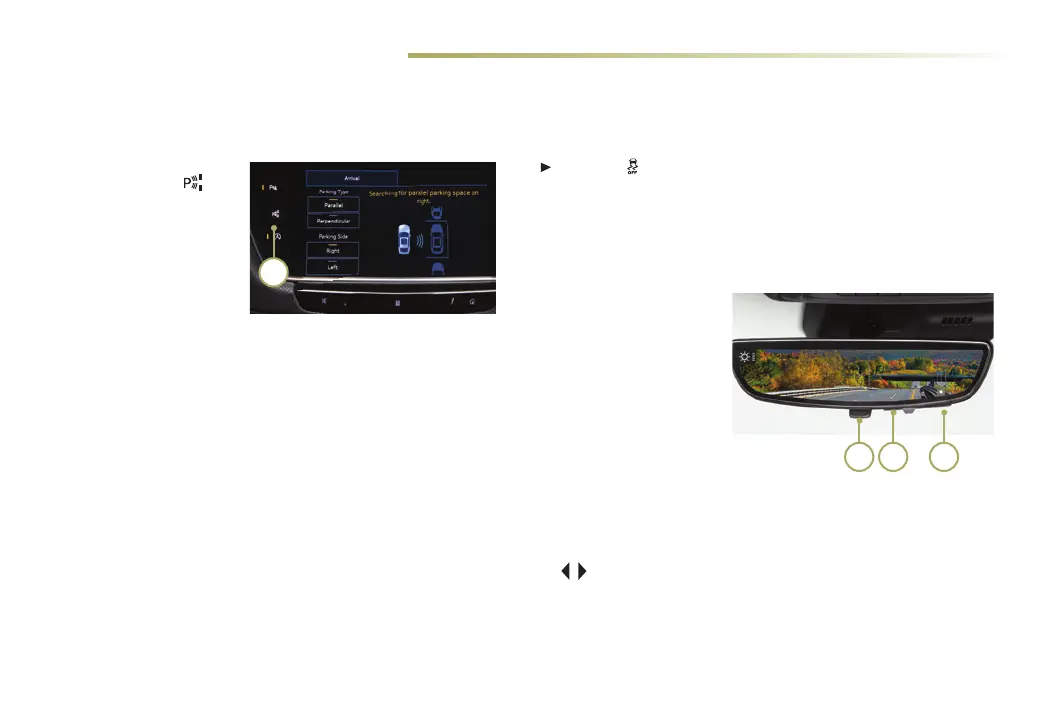
1. While driving below
18 mph, press the
Parking Assist with
Braking buon (A) on the
center of the instrument
panel. A parking assist
display is shown on the
infotainment screen. e
system will begin search-
ing for a large enough parking space.
2. To switch between parallel and perpendicular parking, touch
the Parking Type screen buon. To search for a parking spot to
the right or le, touch the Parking Side screen buon.
3. Once a space is found, shi the vehicle into Reverse or Drive as
directed and follow the instructions on the infotainment screen.
e vehicle automatically steers and brakes, moving at idle
speed into a detected parking space. e driver must follow the
instructions, select gears, and override braking and acceleration
as needed. Parking Complete will be displayed and a beep will
sound when the parking maneuver is complete.
TRACTION CONTROL – e traction control system limits wheel-
spin in dicult driving conditions. e system turns on automati-
cally every time the vehicle is started. Turn o traction control if
the vehicle is stuck and rocking the vehicle is required.
Press the Traction Control buon on the center console to
turn traction control o or on again.
See Driving and Operating in your Owner's Manual.
A B C
A














 To Next Page