9
STORING STATION FAVORITES
Radio stations from all bands (AM, FM or SiriusXM
♦
) can be stored
in any order.
1. Display the desired radio station.
2. Touch and hold a favorite screen buon. Favorites also can be
saved by touching the
in a station list.
3. Repeat the steps to store another favorite item.
SIRIUSXM® WITH 360L
♦
Trialers and subscribers can enjoy an advanced entertainment
experience with SiriusXM with 360L. e personalized content
features over 200 channels, including ad-free music, sports, com-
edy, talk andnews, along with access to thousands of hours of On
Demand shows, performances and interviews. Certain features
require a SiriusXM subscription and the Cadillac Connected Access
plan. See siriusxm.com and onstar.com for details and limitations.
PORTABLE AUDIO DEVICES
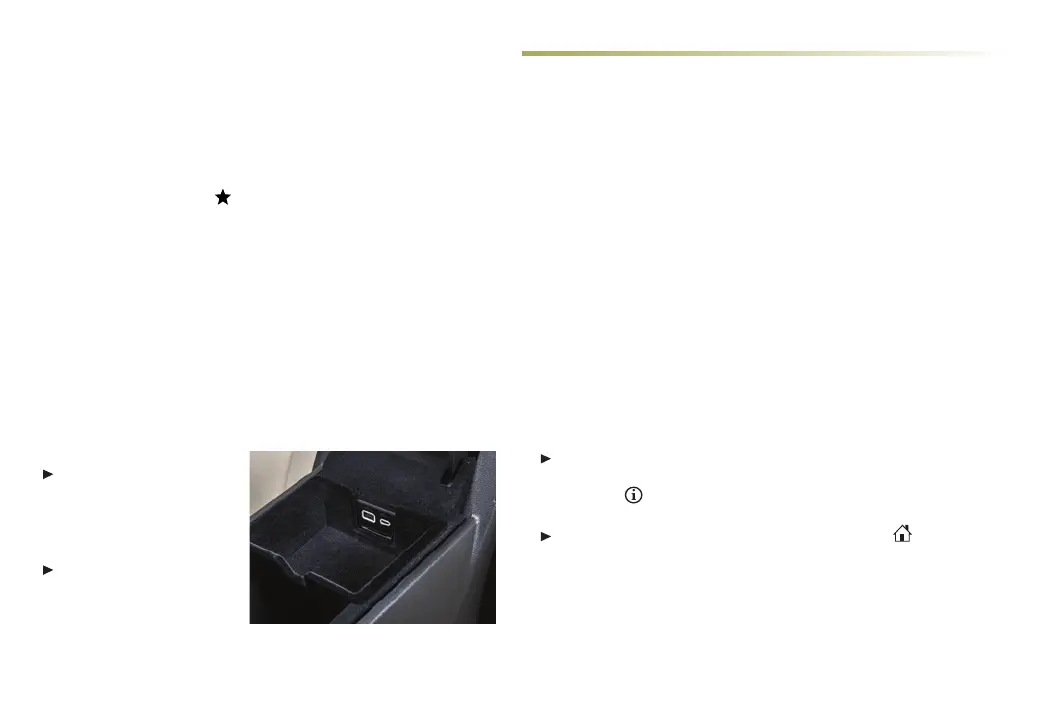
USB ports for data and charging are located in the center console
storage compartment.
Connect an iPod
®
,
iPhone
®
, MP3 player, a
USB ash drive or a USB
mass storage device to
the USB port.
Touch Audio, and then
touch More, if necessary,
to select the USB device.
APPLE CARPLAY AND ANDROID AUTO
Apple CarPlay or Android Auto capability is available through a
compatible smartphone using the Apple CarPlay or Android Auto
icon on the Home page.
1. Download the Android Auto app to your compatible smart-
phone from the Google Play Store. No app is required for Apple
CarPlay.
2. ere are two ways to set up device projection:
• Wireless Connection – Connect your smartphone by pairing
it to the in-vehicle Bluetooth system. Turn on wireless Apple
CarPlay or Android Auto in your phone’s seings.
• Wired Connection – Connect your smartphone to a USB data
port using the USB cable provided with your smartphone.
Aermarket USB cables may not work.
3. Follow the instructions on the infotainment system and the
smartphone.
4. e Apple CarPlay or Android Auto icon will illuminate when
connected. Touch the icon to have your apps displayed.
To automatically launch Apple CarPlay or Android Auto when a
Bluetooth-paired phone is connected, select Phone icon >
Phones > Information. Turn Apple CarPlay or Android Auto
on or o.
To exit Apple CarPlay or Android Auto, press the
Home
buon. To return to Apple CarPlay or Android Auto, press and
hold the
Home buon.
See Infotainment System in your Owner's Manual.
CADILLAC USER EXPERIENCE FEATURES
♦ Optional equipment














 To Next Page