6 49-2000695 Rev. 2
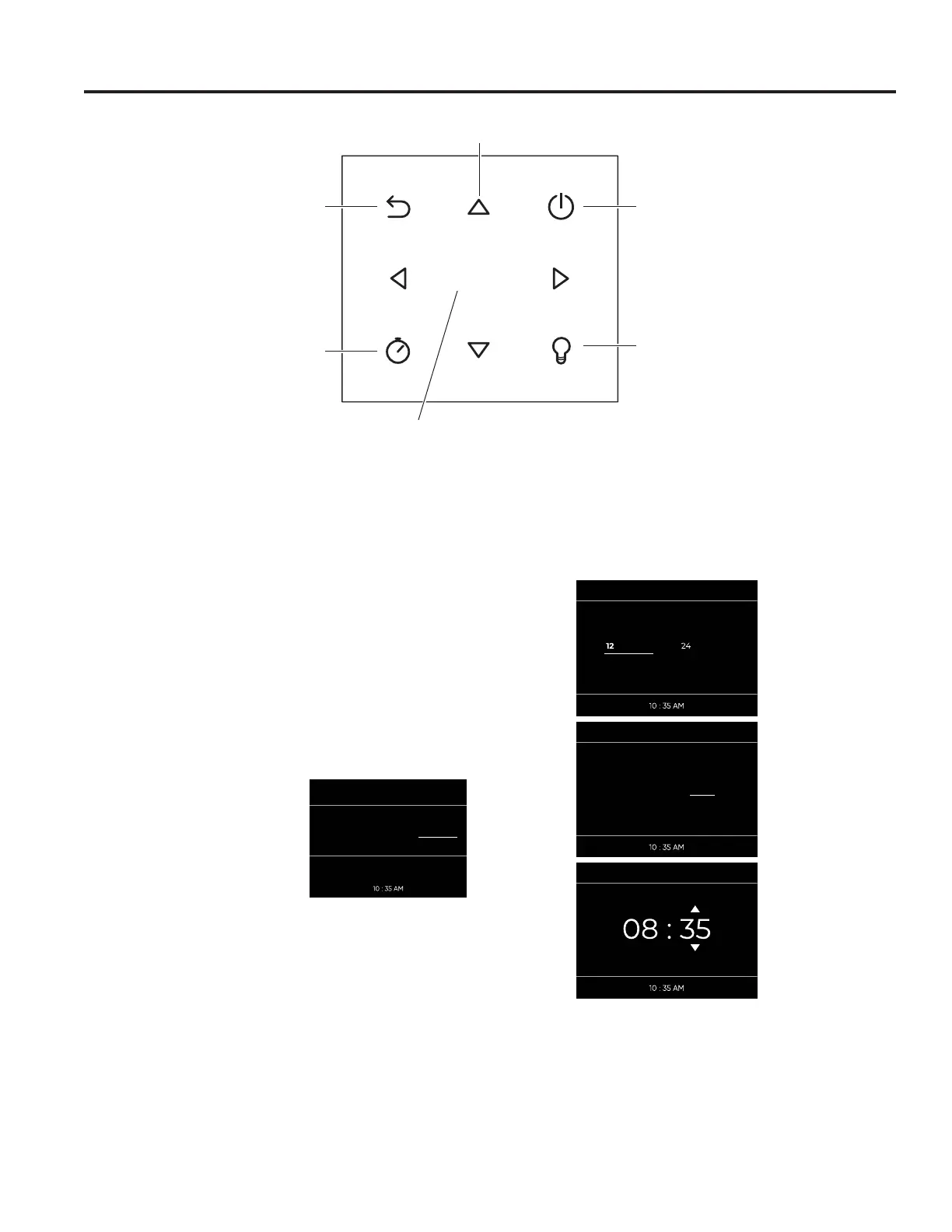
To operate the keypad, press gently. The keypad will not
work if more than one key is pressed at the same time or
if the press is too quick.
First Use
When using your oven for the first time, you will be
prompted to enter user settings for:
-Time
-Date
-Language
-Temperature measurements
These settings can be modified at any time by accessing
the settings menu.
From the home screen, press
ŻŹWR VHOHFW SETTINGS.
Then press SELECT. To access
the SETTINGS menu, no other
functions can be in progress.
Settings
,Q WKH 6(77,1*6 PHQX SUHVV ŻŹRU Ÿź WR VHOHFW WKH
setting you want to change and then press SELECT.
Language
3UHVV Ÿź WR FKRRVH IURP DYDLODEOH ODQJXDJH RSWLRQV
Press SELECT.
Temperature
3UHVV ŻŹ DQG ŸźWR FKRRVH IURP DYDLODEOH
temperature units. Press SELECT.
Clock
3UHVV ŻŹ WR FKRRVH IURP DYDLODEOH WLPH VHWWLQJV
Press SELECT 3UHVV ŻŹ WR FKRRVH DP RU SP 3UHVV
SELECT 6HW WKH WLPH E\ SUHVVLQJ Ÿź DQG SELECT.
Date
3UHVV Ÿź WR FKRRVH IURP WKH DYDLODEOH GDWH RSWLRQV
Day.Month.Year
Year.Month.Day
Month.Day.Year
Press SELECT to confirm your selection.
Select
For adding functions of
cook time, delay start,
or 5 minutes of steam
during cooking.
ON/OFF
Switches the oven
on and off.
Movement arrows
Confirms the settings and starts cooking operations.
When pressed during a cooking operation, the
function is placed in pause. Press again to restart.
Switches the inner
oven light on and
off.
Cancel and return to
previous display page.
RECIPES SETTINGSCOOKING
CHOOSE CLOCK FORMAT
CLOCKH CLOCK
H
CHOOSE CLOCK FORMAT
AM
PM
SET TIME
PM
Oven Keypad
USING THE OVEN: Oven Keypad


 To Next Page