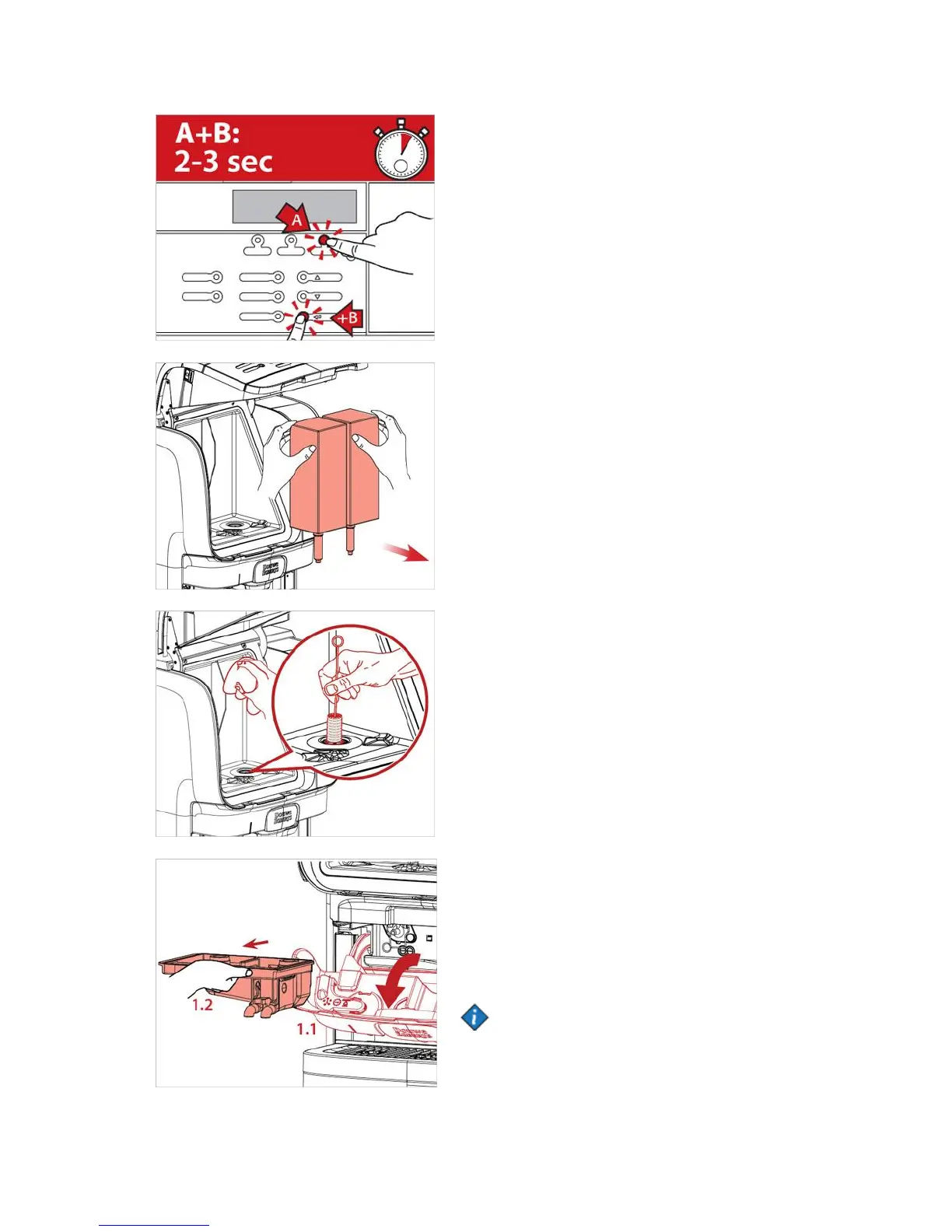
1. Press STOP and then ENTER button, hold them
pressed simultaneously for 2-3 seconds to enter the
cleaning mode.
2. The display will show FLUSHING,
press UP or DOWN button until display
shows CLEANING, press ENTER to continue.
Follow the instruction on the display:
REMOVE PRODUCT PACKS
3. Open the dispenser door.
4. Remove the product packs.
5. When all packs have been removed the display will
automatically continue and show:
CLEAN COOLING BOX PRESS ENTER WHEN DONE
6. Clean the doser opening with a brush and the interior
of the cooling compartment with a clean, damp cloth.
Dry with a clean paper cloth.
Remove and clean Mixing tray
7. Press ENTER and display will show:
REMOVE AND CLEAN MIXING TRAY
8. Follow the steps below:
a. Open the water treatment panel (fig.1.1)
b. Pull the mixing tray straight out (fig.1.2)
Note:
It is recommended to use the included exchange kit,
which consists of clean mixing tray and sealings, to
save time.


 To Next Page