Determine cleaning days
If you have a Coffee-Coffee version, the dispenser only needs to run the "Cleaning" program once a week.
You can select any day you prefer.
If you have a Coffee-Milk version the dispenser needs to run the "Cleaning" program at least twice a week.
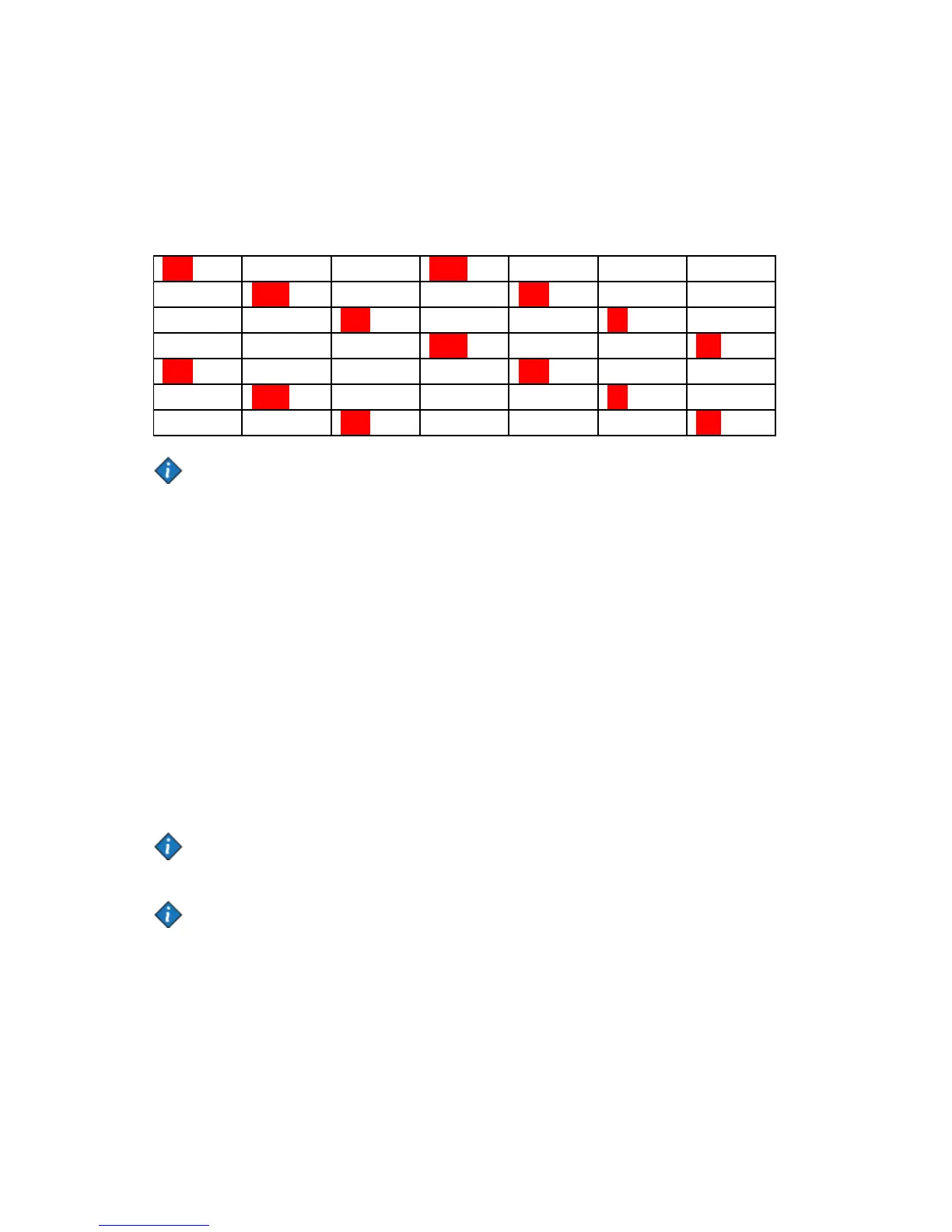
You must select at least two days with a maximum interval of 3 days. The table below indicates which days
can be combined (red = Cleaning)
Set days for "Clean"
1. Use ↑ or ↓ to select the CLEAN submenu.
The icon indicates the active weekday(s) for cleaning:
SUN MON TUE WED THU FRI SAT
CLEAN
2. Press ← to enter the submenu.
The icon is displayed, it is positioned under SUN (Sunday):
SUN MON TUE WED THU FRI SAT
CL. SET:
3. Use ↑ or ↓ to move the icon to the weekday you would like to select or deselect for cleaning.
4. Press ← to access the selected day, now you may use ↑ or ↓ to select CL.SET or CL.OFF for that day.
Press ← to confirm.
The icon appears under activated weekday(s).
Note:
Several days for cleaning can be set in sequence.
5. Press STOP to go back one level within the CLEANING DAYS menu.
Note:
If you set a faulty combination of days, the machine will automaticlly go back to default cleaning on
Monday and Thursday.


 To Next Page