Ambix Activ Ambulatory Pump and Accessories - User Guide
How to prime and load your Ambix activ giving set
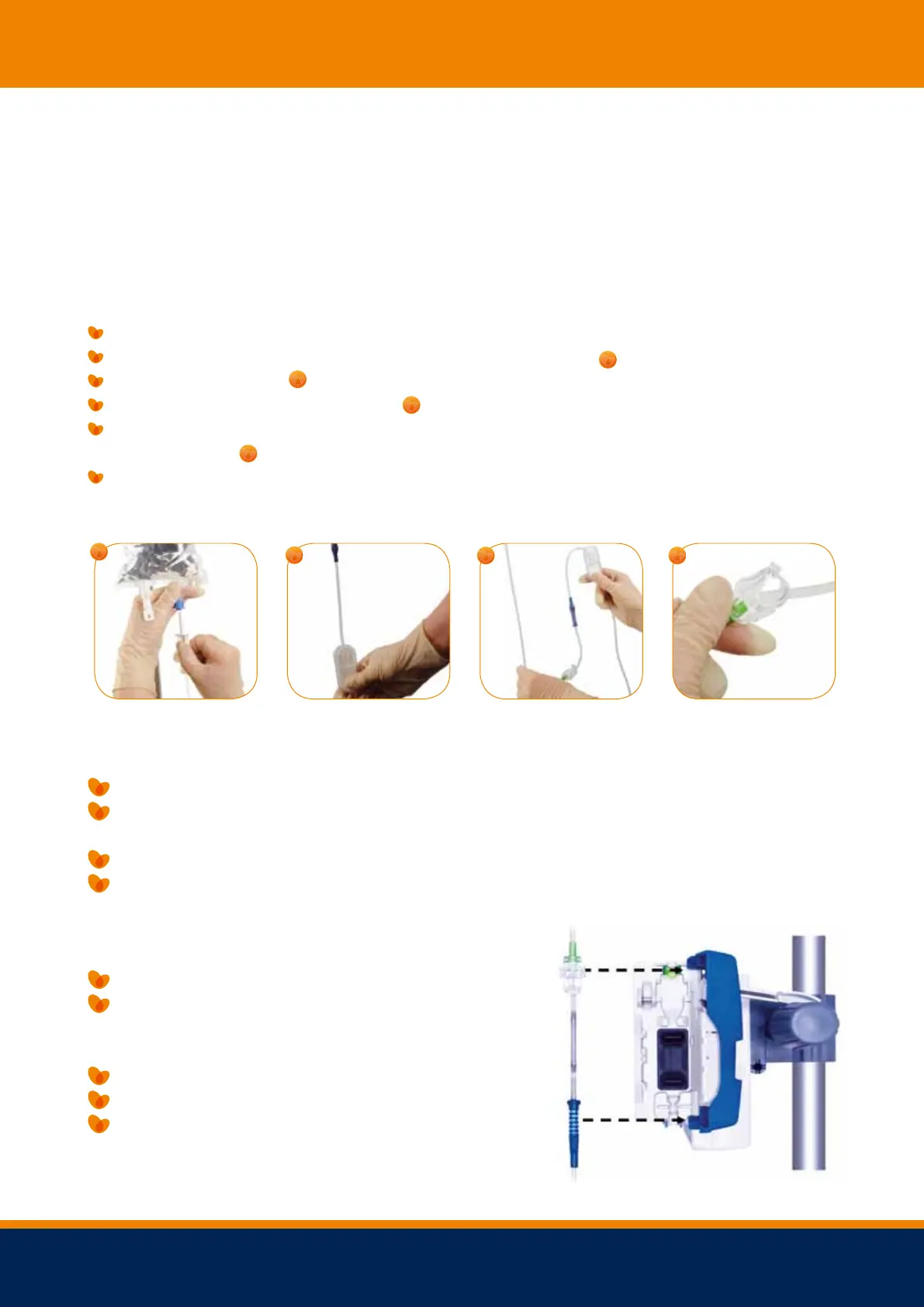
PRIMING THE SET MANUALLY:
You will need to prime your Ambix activ giving set slowly.
Close the Ambix activ clamp.
Spike your bag with the Ambix activ giving set and hang up.
Create an ‘S’ shape with the line.
Open the Ambix activ clamp to start priming the line. The blue cap on the end will prevent
Close the Ambix activ clamp when the line is fully primed. Remove the blue cap prior to
Open the door with the lever.
Match the green mark on the Ambix activ giving set to the green mark on the pump.
(Make sure the foot of the clamp is facing outwards).
Match the blue mark on the Ambix activ giving set to the blue mark on the pump.
Close the door and push the lever back into place.
Stop the pump, by pressing STOP/ ESC.
To turn off the pump, you need to press
ON/OFF for 3 seconds or more.
The pump will count down 3.2.1. off.
Remove the Ambix activ giving set.
Dispose of the set – follow the correct procedure.
Freephone 24 hour Advice Line 0 8 0 0 121 830 0



 To Next Page