Need help?
Do you have a question about the Caliber RMD 583DAB-BT and is the answer not in the manual?
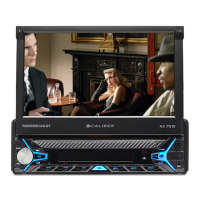
The Caliber RMD583DAB-BT is a car audio system designed for in-car entertainment and communication, featuring a 7-inch diagonal TFT LCD display with an 800x480 resolution. It supports various audio and video formats, including MP3, WAVE, WMA, AAC, FLAC, APE for audio, and MPEG1, MPEG2, MPEG4, AVI, MKV, QT, ASF, FLV, RMVB for video. Photo formats like JPEG, BMP, GIF, PNG, and TIFF are also compatible.
The device offers a wide range of functionalities accessible via its touchscreen and physical buttons. The main interface, or "Home screen," allows users to select different modes such as DAB+, Radio, USB, SD, Bluetooth, and AUX, as well as access Autolink, EQ, or SETTING menus.
Volume adjustment is done via the [VOL] knob (1). The audio menu, accessed by pushing the [SEL] button (1), allows for adjustment of BASS, TREBLE, BALANCE, and FADER. EQ presets, loudness, and subwoofer ON/OFF can also be configured.
The device supports day and night display modes. Tapping the "Sun" button on the top bar increases brightness, while subsequent taps reduce brightness for night mode or black out the screen entirely.
The [SETTING] icon on the main menu provides access to the setup menu, where users can adjust audio, date and time, language, and calibration settings.
The device supports FM1, FM2, and FM3 bands, with up to 6 presets storable per band. The radio seek function allows for automatic frequency searching by touching and holding the or buttons, or manual step-by-step adjustment by tapping. Preset stations can be saved by tuning to a desired station and holding a preset button (P1-P6) until a beep is heard. RDS functions (AF, TA, PTY) can be toggled ON/OFF via onscreen buttons.
For DAB radio, users can search for available stations using the SEARCH button. The LIST button (bottom left) displays a list of all available DAB stations. Previous or next DAB stations can be selected using the 7 or 8 buttons. Up to 18 DAB stations (DAB1-DAB2-DAB3) can be saved by pressing and holding an empty slot in the station list. The BACK or HOME button returns to the main user interface.
The device supports Bluetooth pairing with mobile phones. To pair, activate Bluetooth on your phone, search for "RMD583DAB-BT CALIBER," and enter the password "0000." A successful connection is indicated by a solid Bluetooth logo, while a flashing logo indicates a failed connection. The phone book can be downloaded by pressing the icon. A dial pad allows users to enter numbers and make calls using the [CALL] (green) button. The call list displays phonebook and call history. A2DP functionality is available, allowing control of mobile phone music playback via onscreen controls (if the device supports A2DP). Incoming calls can be answered by pushing the green horn, and ended or rejected by pushing the red horn.
The unit automatically starts playing content when a USB or SD card is inserted into the respective port. Audio playback is controlled via onscreen buttons. Image playback options are displayed by pushing the [SEL] button (9). The folder/file list, accessible by tapping the onscreen button, organizes files into audio, movies, and pictures.
This feature allows mirroring of a smartphone's audio and image onto the car audio system display. It requires connecting the smartphone to the car audio via a USB data cable. The Phone Link icon initiates the process, supporting both Android and iOS phones.
The device is designed for mobile 12V applications. It is crucial to operate it only when it is safe to do so, avoiding any functions that distract from driving. Volume should be kept at a level that allows external noises to be heard. Small objects like screws should be kept out of reach of children. The correct ampere rating must be used when replacing fuses. Vents and radiator panels should not be blocked to prevent overheating.
For cleaning, a soft, dry cloth is recommended. For more severe stains, the cloth can be dampened with water only; other substances may damage the paint or plastic. The operating temperature inside the vehicle should be between 0°C (32°F) and +45°C (113°F). In case of problems, users should not attempt to repair the unit themselves but return it to an authorized Caliber dealer or service center.
 General
| Brand | Caliber |
|---|---|
| Model | RMD 583DAB-BT |
| Category | Car Video System |
| Language | English |

 To Next Page