Button Operating Instructions
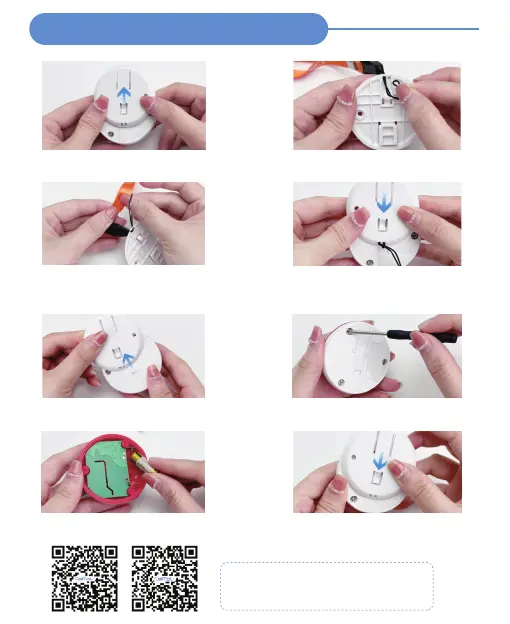
Attach Lanyard - E-01A
STEP 1
Slide the back cover according to the
direction of the arrow
STEP 2
Pin the lanyard
STEP 3
Slip the tip of the rope over the entire
lanyard
STEP 4
Slide the back cover back (to where it
was)
Replacing Battery - E-01A
STEP 1
Slide the back cover according to the
direction of the arrow
STEP 2
Open the button base by turning the
screw with a screwdriver
STEP 3
Replace the 23A 12V AIkaline battery
STEP 4
Close the button base, retighten the
screws, and close the back cover
Video Guide
Button -Operating Instructions (E-01A)
Low battery alert - red light flashes



 To Next Page