Button Operating Instructions
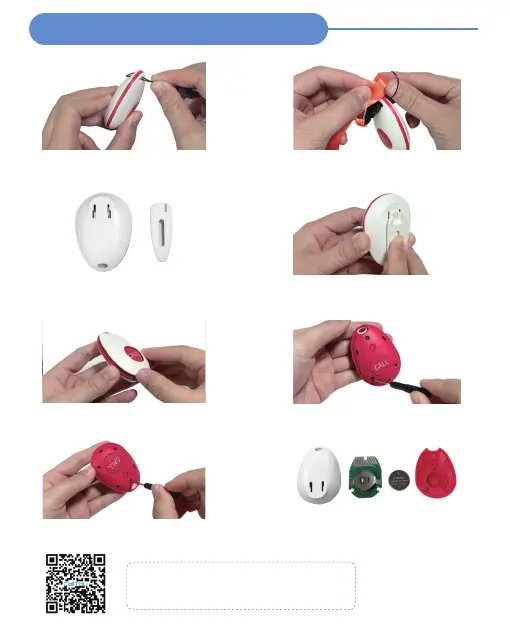
Attach Lanyard --- BT007WH
STEP 1
Pin the lanyard
STEP 2
Slip the tip of the rope over the entire
lanyard
STEP 1
Removable back clip
STEP 2
Place the back clip in the hole on the
back cover and push up to use
Replace Battery--- BT007WH
STEP 1
Open the outer white plastic cover
STEP 2
Use a screwdriver to unscrew the red
plastic cover inside
STEP 3
Use a screwdriver to unscrew the red
silicone cover inside
STEP 4
Replace the 3V CR2450 Coin Battery
Video Guide
Button -Operating Instructions (BT007WH)
Low battery alert - red light flashes
Backclip Instructions --- BT007WH



 To Next Page