This document outlines the features and operating instructions for the CallToU Caregiver Pager System, designed to provide a reliable help signal for individuals in need of care. The system comprises various receiver and transmitter models, offering flexibility for different caregiving scenarios.
Function Description
The CallToU Caregiver Pager System is a home caregiver pager solution aimed at enhancing the quality of long-term care and enabling loved ones to maintain independence and dignity. It allows users to send a help signal to their family or caregivers anywhere within the home, ensuring timely assistance. The system is designed to be user-friendly, providing peace of mind for both caregivers and care recipients.
Usage Features
The system offers a range of receiver and transmitter options to suit diverse needs:
Receiver Models:
- Portable Battery Receiver (VP02): This receiver is designed for portability, featuring a back clip for easy attachment. It operates on 2 AAA batteries (included) and offers 15 selectable ringtones. Users can choose between vibration and ringtone alert modes. It includes a low battery reminder (audio reminder) and 5 adjustable volume levels (0dB - 110dB). A STOP button allows users to halt the receiver's calling. The VP02 has memory function, retaining the set ringtone even after power off.
- Plug-in Receiver (CC11WH): This receiver is a plug-in unit that simply connects to any standard socket. It features a high-quality audio speaker and an LED light melody indicator. It offers 55 selectable ringtones and 5 adjustable volume levels (0dB - 110dB). Like the portable receiver, it has memory function, ensuring the set ringtone remains unchanged after power off. It includes backward and forward buttons for ringtone selection and a volume control button.
Transmitter Models:
- Wearable Button (BT007WH): This is a wearable call button with a detachable lanyard, making it easy to carry. It features a red light indicator that illuminates after pressing, confirming the signal has been sent. It has a silicone cover and includes a low battery reminder and IP55 water repellency.
- Wearable Button (E-01A): Similar to the BT007WH, this wearable button also comes with a detachable lanyard and a red light indicator upon pressing. It has a silicone cover and a detachable bracket for wall-mounting. It also includes a low battery reminder and IP55 water repellency.
- Stickable Button (DB19WH): This button is designed to be stickable to surfaces, coming with stickers for wall attachment. It features a light indicator after pressing and a silicone cover. It is IP55 water repellent.
General System Features:
- Extensibility: Both receiver models are extendable, meaning they can be paired with more receivers and call buttons from the CallToU range, allowing for a customized and comprehensive care system. One transmitter can be paired with up to 20 receivers, and one receiver can be paired with up to 55 transmitters.
- Coverage Range: All models offer a 500-foot coverage range, ensuring signals can be transmitted effectively across most homes.
- Pre-paired at Factory: The devices are pre-paired at the factory, allowing for immediate use upon receipt without the need for initial coding.
- Pairing Process: If users wish to change the default ringtone or add new units, a simple pairing process is available. For the Plug-in Receiver (CC11WH), users select a desired ringtone using the backward/forward buttons, then press the volume button until a "Ding" is heard. A short press of the call button initiates pairing ("Ding-ding"), and a second press confirms successful pairing. For the Portable Battery Receiver (VP02), users turn on the receiver, select desired settings (chimes, volume, vibration), then long-press the [Setting & Volume] button until "DI" is heard to enter pairing mode. A short press of the call button ("Di Di") initiates pairing, and a second press confirms success.
- Low Battery Reminder: The wearable buttons (BT007WH, E-01A) and the portable receiver (VP02) include a low battery reminder, typically indicated by a red light flashing or an audio reminder, to ensure timely battery replacement.
- Water Repellency: The BT007WH, E-01A, and DB19WH transmitters are IP55 water repellent, making them suitable for environments where splashes might occur, though wearing them in the shower is not recommended.
Maintenance Features
- Battery Replacement:
- E-01A: To replace the 12V Alkaline battery, slide off the back cover, pin the lanyard, slip the rope tip over the lanyard, and then slide the back cover back. To access the battery, open the button base by turning a screw with a screwdriver, replace the battery, then close the button base, retighten screws, and close the back cover.
- BT007WH: To replace the 3V CR2450 Coin Battery, open the outer white plastic cover, then use a screwdriver to unscrew the red plastic cover inside, and finally use a screwdriver to unscrew the red silicone cover inside to access and replace the battery.
- DB19WH: To replace the 23A 12V Alkaline battery, use a tool to lift the plastic shell, take off the silicone cover, replace the battery, and then press the back cover to complete the replacement.
- VP02: The portable receiver operates on 2 AAA batteries.
- Clearing Settings: To clear all previous settings and return transmitters to default, users can press and hold the "Forward" button (CC11WH) or "Music Selection" button (VP02) on the receiver for 5 seconds until a "Ding" or "Di" is heard, and the indicator flashes. This clears all paired transmitters and allows the receiver to enter pairing mode automatically for re-pairing.
- Troubleshooting: The manual provides guidance for common issues, such as the AC receiver not working (checking battery, polarity, power, interference, and obstructions) and the receiver not ringing (checking power, pairing, and working range).
- Precautions: Important precautions include testing the working distance before installation, avoiding installation of transmitters on metal doors, keeping receivers away from strong electromagnetic sources (TVs, induction cookers, microwave ovens), preventing exposure to water or fire, and removing batteries during long periods of inactivity to prevent damage.

 Need help?
 General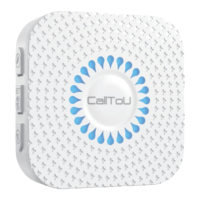

 To Next Page