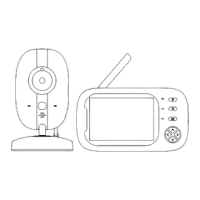
The display unit
doesn't turn on
Refer to "Turn Display Unit On and Off" on page 7
The camera doesn't
pan n tilt
Long press the up/down/left/right touch buttons to
adjust the camera's view angle. Refer to page 7 for
detailed instructions.
Restart the display unit, and pull out the antenna.
Test the signal in another location.
Keep it away from other 2.4GHz products, like
WIFI Routers, Microwave ovens and other baby
monitors, which may interfere with the
connection.
Re-pairing, follow the Operations guide to Delete
the camera and add it back on page 10.
Check the volume settings on the monitor, making
sure it is not on mute.
Image is in black and
white?
Night Vision makes picture appears as black and
white, when the light sensor detects enough light, it
will switch back to full colour.
Can't connect to the
WIFI?
This model doesn't connect to WIFI. The image only
runs on the display unit.
The product doesn't
charge or takes too
long?
Confirm the power point in working order.
Make sure to use the provided charger.
There's no video on
the display unit?
Confirm the camera has been connected to
power, and the power indicator is on.
Follow the troubleshooting guide to re-pair the
camera with the display unit.



 To Next Page