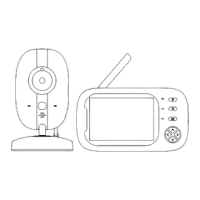
The CALMPER BM200S is a baby monitor designed to help parents keep an eye on their baby. It consists of two main units: a display unit (monitor) and a camera unit. The system operates wirelessly, providing video and audio monitoring of the baby's room.
Function Description:
The primary function of the CALMPER BM200S is to provide real-time audio and video surveillance of a baby. The camera unit is placed in the baby's room, and it transmits footage to the portable display unit, allowing parents to monitor their child from another room. The system includes features such as night vision for clear viewing in low-light conditions, a lullaby player to soothe the baby, and a two-way intercom function for communication. It also monitors the room temperature and alerts parents to potential issues like high/low temperatures, poor signal, or low battery. The device is designed for indoor use only and is not waterproof.
Usage Features:
Display Unit (Monitor):
The display unit is the parent-facing component, featuring a screen and various control buttons.
- Power On/Off: To turn the display unit on or off, long-press the Power Button located at the top.
- Menu Navigation: The Home Touch Button brings up the menu at the bottom of the display. Directional Touch Buttons (up, down, left, right) are used to navigate through menu options, and the OK Touch Button confirms selections.
- Volume Control: Users can adjust the volume levels (6 levels available) through the menu.
- Brightness Adjustment: The screen brightness can be adjusted via the menu to suit different lighting environments.
- VOX Mode (Voice Operated Exchange): This mode allows the display unit to automatically turn off its screen and audio after 30 seconds to save power. It will reactivate when a sound louder than a configured threshold is detected in the baby's room. VOX sensitivity can be set to High, Medium, or Low.
- Audio Only Mode: It's possible to turn off the display while keeping the audio active, allowing parents to listen to their baby without the screen being on.
- Intercom Mode: By pressing and holding the Microphone button on the display unit, parents can speak to their baby through the camera unit, providing comfort or instructions. Sound from the baby's room will not be heard during intercom mode until the button is released.
- Zoom In/Out: The display unit offers a zoom function (x1 or x10) to get a closer look at the baby.
- Lullaby Player: The monitor can play a selection of lullabies to help soothe the baby to sleep. Users can select and play desired lullabies from the menu.
- Feeding Reminder: Parents can set feeding reminders (0:30, 1:00, 2:00, 3:00, 4:00) through the menu, which will trigger an alert on the display unit.
- System Time Setting: The system time can be set and is displayed on the top status dock.
- Temperature Unit Setting and Alarm: The temperature unit can be set to Celsius or Fahrenheit, and an alarm can be configured to alert parents if the room temperature goes outside a safe range.
- Camera Selection: If multiple cameras are paired, the display unit allows switching between them or setting up an automatic switch between cameras.
- Button Click Sound: The click sound for button presses can be turned on or off by long-pressing the Home Touch Button for 5 seconds.
- Battery Levels: The display unit shows the current battery level, and a "LOW BATTERY" alert will appear when recharging is needed.
- Signal Alert: The monitor provides a signal alert when the connection to the camera is lost for 5 seconds, accompanied by a beeping sound and a flashing icon.
- Video Recording: The display unit supports video recording onto a microSD card inserted into the camera unit. Recording can be initiated and stopped from the display unit. Recorded videos can be played back on a computer using a card reader.
Camera Unit:
The camera unit is placed in the baby's room and captures the video and audio.
- IR Light Sensor: Enables night vision for clear images in the dark.
- MicroSD Card Slot: Allows for the insertion of a compatible microSD card for video recording.
- Pairing Button: Used to pair the camera unit with the display unit.
- Pan-n-Tilt: The camera's angle can be adjusted remotely from the display unit by pressing and holding the directional touch buttons. This allows for horizontal (355°) and vertical (120°) movement.
- Thermometer: Measures the room temperature and displays it on the monitor.
- Adding/Deleting Cameras: The system supports adding multiple camera units. New cameras are paired by selecting an available slot on the display unit and then double-clicking the pairing key on the camera. Cameras can also be deleted from the system through the display unit's menu.
Maintenance Features:
- Charging: Both the display unit and camera unit require charging. Users should only use the provided charging cables and ensure the power points are in working order. The charging indicator turns green when fully charged.
- Cleaning: Only a dry microfiber cleaning cloth should be used on the camera lens.
- Regular Checks: It is recommended to check the product condition and safety initially and on a regular basis. Reception should also be checked regularly, especially after relocating the camera.
- Ventilation: Allow 10cm of air space around the product for proper ventilation.
- Interference Avoidance: To avoid interference, the monitor should be kept at least 1 meter (3 feet) away from other 2.4GHz products like wireless routers, microwaves, cell phones, and other baby monitors.
- Feedback Prevention: Keep the monitor at least 1 meter (3 feet) apart from the camera to avoid feedback sound.
- Troubleshooting: The manual provides guidance for common issues such as the display unit not turning on, camera pan-n-tilt not working, weak or no signal, no sound, black and white image, charging problems, and no video. Solutions often involve restarting units, checking connections, re-pairing, or adjusting settings.
- Battery Care: The product contains a lithium-ion battery and should be handled with care. It should be kept away from heat sources, not exposed to high temperatures, and not punctured or disassembled. Proper disposal and recycling should be followed.
- Safety: The device is not a toy and should be kept out of reach of children under 3 years old due to choking hazards from small parts and strangulation hazards from cords. Assembly should be done by adults only. The product should not be placed near heat sources. Unplug during lightning storms.

 Need help?
 General

 To Next Page