This document is a user manual for the CALMPER BM600 Baby Monitor, a device designed to help parents monitor their baby. The system consists of a display unit (monitor) and a camera unit, facilitating audio and video surveillance of a child.
Function Description:
The CALMPER BM600 Baby Monitor provides real-time monitoring of a baby, offering both visual and auditory feedback to the parent. The camera unit captures video and audio from the baby's room, transmitting it wirelessly to the display unit. Key functions include:
- Video Monitoring: The camera provides a live video feed, which can be viewed on the display unit's 3.5-inch IPS color screen.
- Audio Monitoring: The system transmits audio from the baby's room, allowing parents to hear their child.
- Two-Way Talk (Intercom Mode): The display unit features a microphone and a talk button, enabling parents to speak to their baby remotely through the camera's speaker.
- Night Vision: The camera is equipped with infrared lights and an IR light sensor, allowing for clear video monitoring in low-light or dark conditions. The display unit will show a black and white image in night vision mode, switching to full color when sufficient light is detected.
- Temperature Monitoring: The camera unit includes a thermometer that measures the room temperature, which is displayed on the monitor. Parents can set temperature alarms to be notified if the room temperature falls outside a desired range (20°C ~ 30°C).
- Lullaby Player: The system can play pre-programmed lullabies through the camera's speaker to soothe the baby.
- Feeding Reminder: Parents can set reminders for feeding times, with options for 0:30, 1:00, 2:00, 3:00, and 4:00 hour intervals.
- VOX Mode (Voice Operated Exchange): This mode allows the display unit to automatically turn on its screen and audio when a sound louder than a configured threshold is detected in the baby's room. The video and audio will turn off after 30 seconds of silence, conserving battery. VOX sensitivity can be set to High, Medium, or Low.
- Zoom Function: The display unit allows users to zoom in on the camera's view (x10 magnification).
- Signal Alert: The system provides an alert (beeping sound and flashing icon) if the signal between the camera and monitor is lost for 5 seconds.
- Battery Alert: The display unit alerts the user with a beeping sound and an on-screen message ("LOW BATTERY") when its battery level is low and requires recharging.
- Video Recording: The camera unit supports microSD card insertion for local video recording. Users can start and stop recording from the display unit. Recorded videos can be played back on a computer using a card reader.
- Multi-Camera Support: The system can connect to and switch between multiple camera units, allowing monitoring of different rooms or angles.
Usage Features:
The baby monitor is designed for ease of use with intuitive controls and a clear display.
- Quick Setup: To set up, the camera is connected to a power source, and the display unit is charged. The display unit is then turned on, and the connection is automatically established, showing the live feed.
- Display Unit Controls: The display unit features several buttons for navigation and control:
- Menu Button: Accesses the main menu for settings and operations.
- OK Button: Confirms selections and actions.
- Navigation Buttons (Up/Down/Left/Right): Used to navigate through menu options, adjust volume, and brightness.
- Talk Button: Activates the two-way talk function.
- Power On/Off Button: Turns the display unit on or off.
- Power Charging Indicator: Shows the charging status.
- Reset Key: Used to reset the device if needed.
- Camera Unit Controls: The camera unit has a pairing button for connecting to the display unit and a microSD card slot for recording.
- Adjusting View Angle: The camera's position can be manually adjusted to achieve the desired viewing angle.
- Volume and Brightness Adjustment: Volume levels (6 levels) and screen brightness can be easily adjusted using the navigation buttons on the display unit.
- System Time Setting: The display unit allows users to set the system time.
- Temperature Unit Selection: Users can switch between Celsius (°C) and Fahrenheit (°F) for temperature display.
- Camera Switching: If multiple cameras are paired, users can manually switch between them or set the system to automatically cycle through the camera feeds.
- Button Click Sound: The display unit provides an option to turn on or off the sound feedback for button presses.
- Interference Avoidance: To ensure optimal performance, it is recommended to keep the baby monitor at least 1 meter (3 feet) away from other 2.4GHz electronic devices such as wireless routers, microwaves, and other baby monitors.
- Feedback Prevention: The monitor should be kept at least 1 meter (3 feet) away from the camera to prevent feedback sounds.
Maintenance Features:
The manual provides guidelines for maintaining the device and ensuring its longevity and safe operation.
- Cleaning: Only a dry microfiber cleaning cloth should be used on the camera lens.
- Power Source: Only the provided chargers should be used for both the camera and display units.
- Storage: If the monitor and camera are unused for long periods, they should be disconnected from power.
- Ventilation: Allow 10cm of air space around the product for proper ventilation.
- Regular Checks: Users are advised to check the product's condition and safety at initial installation and on a regular basis. Reception should also be checked regularly, especially after relocating the camera.
- Troubleshooting: The manual includes a "Questions & Answers" section to help users resolve common issues such as the display unit not turning on, weak signal, no sound, black and white image, charging problems, and no video.
- Warranty and Customer Service: CALMPER offers a 12-month warranty covering defects in material and workmanship. The manual provides contact information for customer support and warranty registration.

 Need help?
 General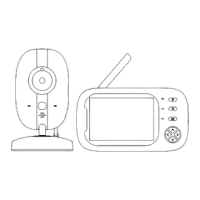

 To Next Page
