Cambridge Engineering, Inc. 42 S-Series Technical Manual
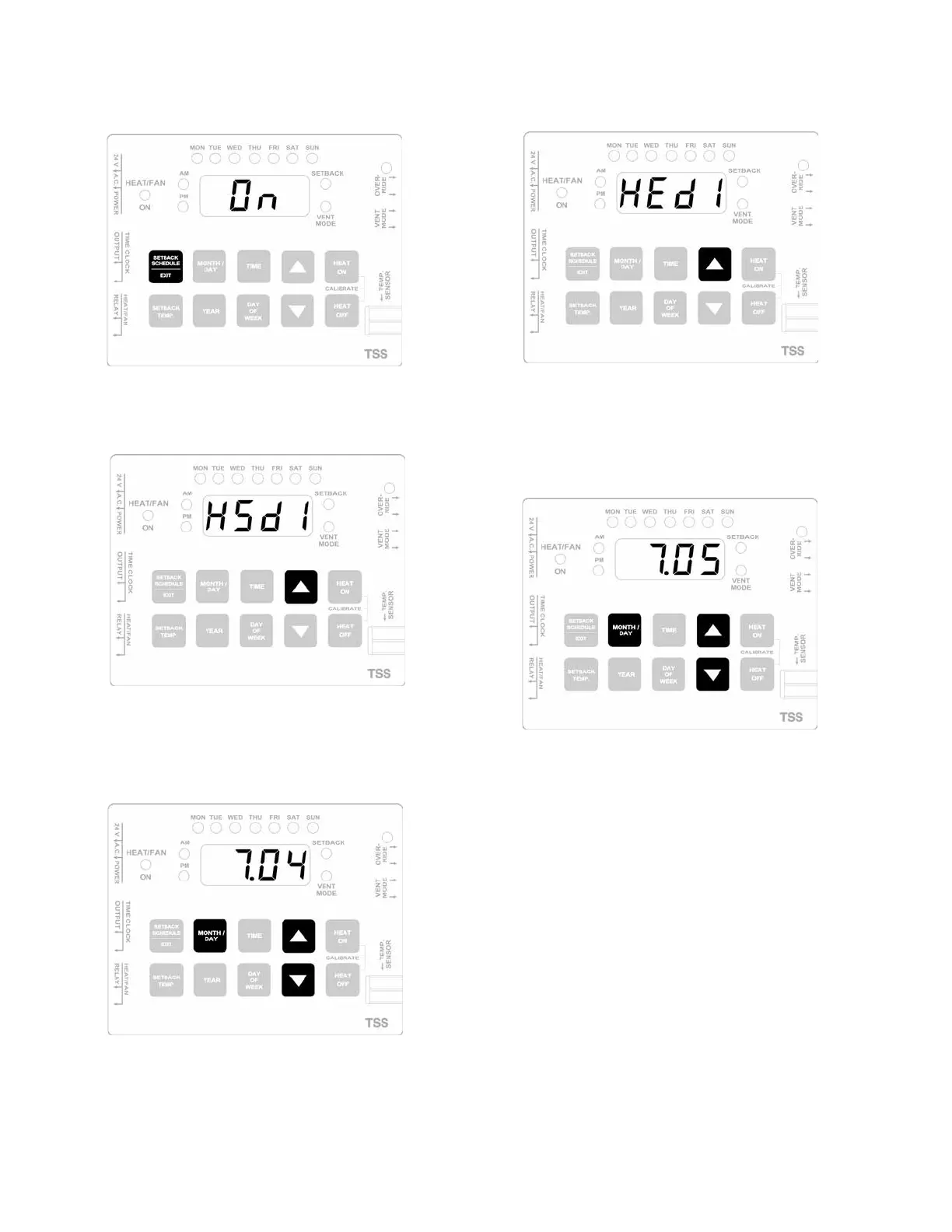
1. Press the SETBACK SCHEDULE/EXIT button to enter
the scheduling program at the first ON cycle.
2. Press the UP button repeatedly to step to the first holi-
day start date (HSd1).
3. Press and hold. the MONTH/DAY button while press-
ing the
UP or the DOWN button to scroll to the
desired holiday start date.
4. Press the UP button once to step to the first holiday
end date cycle (HEd1).
5. Press and hold the MONTH/DAY button while pressing
the UP or the DOWN button to scroll to the desired
holiday end date. (NOTE: Holiday end date must be at
least one day after holiday start date).
6. Repeat steps 2-5 until all required holiday cycles have
been entered.
7. Press the SETBACK SCHEDULE/EXIT button to exit
the scheduling program.



 To Next Page