8
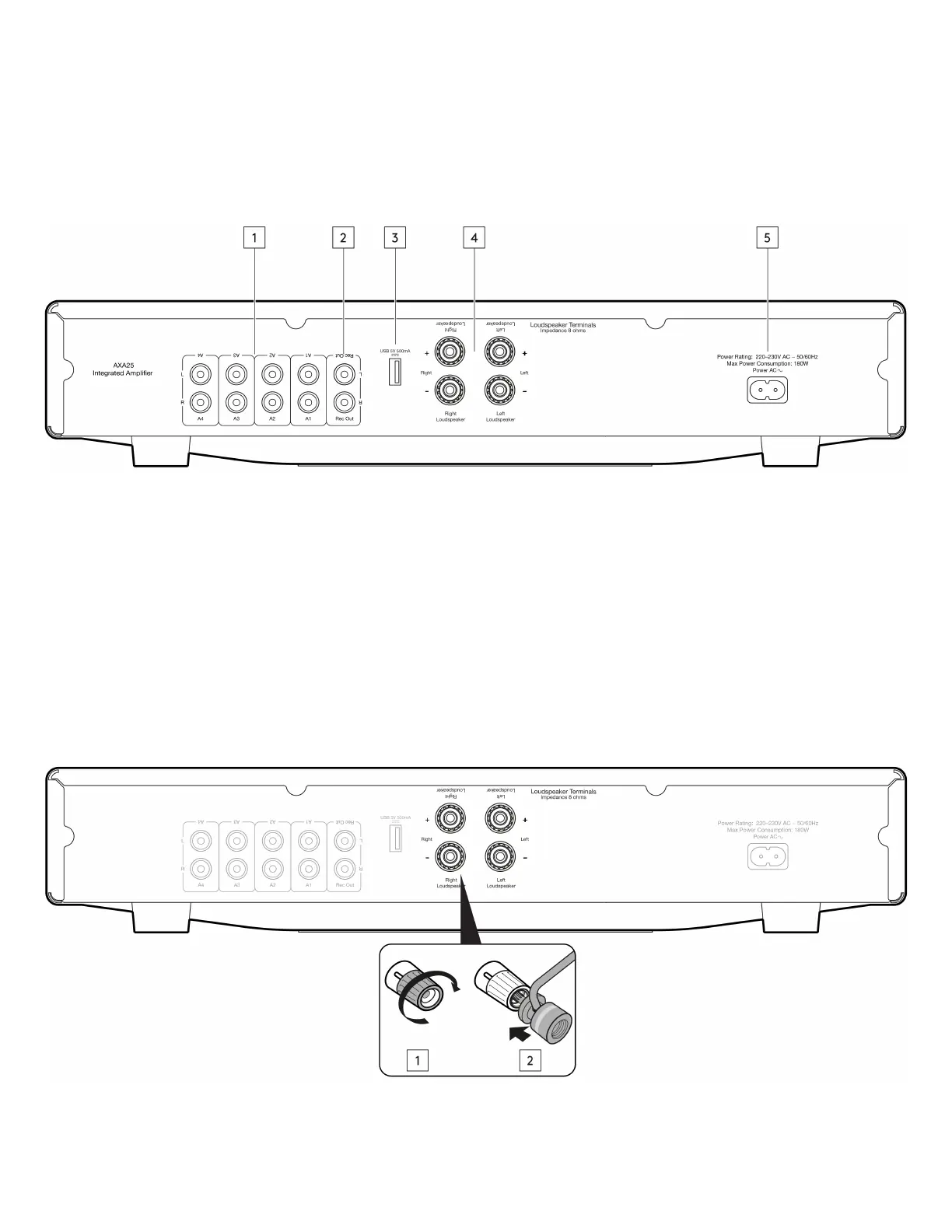
Rear panel connections
Last updated: July 29, 2022 10:23. Revision #5417
1. Audio inputs (A1-A4) - These inputs are suitable for any ‘line level’ source equipment such as the audio outputs of CD players, streaming devices
such as a Chromecast Audio (RCA Phono to jack cable required) etc.
2. Rec out - Connect to the recording input of a CD recorder, tape deck or other compatible recording device etc.
This output provides a constant high level output that does not fluctuate with the volume, balance or tone controls of the main unit. For this reason, the
AXA25 cannot be used as a Preamplifier only or with a subwoofer.
3. USB power 5V 500mA - This USB connection is designed to charge a device, such as a smartphone. The charging device needs to require 5V DC to
be able to be charged.
Note: This is not an input so will not allow you to play audio directly to the unit.
Note: Do not use this port for charging a device and using it as a source at the same time, as this will create a ground loop that will cause interference
during playback.
4. Loudspeaker terminals - Note: When using a banana plug, make sure the speaker terminals are completely tightened before inserting the plug.


 To Next Page