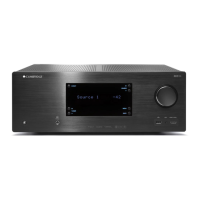
Need help?
Do you have a question about the CAMBRIDGE CXR200 and is the answer not in the manual?
Read and follow all numbered safety instructions to prevent hazards.
Understanding symbols like CE, WEEE, FCC, and C-Tick for regulatory information.
Ensuring adequate airflow and selecting an optimal location for the unit.
Information on power sources, avoiding overloading, and proper cleaning procedures.
Details on product warranty, service, and battery disposal.
Controls for unit power, Zone 2 functionality, and the status display.
Buttons for selecting sources, adjusting volume, and navigating menus.
Inputs for headphones, USB, MP3, HDMI, and MHL devices on the front panel.
Connections for aerials, analogue/digital audio, HDMI, and speaker outputs.
Ports for Ethernet, IR control, trigger outputs, RS232C, and AC power.
Controls for powering on/off, source selection, menu navigation, and information display.
Buttons for volume, bass/treble, lip sync, playback, and mode selection.
Functions for storing/recalling presets, controlling Zone 2, and trigger outputs.
Instructions for connecting front, center, surround, and subwoofer speakers to terminals.
Wiring guides for CD players, BD/DVD players, and audio recorders via RCA cables.
Diagrams for connecting BD/DVD players, CD players, and iPod docks using digital interfaces.
Wiring instructions for connecting a DVD-A SACD player for 5.1 or 7.1 direct input.
Connecting Blu-ray players and set-top boxes via HDMI for optimal audio/video.
Details 4K resolution support and notes limitations for HDMI/MHL inputs.
Instructions for connecting aerials and operating the built-in FM/AM tuner.
How to choose input sources, listening modes, and explains Dolby/DTS technologies.
Explains Dolby Digital, EX, Pro Logic II/IIx/IIz, and DTS, DTS-ES, DTS-HD formats.
Overview of Stereo, Direct, and All Channels digital signal processing modes.
Instructions for speaker layout, auto setup, and manual configuration.
Step-by-step guide for manually configuring speaker size, distance, level, and crossover.
Adjusting speaker levels for balance and setting crossover frequencies for optimal sound.
Setting measurement units and configuring source inputs and custom names.
Configuring video scaling, audio input types, and analog audio processing.
Adjusting Bass, Treble, Dolby volume, and calibration offsets for optimal sound.
Selecting stereo and multichannel processing modes, and adjusting lip sync for video.
Controlling Zone 2 power, source, volume, and configuring line level/speaker outputs.
Requirements for network connection and guides for wired and wireless setups.
Scanning for networks, entering passwords, and handling connection retries.
Adjusting OSD language, auto power off, dimming, eco mode, and tuner steps.
Enabling TV ARC and configuring CEC control for power and display information.
Mute levels, analogue REC out, front IR, main power volume, and Dolby DRC.
Settings for Panorama mode, Centre Width, Dimension, and Height Gain.
Electronically repositioning speakers to match studio layouts for DTS-HD tracks.
Configuration options for trigger outputs, including manual select, standby, and source linking.
Obtaining software version numbers and updating the CXR via USB.
Saving current settings, loading saved settings, and performing a factory reset.
Using the web interface for setup and connecting the CXR to a wired network.
Steps for connecting the CXR wirelessly using the supplied antenna.
 General
| Channels | 7.2 |
|---|---|
| Dolby Atmos | Yes |
| DTS:X | Yes |
| Power Output | 200W per channel (6 ohms, 1kHz, THD 1%, 1ch driven) |
| HDMI Outputs | 2 |
| Streaming Services | Spotify Connect, AirPlay |
| Power Output (RMS) | 200W per channel (6 ohms, 1kHz, THD 1%, 1ch driven) |
| Audio Inputs | Optical, Coaxial, Analog RCA |
| Audio Outputs | Pre-out, Headphone |
| Video Outputs | 2 x HDMI |

 To Next Page