Need help?
Do you have a question about the CAMBRIDGE EVO CD and is the answer not in the manual?
Details the process of playing a disc, including loading and playback.
Explains how to navigate between tracks on a CD during playback.
How to find specific tracks on a CD when playback is paused or stopped.
Information on repeating entire discs or individual tracks and playing tracks in random order.
Step-by-step guide to resolve power-related problems.
Solutions for when the player fails to read the inserted disc.
Troubleshooting steps to fix issues with audio not being heard.
Explains why CD artwork and track information may not appear.
Addresses common causes and solutions for disc skipping.
Guidance on how to eliminate unwanted humming from speakers.
Steps to diagnose and fix issues with the remote control.
Clarifies compatibility of the EVO CD with other amplifiers and devices.
Details on which connection cable is recommended for the EVO CD.
Explains reasons why CD artwork and track information might not display.
Addresses potential cosmetic differences in wooden side panels.
Lists the types of discs that the EVO CD can play.
Instructions on how to check and update the EVO CD's firmware.
Confirms whether the EVO CD supports gapless playback.
Explains how volume is controlled for the EVO CD.
Confirms the EVO CD's capability to play MQA CDs.
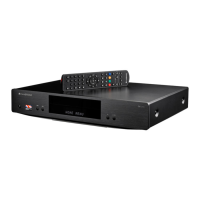
The EVO CD is a compact disc transport designed to seamlessly integrate with Cambridge Audio's EVO 75/150 all-in-one music systems. It serves as a dedicated CD player, allowing users to enjoy their physical CD collections with the high-fidelity audio experience offered by the EVO system. The device itself is a sleek, minimalist unit, featuring a disc tray and an open/close button on its front panel for disc loading and unloading. Its design emphasizes simplicity and direct functionality, acting as a specialized component within a larger audio ecosystem.
The primary function of the EVO CD is to read and transport data from compact discs to a connected EVO 75/150 unit for audio processing and playback. It is not a standalone player and requires an EVO 75/150 to operate, as it relies on the EVO 75/150 for power, control, and audio output. The EVO CD is specifically designed to play standard Compact Discs (CD-DA), recordable CDs (CD-R), and re-writable CDs (CD-RW), provided these discs contain properly recorded Table of Contents (TOC) information. It also supports gapless playback, ensuring a smooth listening experience for albums where tracks are meant to flow continuously without interruption. Notably, the EVO CD is capable of playing MQA CDs, offering enhanced audio quality for compatible discs when paired with the EVO 75/150. However, it does not support SACD, MP3, or WMA discs, although it can play the CD layer of hybrid SACDs. The unit itself does not have its own volume control; all volume adjustments are managed through the connected EVO 75/150.
Connecting the EVO CD to an EVO 75/150 is straightforward, utilizing a dedicated connection cable supplied with the unit. This cable ensures proper communication and power delivery between the two devices. Once connected, the EVO 75/150 needs to be powered on, and the 'CD' source selected for the EVO CD to function. It's crucial that the EVO 75/150 is running the latest firmware (Service Pack version v132-b-004 or later) to ensure compatibility and optimal performance with the EVO CD.
Loading a disc involves pressing the "Open/Close" button on the EVO CD's front panel or the remote control to open the disc tray. Discs should be carefully placed into the tray with the label side facing upwards. Pressing the "Open/Close" button again closes the tray, after which the EVO CD will read the disc, and the EVO 75/150 will display the content information. Playback is initiated via the Play button on the EVO 75/150's front panel, its remote control, or the StreamMagic app. The remote control, which is supplied with the EVO 75/150 (as the EVO CD does not include one), offers comprehensive control over playback, including play, pause, stop, and track skipping. The 'Eject CD' button on the remote specifically controls the EVO CD's disc tray.
For navigating tracks, a short press of the forward 'Skip/Scan' button on the EVO 75/150 (front panel, remote, or StreamMagic app) advances to the next track, while the reverse 'Skip/Scan' button returns to the beginning of the previous track. These controls also work when playback is stopped, allowing users to select a specific track before starting playback. The StreamMagic app provides additional functions for repeating discs and tracks, as well as playing tracks in random order, expanding the user's control over their listening experience.
A unique feature of the EVO CD, in conjunction with the EVO 75/150, is its ability to display album artwork and track information. This functionality relies on the 'Music Brainz' music database. If a CD's artwork or data isn't displayed, it's likely because the album or release isn't in the Music Brainz database. Users have the option to contribute to this database by creating an account and adding missing album or track information, thereby enriching the experience for themselves and others.
The EVO CD is designed for minimal user maintenance, focusing on careful handling and proper environmental conditions. Users are advised to only place compact discs into the disc tray to prevent damage to the mechanism. Forcing the disc tray by hand during opening or closing should be avoided. To protect the internal mechanism from dirt and dust, it's recommended to keep the disc tray closed when not in use.
Disc care is also important; badly scratched or dirty discs may prevent the player from reading or playing them correctly. Users should never attempt to load multiple discs into the tray simultaneously. For optimal playback and to prevent skipping, the player should be placed on a firm surface, free from vibrations.
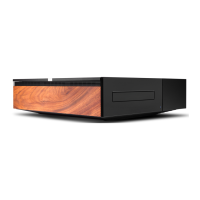
The EVO CD features replaceable magnetic side panels, allowing for aesthetic customization. When installing new panels, it's important to align the groove cuts with the direction of the front panel and insert them from the rear. A cautionary note is provided regarding the magnets, which can snap hard and potentially pinch fingers if not handled correctly.
Firmware updates for the EVO CD are automatically managed through the connected EVO 75/150. As long as the EVO CD is connected, its firmware will sync with that of the EVO 75/150, ensuring both devices are always up-to-date. This eliminates the need for separate firmware management for the CD transport.
Troubleshooting guidance is provided for common issues such as no power, disc reading errors, no sound, missing album artwork, disc skipping, hum from speakers, and remote control malfunction. These tips often involve checking cable connections, power supply, disc condition, firmware versions, and ensuring the EVO 75/150 is correctly configured and not in mute mode. The EVO CD does not have an IR sensor itself; remote control signals are received by the EVO 75/150, which then relays commands to the EVO CD. Therefore, ensuring a clear line of sight to the EVO 75/150 is important for remote functionality.
 General
| Compatibility | CD, CD-R, CD-RW |
|---|---|
| DAC | ESS Sabre ES9018K2M |
| THD @ 1kHz 0dBFs | <0.002% |
| Standby Power Consumption | <0.5W |
| Digital Outputs | S/PDIF Coaxial, TOSLINK Optical |
| Analog Output | RCA |
| Frequency Response | 20Hz - 20kHz |
| Dimensions | 317 x 89 x 352mm |

 To Next Page