Need help?
Do you have a question about the CAMBRIDGE AXC35 and is the answer not in the manual?
Covers essential safety guidelines for using the apparatus, including handling and environmental factors.
Step-by-step guide for inserting and removing compact discs.
How to play standard CDs, including track skipping and pausing.
Solutions for no power, player not reading discs, and disc skipping problems.
Addresses no sound, hum from speakers, and remote control malfunctions.
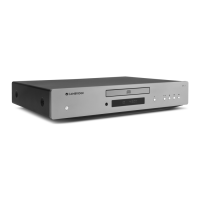
The Cambridge Audio AXC35 and AXC25 are compact disc players designed to deliver high-quality audio playback. These units are part of Cambridge Audio's commitment to "Great British Sound," a legacy maintained since 1968. The devices are intended for use in a home audio setup, connecting to an amplifier for sound output.
The primary function of the AXC35 and AXC25 is to play compact discs, including standard audio CDs, CD-R, and CD-RW discs. The AXC35 model also features an S/P DIF Co-axial Digital Output, allowing it to connect to a separate Digital-to-Analog Converter (DAC) or digital recording machine for enhanced audio flexibility and quality. Both models provide a Line Output for connecting to any line-level input on an amplifier, with Cambridge Audio recommending their own amplifiers for optimal performance.
The disc player reads the Table of Contents (TOC) information from an inserted disc, displaying the number of tracks and the total length of the CD on its alpha-numeric display. Users can play, pause, stop, skip, and scan through tracks. The units support normal playback, as well as programmed playback, allowing users to create a custom sequence of up to 20 tracks. Additionally, the players offer "Random" playback, which shuffles the order of tracks, and "Repeat" functions, enabling continuous playback of a single track or the entire disc. The "Remain" function allows users to view the time remaining for the current track or the entire disc.
The AXC35 and AXC25 are designed for straightforward operation. The front panel features a Power button to switch the unit between On and a low-power eco-friendly Standby mode. An Auto Power Down (APD) feature is enabled by default, automatically switching the unit to Standby after 20 minutes of inactivity. This APD setting can be enabled or disabled by pressing and holding the Power button until the LED flashes a specific sequence.
Disc loading and unloading are managed via an Open/Close button on the front panel, which controls the disc tray. Users simply place a disc with the label side facing up. The unit includes an Infrared Sensor to receive commands from the supplied remote control, requiring an unobstructed line of sight.
The remote control provides comprehensive control over the disc player's functions. It includes numerical buttons for direct track selection, dedicated buttons for Play/Pause, Stop, Skip, and Scan. The remote also features buttons for Random, Repeat, and Remain functions, mirroring the unit's playback options. For users with a Cambridge Audio AXA35 amplifier, the remote offers additional controls for volume, bass, treble, balance, and source selection (CD, BD/DVD, MP3/AUX, TUNER, PHONO), as well as a mute function. These amplifier-specific controls are not compatible with other manufacturers' units or older Cambridge Audio models.
To ensure optimal performance and longevity, several maintenance guidelines are provided. The unit should be cleaned with a dry, lint-free cloth, avoiding cleaning fluids containing alcohol, ammonia, or abrasives. Aerosol sprays should not be used near the unit.
Proper ventilation is crucial; the unit should not be placed in an enclosed space, on soft surfaces like rugs, or have its ventilation grilles obstructed. No objects should be placed on top of the unit. It is important to avoid placing the unit near heat sources or in direct sunlight.
For safety, the power cord should be protected from being walked on or pinched, and only the supplied mains cord should be used. Overloading wall outlets or extension cords is discouraged to prevent fire or electric shock. In the event of a problem or failure, users are advised to contact their dealer, as the units are not user-serviceable. Batteries for the remote control should be disposed of in accordance with local environmental recycling guidelines.
The manual also notes that electronic audio components have a "running-in" period of about a week (if used several hours per day), during which the new components settle down and the sonic properties improve.
 General
| CD changer | No |
|---|---|
| Device type | HiFi CD player |
| MP3 playback | Yes |
| Product color | Gray |
| Playback modes | Pause, Play, Stop |
| Playback disc types | CD, CD-R, CD-ROM, CD-RW |
| Frequency range | 20 - 20000 Hz |
| Audio formats supported | MP3, WMA |
| Signal-to-Noise Ratio (SNR) | 93 dB |
| Total Harmonic Distortion (THD) | 0.01 % |
| Power source type | AC |
| Power consumption (standby) | 0.5 W |
| Power consumption (typical) | 15 W |
| Digital audio coaxial out | 1 |
| Display type | LCD |
 Weight and Dimensions
| Depth | 305 mm |
|---|---|
| Width | 430 mm |
| Height | 75 mm |
| Weight | 4300 g |

 To Next Page