PROGPROG
>3’’
1
3
3 A
D
3 B
1
2
3
4
5
6
7
8
9
10
1
2
3
4
5
6
7
8
9
10
3 C
y
E
F
beep
3
8
4
6
9
7
5
2
1
100 °
82 °
54 °
72 °
1÷9
9
PROGPROG
7
8
<1’’
2
Page 6 - Manual FB00865-EN- ver. 1 - 08/2017- © Came S.p.A. - The contents of the manual are to be considered as subject to change at any time and without the need for any advance warning.
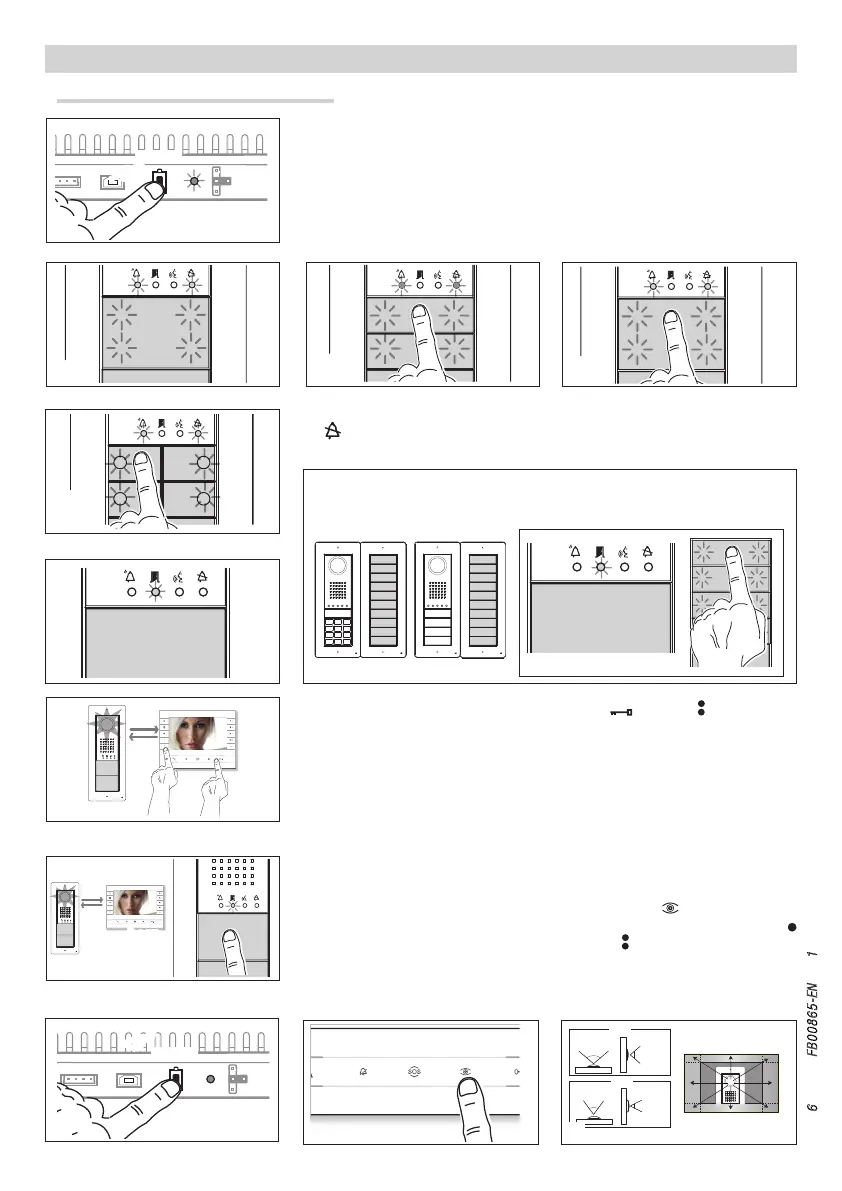
Programming the call keys. Press the door release and AUX2 buttons 5. On
the entry panel, press the call key to be linked to the receiver 6: a beep will confirm
that the setting has been stored. Continue, repeating the same operations for all the
other receivers.
Exiting Programming. Briefly press the PROG key on the power supply 7: the PROG
LED and the LEDs on the entry panels will go out. NOTE. If no action is performed, the
procedure will end automatically after 30 minutes.
Programming entry panel video cameras. While programming the call keys the
"visual range" of the video camera can be adjusted from any receiver (with handset
raised, it there is one), by pressing on the "Self-connection" key 8. From the default
settings it is possible to scroll through the following ones I by pressing the AUX1
key or to go back to the previous ones with the AUX2 key J: the setting is saved
automatically.
Should call keys be present ONLY ON ADDITIONAL BUTTON PANELS, the op-
eration shown in figure 3 is carried out on these as shown in figure 3C.
Programming Type of Keys. Press the first key on the entry panel 3/3A/3B until
the LED stops flashing along with the backlighting LEDs 4.
PROGRAMMING ENTRY PANELS WITH VA/01
First Programming with ONE entry panel
Entering Programming Mode. Press the PROG key on the power supply 1 until the
PROG LED lights up. If the PROG LED immediately goes out, this indicates a malfunction
in the connections between the power supply and the entry panel. Check the connec-
tions and return to programming. The LEDS on the entry panels light up as shown in fig-
ure 2. Wait 5 seconds for the auto test to be completed and continue as shown below.






 To Next Page