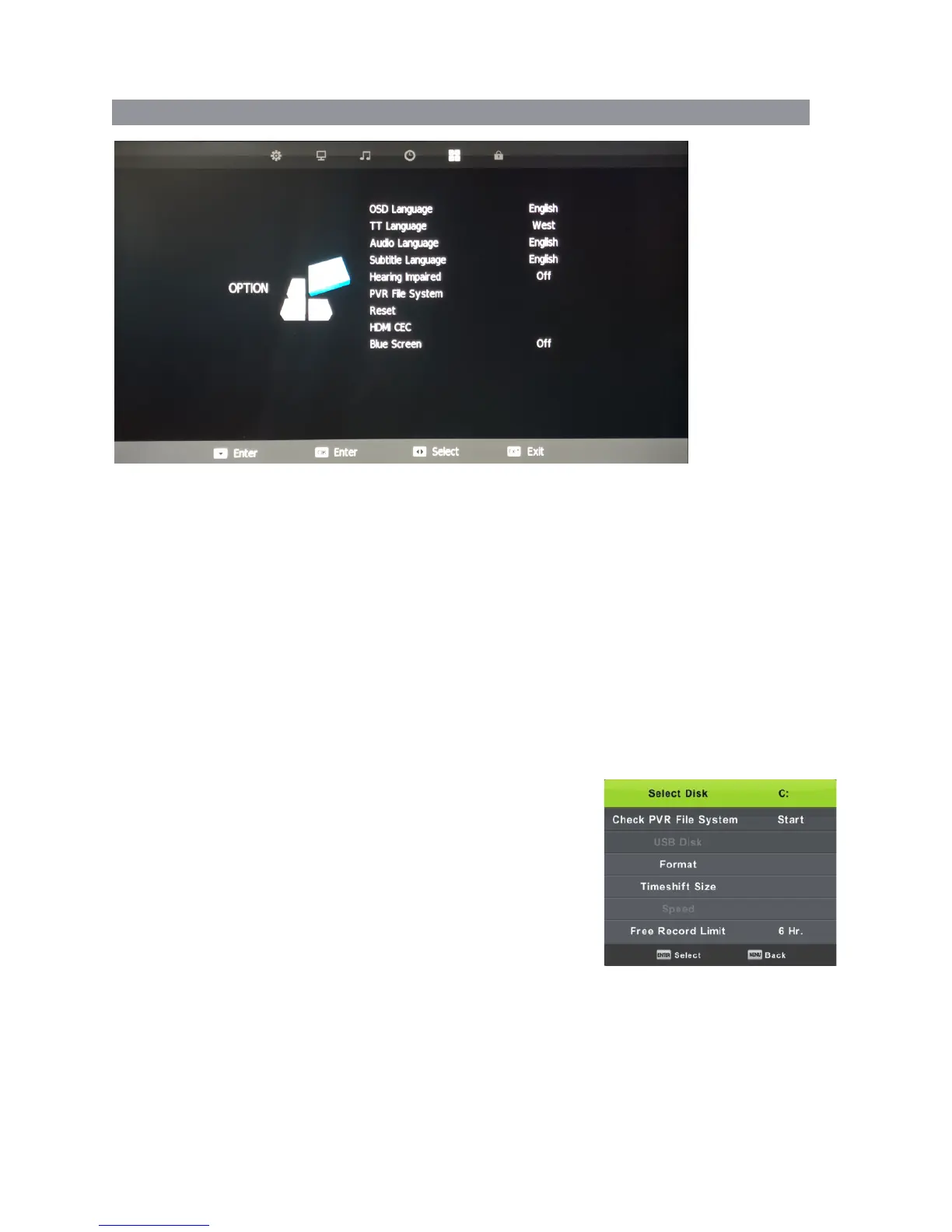
OPTION MENU
OSD Language
Select OSD Language with the ▼/▲ buttons then press OK to adjust the on-screen Language.
TT Language
This setting is not used in Australia & New Zealand
Audio Languages
Press ▼/▲ to select Audio Language and select language with▼/▲ or buttons. ◄ / ►
Press the OK button to confirm then the menu button to return to the previous menu.
Subtitle Languages
Press ▼/▲ to select Subtitle Language and select language with▼/▲ or buttons. ◄ / ►
Press the OK button to confirm then the menu button to return to the previous menu.
Hearing Impaired
Select Hearing Impaired (where supported) with ▼/▲ buttons and then press the OK button.
PVR File System
To check the status of the USB drive, format a drive or change
the maximum record/timeshift setting, select PVR File System
with ▼/▲ buttons and then press the OK button enter
Reset
Press the ▼/▲ buttons and OK to select the Reset menu.
Select Yes with the left arrow to reset the TV to its factory
settings which will erase all of the previous settings.
Blue Screen
To have a Blue Screen background rather than Black when no input signal is available,
select Blue Screen with ▼/▲ buttons and then press the OK button to select on/off then
the menu button to return to the previous menu.
22



 To Next Page