4
Button Descriptions
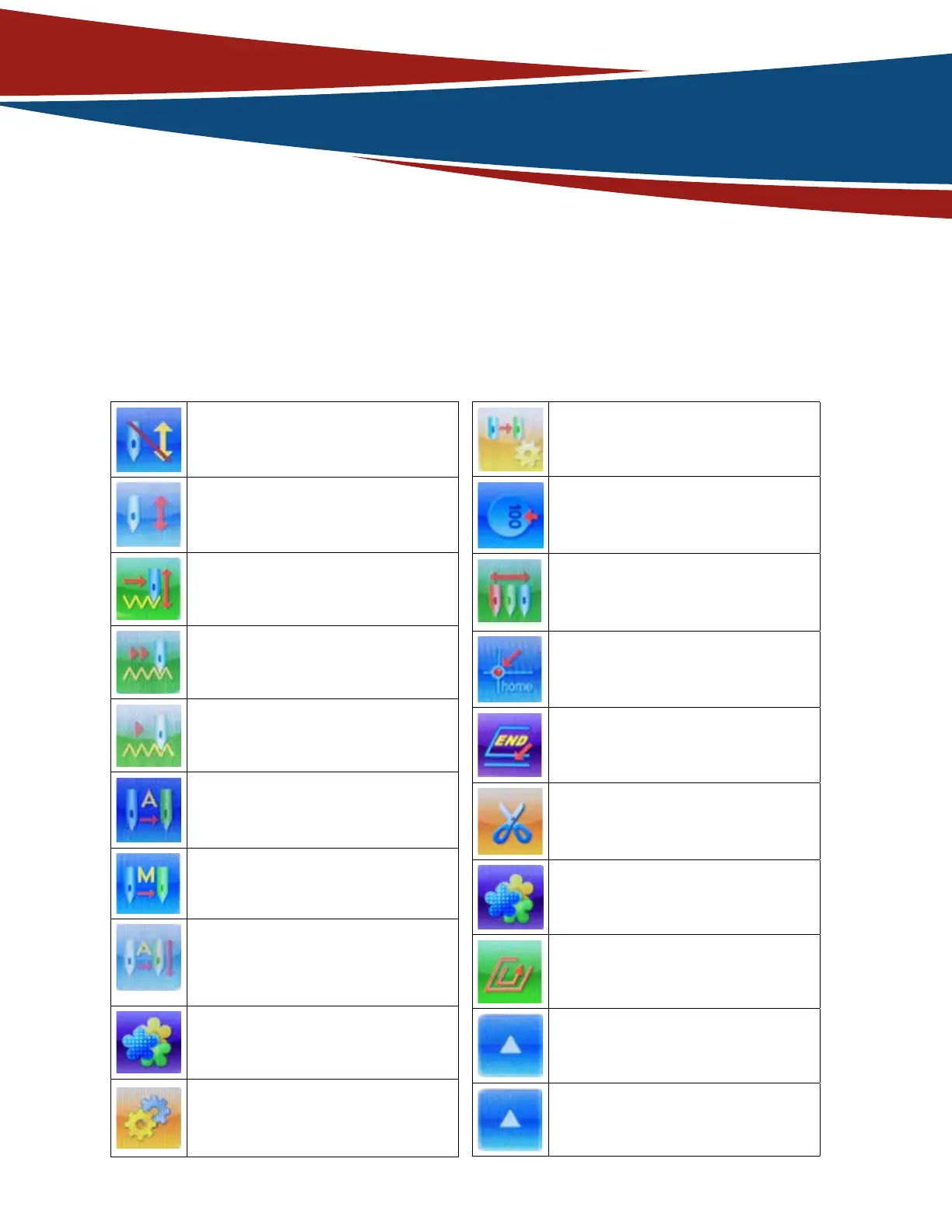
Machine is in “Emb Release” state, click
to take “Emb Confirm” (confirm the
design) operation.
Machine is in “Emb Confirm” state, click
to take “Emb Release”(delete design/
start over) operation.
Machine is in normal embroidery mode,
click to switch to idling mode.
Machine is in “High Speed idling” mode,
click to switch to a dierent embroidery
mode.
Machine is in “Low Speed idling” mode,
click to switch to a dierent embroidery
mode.
Machine is in “Auto change color, man-
ually start” color change mode, click to
switch to other color change modes.
Machine is in “Manually Change color”
color change mode, click to switch to
other color change modes
Machine is in “Auto Change Color, auto
start” color change mode, click to
switch to other color change modes.
Activate design managing function and
other management functions.
Open Machine parameter settings win-
dow to modify parameters.
Set Color change sequence of current
Embroidery Design
Activate main shaft origin (main shaft
stops at 100 degrees).
Change Needle.
Go to home position.
Go to End position.
Trim Thread.
Open “Embroidery Help Functions”
window.
Open “Other Functions” window.
Increase Speed.
Decrease Speed.


 To Next Page