CAMON TC07 Turf Cutter Tracmaster Ltd
_______________________________________________________________________________________________
4 For parts diagrams visit www.tracmaster.co.uk
3.0 Unpacking and Assembly
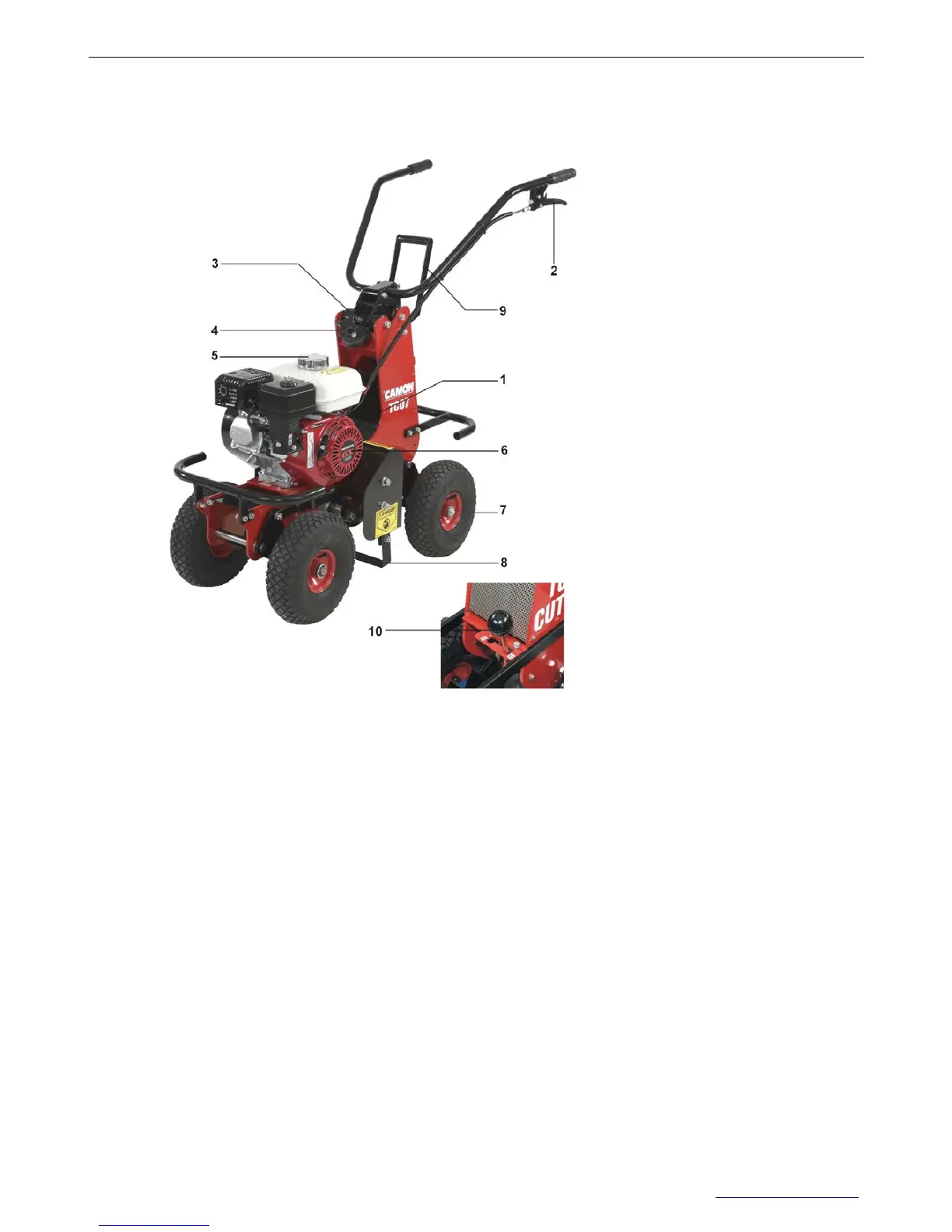
3.1 Major Components Diagram
1 Engine On/Off Switch
2 Drive Lever
3 Vibration Mounts
4 Cutting Depth Controls
5 Fuel Tank
6 Engine
7 Wheels
8 Cutting Blade
9 Lifting Lever
10 Gear Selector Lever
3.2 Unpacking Instructions
Open the top of cardboard box.
Cut the box open by using a sharp knife to cut down through the four corners of the box.
Swivel the folded top part of the handle bar until it locates into position.
Insert the pin located on a chain to fix handlebars into position. Secure the pin with R-Clip.
Push the machine forward safely and gently out of the box.
Dispose of the cardboard box and other padding material.


 To Next Page