English - 6 -
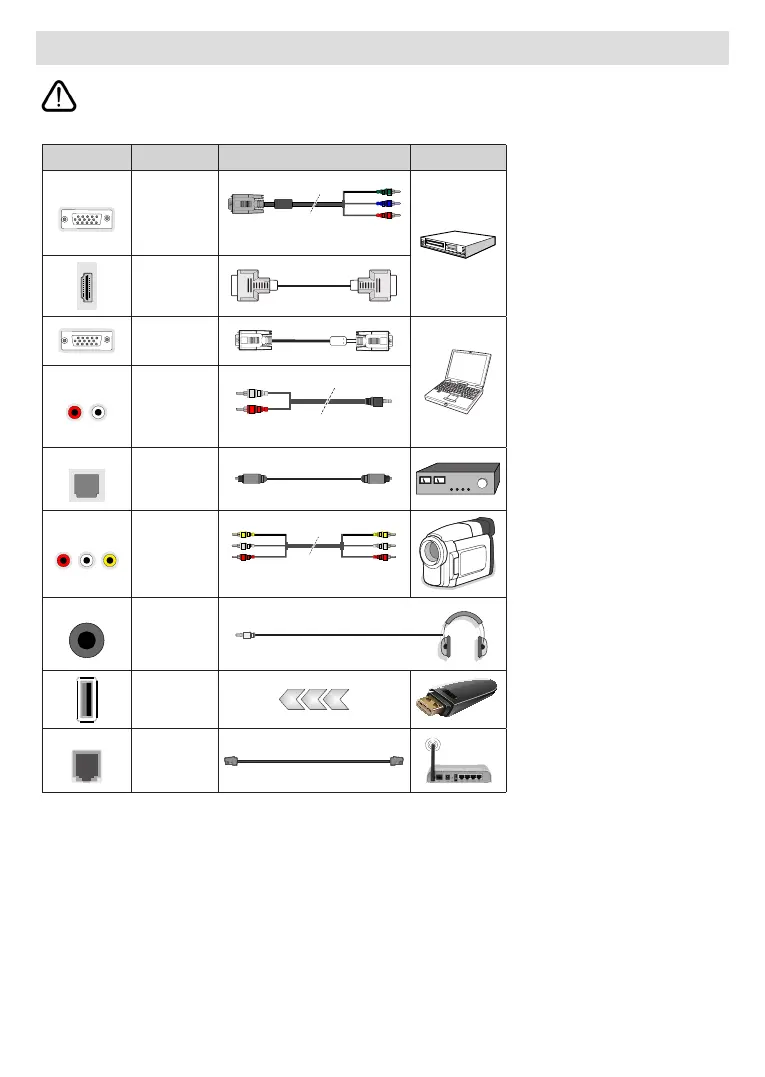
Other Connections
any connection. After the connection is done, you can turn on the units and use them.
Connector Type Cables Device
COMPONENT
Component
Video
Connection
(back)
VGA to Component Connection Cable
HDMI
Connection
(back&side)
VGA
Connection
(back)
AUDIO IN
VGA/
Component
Audio
Connection
(back)
Component/VGA Audio Cable
SPDIF
SPDIF
(Optical Out)
Connection
(back)
COMPOSITE
Composite
(Audio/Video)
Connection
(back)
Audio Video Cable
HEADPHONE
Headphone
Connection
(side)
USB
Connection
(side)
LAN
Ethernet
Connection
(back)
LAN / Ethernet Cable
To enable VGA/Component audio,
you will need to use the back audio
inputs with a VGA/Component
audio cable for audio connection.
When using the wall mounting kit
(contact your dealer to purchase one,
if not supplied), we recommend that
you plug all your cables into the back
of the TV before mounting on the
wall. The USB inputs on the TV sup-
port devices up to 500mA. Connect-
ing devices that have current value
above 500mA may damage your TV.
When connecting equipment using a
HDMI cable to your TV, to guarantee
sucient immunity against parasitic
frequency radiation and trouble-free
transmission of high denition sig-
nals, such as 4K content, you have
to use a high speed shielded (high
grade) HDMI cable with ferrites.


 To Next Page