07:40
8
3. Use of the Oven (According to model)
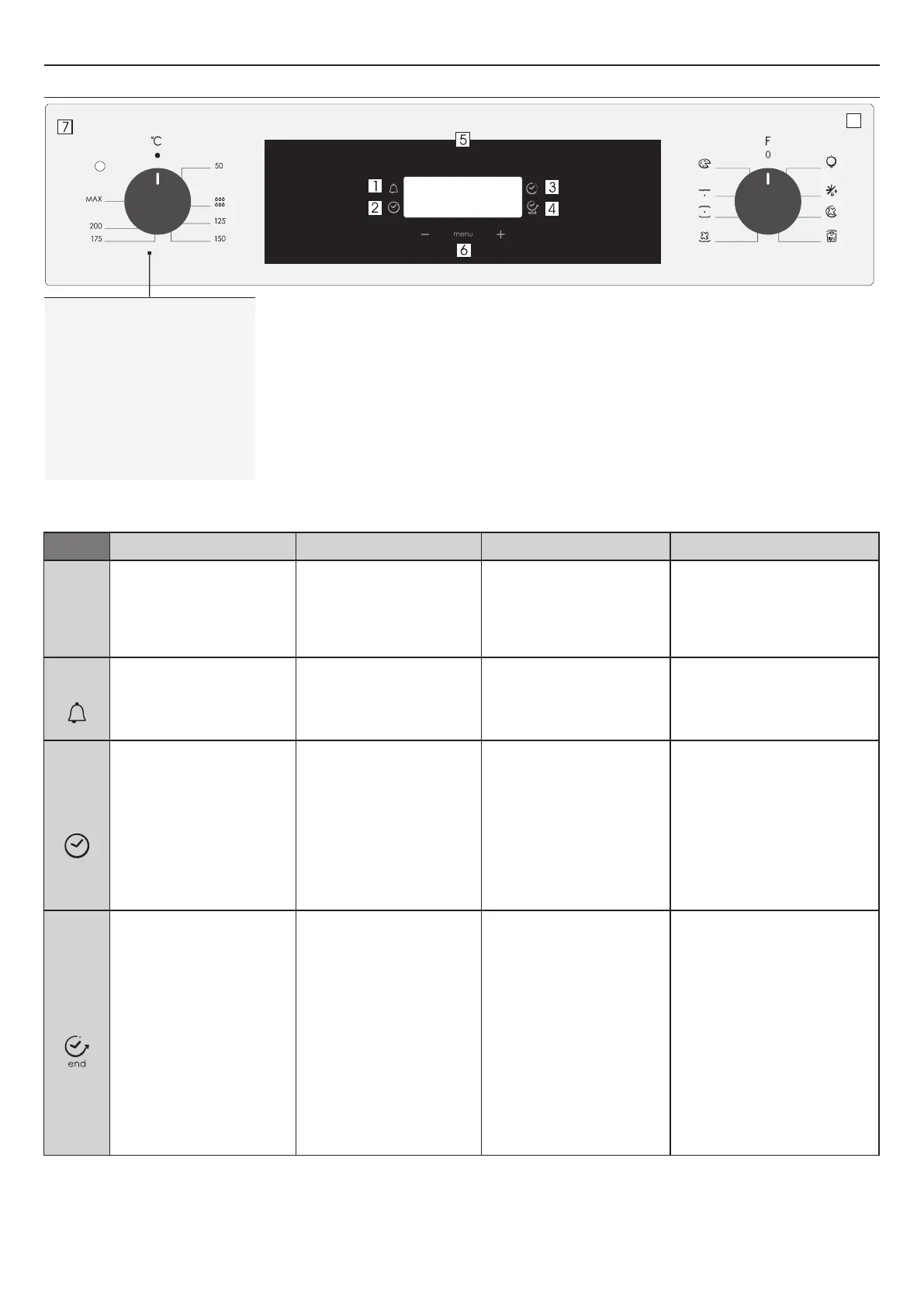
3.1 Display description
FUNCTION HOW TO DEACTIVATE WHAT IT DOES
NOTE
HOW TO USE
KEY LOCK
•Child Lock function is activated by
touching Set (+) for a minimum of 5
seconds. From this moment on all
other function are locked and the
display will flash 3 sec intervals STOP
and preset time intermittently.
•Child Lock function is deactivated by
touching touchpad Set (+) again for a
minimum of seconds. From this 5
mo m ent o n a l l f unc t ion s a re
selectable again.
•Push the central button 3 times
•Press the buttons "-" "+" to set
the required time
•Release all the buttons
•When the set time has elapsed, an
audible alarm is full stop after
activated this alarm will stop on its
own, however it can be stopped
immediately by pressing any button.
•Sounds an alarm at the end of the
set time.
•During the process, the display
shows the remaining time.
•Allows to use the oven as alarm clock
(could be activated either with operating
the oven or with out operating the oven)
•Select the cooking function with the
oven function knob, the temperature
you want to cook with the thermostat
knob.
• Push the central button 1 times
• Press the buttons "-" or "+"to set the
lenght of cooking required
• Release all buttons
NOTE: If the oven is switched off or
the lamp is functioning, the cooking
time schedule function will not work.
• It allows to preset the cooking time
required for the recipe chosen.
• To check how long is left to run press
the MENU button 1 time.
• To alter/change the preset time press
MENU and "-" "+" buttons.
•Push any button to stop the signal.
Push the central button to return to
the clock function.
•At the end of the program the program
gives 3 warning signals and “End” appears
on the display.
Set the function selector switch to "0" to
return to the clock function.
•At the time set, the oven will switch
off. To switch off manually, turn the
oven function selector to position O.
•Enables you to set the end of
cooking time
•To check the preset time push the
central button 2 times
•To modify the preset time press
buttons MENU + "-" "+"
•Select the cooking function with the
oven function knob, the temperature
you want to cook with the thermostat
knob.
•Push the central button times 2
•Press the buttons "-" "+" to set the
time at which you wish the oven to
switch off
•Release the buttons
NOTE: If the oven is switched off or
the lamp is functioning, the cooking
time schedule function will not work.
•This function is typically used with
“cooking time” function.
For example if the dish has to be cooked for
45 minutes and needs to be ready by
12:30, simp ly select the required
function, set the cooking time to 45
minutes and the end of cooking time to
12:30.
•At the end of the cooking set time, the
oven will switch off automatically and an
audible alarm will ring.
•Cooking will start automatically at 11:45
(12:30 minus 45 mins) and will continue
until the pre-set end-of-cooking-time,
when the oven will switch itself off
automatically.
END OF
COOKING
COOKING
TIME
MINUTE
MINDER
EN 07
1. Minute minder
2. Clock setting
3. Cooking time
4. End of cooking
5. Temperature or clock display
6. LCD display adjustment controls
7. Thermostat selector knob
8. Function selector knob
WARNING: the first operation to carry out after the oven has been installed or following the interruption of
power supply (this is recognizable the display pulsating and showing 12:00 ) is setting the correct time. This is
achieved as follows.
•Push the central button 4 times
•Set time with "-" "+" buttons.
•Release all buttons.
ATTENTION: The oven will only operate providing the clock is set.



 To Next Page